Author: ahsanqureshi2025

  • Why is my PPC getting more expensive and how do I stop wasted spend?

    PPC Google Ads Marketing Ops

    Ad costs rising, conversions dropping, and your team is firefighting. This actionable guide shows why paid channels feel harder, gives a short triage playbook, and maps fixes to concrete tools at ExecWrite so you can recover wasted spend fast.

    TL;DR
    • Most wasted Google Ads spend comes from mismatched intent, poor negative keyword coverage, and un-tuned bidding windows.
    • Apply five quick checks this week (search term audit, ad-to-LP relevance, hourly bid shifts, budget leakage, negative keywords).
    • Use ExecWrite’s Wastage Snapshot and Search Term Analyzer to identify leaks and produce prioritized fixes in under 90 minutes.

    Why PPC feels harder now

    Automation, privacy, and competition have converged: bid algorithms are opaque, keyword intent fragments, and CRO expectations are higher. That makes small account hygiene issues costlier and harder to spot without tools and a repeatable triage process.

    The 5 biggest PPC problems marketers face

    1) Wasted spend on low-intent search terms

    Symptoms

    • High spend, low conversion queries showing in search terms.
    • Many clicks with high bounce rates and poor time-on-site.
    • Negative keyword lists are small or unchanged for months.

    Why it happens

    Keyword lists grow by copying broad modifiers and letting automation match too widely. Without regular negative keyword sweeps, irrelevant queries eat budget.

    Fix this week

    • Export search terms for the last 30 days, sort by spend/conversion ratio.
    • Add clear non-converting, irrelevant phrases to negatives (exact + phrase where needed).
    • Pause or lower bids for ad groups showing consistent low-intent clicks.

    2) Ad-to-landing-page mismatch (low Quality Score)

    Symptoms

    • Low CTR vs expected benchmarks for branded and non-branded ads.
    • High CPCs without corresponding conversion lifts.
    • Landing page bounce or low on-page conversion rates.

    Why it happens

    Ad copy promises a specific solution but the landing page fails to deliver that intent or has slow load/conversion friction. Quality Score drops and costs rise.

    Fix this week

    • Align top-performing ad headlines to clear landing page headlines and CTAs.
    • Run a single A/B test: current page vs headline-matched page.
    • Fix obvious UX blockers: form length, CTA visibility, load time.

    3) Hourly/dayparting mismatch

    Symptoms

    • Conversion rate swings by hour with flat bids.
    • High CPA at times when conversions are near zero.
    • No ad schedule optimization in place.

    Why it happens

    Accounts often leave auto-bidding to handle all hours equally, but consumer behavior and competitive bids change by hour and day—so you overpay during low-value windows.

    Fix this week

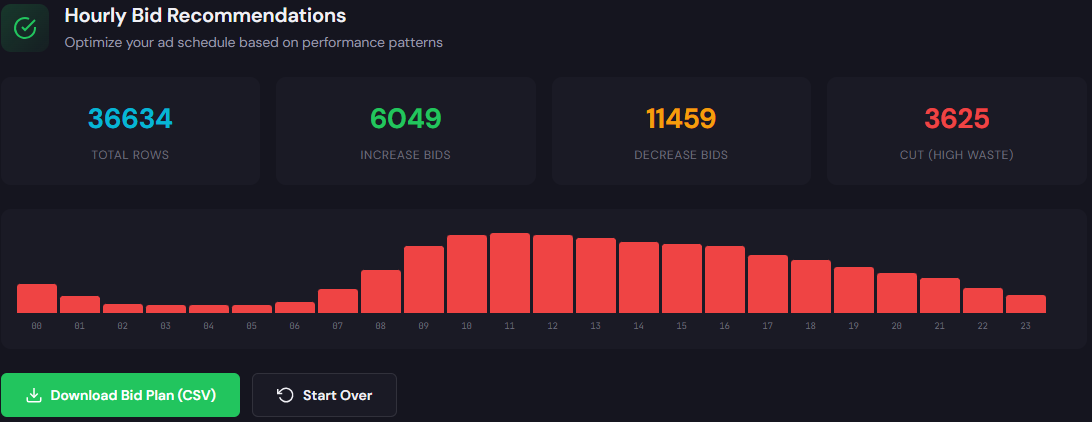
    • Run an hourly performance export (cost, conversions, CPA by hour) for 90 days.
    • Lower bids or exclude low-converting hours; increase bids on peak hours.
    • Test a focused daypart bid modifier for top-performing campaigns.

    4) Budget leakage between campaigns

    Symptoms

    • Low-priority campaigns consistently spend their full daily budgets.
    • High-priority campaigns under-deliver despite adequate budgets.

    Why it happens

    Shared budgets, overlapping keywords, and poor priority settings let lower-value campaigns consume the daily spend before high-value campaigns can serve.

    Fix this week

    • Identify campaigns with full spend and low ROAS; reduce budgets or pause until fixed.
    • Remove overlap by tightening match types or splitting campaigns by intent.
    • Use shared budget caps carefully or move to individual budgets for priority campaigns.

    5) Automation without guardrails

    Symptoms

    • Campaigns switch to expensive keywords or hours without human review.
    • Performance drops after applying broad recommendation changes.

    Why it happens

    Auto-bidding and smart campaigns are powerful but react to inputs. If conversion tracking is noisy or account structure is weak, automation optimizes the wrong signals.

    Fix this week

    • Audit conversion tracking and remove low-quality micro-conversions from Smart Bidding targets.
    • Set bid caps or target CPA ranges while tuning inputs.
    • Run short manual experiments before full automation adoption.

    Fixes you can apply this week

    • Run a wastage snapshot to find top leak categories (search terms, budgets, audiences).
    • Export search terms, build a prioritized negative keyword list, and deploy it account-wide.
    • Align the top 3 ad headlines to landing-page headlines; run a headline-matched LP test.
    • Pull hourly performance and set 3 core bid modifiers: reduce low-hour bids, boost peak hours, cap extremes.
    • Freeze broad automation changes until tracking and account hygiene are verified.
    • Document changes and measure week-over-week impact; revert if CPA worsens.
    Recover wasted spend fast

    Run an ExecWrite Wastage Snapshot to identify leaks and get a prioritized recovery plan in minutes.

    Run a snapshot at ExecWrite

    Tool-based workflow (map each pain point to ExecWrite tools)

    ExecWrite: Wastage Snapshot & Recovery

    Wastage snapshot dashboard showing waste totals and top leakage areas

    Outputs: Dashboard showing total wasted spend, top leakage categories (search terms, budgets, audiences), and a prioritized recovery checklist with suggested negatives and budget shifts.

    How to use it — 3 steps

    1. Upload account CSV or connect via supported export and run the snapshot.
    2. Review the top 5 leak drivers in the dashboard and export the recovery plan.
    3. Deploy suggested negative lists and budget recommendations; re-run snapshot after 7 days to measure gains.

    Link: ExecWrite Wastage Snapshot & Recovery


    ExecWrite: Bid Adjustment by Search Term (Search Term Analyzer)

    Search term analyzer output table showing spend, conversions, tags, and recommended bid actions

    Outputs: Search-term-level table with spend, conversions, CPA, tags (negative/review/keep) and recommended bid actions per term and ad group.

    How to use it — 3 steps

    1. Export search terms and performance metrics, then import to the analyzer tool.
    2. Use the tags to generate a negative keyword list and a per-term bid adjustment CSV.
    3. Upload bid adjustments or apply changes via Google Ads Editor; monitor 7-14 day performance shifts.

    Link: Search Term Analyzer / Bid Adjustment

    Both tools produce exportable CSVs and step-by-step recommendations so you can act without guesswork. Use the snapshot to find the problem, then the analyzer to fix the biggest leak drivers.

    90-minute account triage playbook

    1. 0–10 min: Open the account summary. Check total spend, conversion trend, CPA trend for the trailing 7/30 days.
    2. 10–30 min: Run the ExecWrite Wastage Snapshot (or export top-level metrics manually). Identify top 3 leak types (search terms, budget, audience overlap).
    3. 30–50 min: Export search terms and run the Search Term Analyzer. Tag top spend/low-conversion queries as negatives or candidates for bid cuts.
    4. 50–70 min: Apply urgent fixes — negative list, pause low-value campaigns, adjust daily budgets, set hour bid modifiers for worst hours.
    5. 70–90 min: Implement a landing-page headline match for the top-performing ad group and schedule monitoring. Document changes and set a 7-day review.
    Ready to triage now?

    Start a waste snapshot or search-term audit at ExecWrite and get a prioritized recovery plan you can deploy in under 90 minutes.

    Start your ExecWrite audit

    FAQ

    Q: How fast will I see improvement?

    A: Small hygiene fixes (negatives, budget shifts, hour modifiers) often show measurable CPA improvements in 7–14 days. Structural fixes like landing-page tests take longer but reduce CPCs via Quality Score gains.

    Q: Will automation undo my manual fixes?

    A: If automation targets noisy conversion signals it can. Put bid caps and remove low-quality micro-conversions from Smart Bidding inputs before enabling broad automation.

    Q: Can I recover wasted spend without changing bids?

    A: Yes — adding neg keywords, fixing ad-to-LP relevance, and correcting budget leakage are non-bid levers that often yield quick wins.

    Q: Which tool should I run first?

    A: Start with the Wastage Snapshot to find the largest leaks, then use the Search Term Analyzer to apply surgical fixes.

    Sources

  • Why is my Google Ads account wasting budget — and how do I stop it?

    PPCGoogle AdsMarketing Ops

    If your Google Ads account feels like it’s burning cash, this post gives a pragmatic triage and repair plan you can run in 90 minutes — including targeted workflows that use tools from ExecWrite to recover wasted spend and lock in better bids.

    TL;DR
    • Most wasted spend comes from (1) irrelevant queries, (2) bad ad-to-landing relevance, and (3) time-of-day bid mismatches.
    • Run a quick wastage snapshot and search-term analysis to identify leaks, then apply negatives and hourly bid adjustments.
    • Use the ExecWrite Wastage Snapshot to prioritize fixes and the Search Term Analyzer to set bid/negative actions.

    Why PPC feels harder now

    Higher CPCs, automation that hides signals, and privacy changes have made campaign diagnostics more manual. The bulk of wasted spend is not a single problem — it’s the intersection of noisy query volume, ad relevance gaps, and opaque automated bidding that reacts slowly to account structure issues.

    The 5 biggest PPC problems marketers face

    1. Wasted spend from irrelevant search queries

    • Symptoms: high impressions with zero conversions, broad-match terms driving low-intent clicks, unfamiliar query strings in search terms.

    Why it happens: Broad matches, poor negative keyword coverage, and unchecked query expansion from automation let low-intent traffic in.

    • Fix this week: Export last 30 days of search terms, tag low-intent groups, and upload negatives in bulk.

    2. Ad-to-landing page mismatch (Quality Score and conversion drops)

    • Symptoms: high CTR but low conversions, rising CPA, low Quality Score on key keywords.

    Why it happens: Ads promise different offers than landing pages or page load/UX issues kill conversions even with good click-throughs.

    • Fix this week: Check top 10 conversion keywords, align headlines and CTAs, and apply quick landing page messaging tests.

    3. Hour-of-day and dayparting bid inefficiencies

    • Symptoms: conversion rate swings by hour, wasted spend during low-value hours, poor ROAS at specific times.

    Why it happens: Default ad schedules and automated bids assume uniform performance; without granular data you overpay during dead hours and under-bid during peak conversion windows.

    • Fix this week: Pull hour-of-day performance, add simple ad schedule modifiers, and test aggressive bids during top hours.

    4. Campaign structure and keyword bloat

    • Symptoms: overlapping keywords across ad groups, duplicated audiences, and automation cannibalizing internal auctions.

    Why it happens: Fast scaling without guardrails creates conflicts that confuse smart bidding and inflate CPCs.

    • Fix this week: Identify top overlapping keywords, consolidate/ad group reassign, and set negative match rules between campaigns.

    5. Measurement gaps and false negatives

    • Symptoms: conversion attribution doesn’t match backend, offline conversions missing, or server-side measurement not sending events.

    Why it happens: Privacy changes and misconfigured tracking lead to underreported conversions — which in turn causes automated bidding to undervalue some channels.

    • Fix this week: Reconcile conversions with CRM for last 30 days and verify conversion actions are receiving events.

    Fixes you can apply this week

    • Run a search-term export for the top 10 cost-driving campaigns; add negatives for irrelevant clusters.
    • Audit top 20 keywords for Quality Score gaps and align ad headlines to landing-page headlines.
    • Pull hour-of-day performance and create a simple ad schedule (increase bids +20–50% on peak hours, -30% on low hours).
    • Remove duplicate keywords across campaigns and set campaign-level negatives to prevent self-competition.
    • Compare reported conversions to CRM totals; flag missing conversion actions and re-tag pages or server events.
    Recover wasted spend the fast way

    Run a Wastage Snapshot to see top leakage, then export recommended negatives and a staged recovery plan in minutes.

    See ExecWrite tools

    Tool-based workflow: map problems to ExecWrite tools

    Tool: Wastage Snapshot & Recovery

    Wastage snapshot dashboard showing waste totals and recovery plan

    What it outputs: a dashboard-style snapshot of wasted spend, top leakage areas, and a prioritized recovery checklist you can action immediately.

    How to use it (3 steps):

    1. Run the snapshot for the account or a campaign group — get a one-page waste summary and top leak drivers.
    2. Export the recovery plan: ranked negative keyword lists, budget reassignments, and campaign fixes.
    3. Apply the highest-impact negatives and budget shifts, then re-run the snapshot after 7 days to measure recovery.

    Open the Wastage Snapshot

    Tool: Bid Adjustment by Search Term (Search Term Analyzer)

    Search term analyzer output table showing spend, conversions, tags, and recommended bid actions

    What it outputs: a search-term table with spend, convs, CPA/ROAS and recommended bid actions (raise, hold, lower) plus negative keyword suggestions.

    How to use it (3 steps):

    1. Upload or connect your search-terms export for the target campaign and choose the performance window.
    2. Review the analyzer’s tags and recommended bid adjustments; approve or edit recommendations in bulk.
    3. Export the bid/negative CSV and apply changes through Google Ads Editor or API; monitor hourly performance.

    Open the Search Term Analyzer

    90-minute account triage playbook

    • 0–10 minutes: Pull top 10 cost campaigns, export search terms, conversions, and hour-of-day reports.
    • 10–30 minutes: Run the ExecWrite Wastage Snapshot to generate a prioritized leakage list.
    • 30–50 minutes: Run the Search Term Analyzer on the exported search terms and tag low-intent queries for negatives.
    • 50–70 minutes: Apply highest-impact negatives and update ad schedules (hour-of-day bid modifiers).
    • 70–90 minutes: Fix 2–3 landing page mismatch issues (headlines/CTAs), document changes, and schedule a 7-day follow-up snapshot.
    • Post-triage: Hold bids stable for 48 hours to let changes propagate; track recovery via the snapshot.
    Start a real recovery plan

    Run both the Wastage Snapshot and Search Term Analyzer on the same account to prioritize fixes and export immediate action items.

    Run the tools on ExecWrite

    FAQ

    Does adding negatives hurt traffic?

    Not if you target low-intent clusters. Proper negatives reduce wasted clicks and improve your signal for smart bidding. Always export and review before mass applying.

    How often should I run a wastage snapshot?

    Start weekly after major fixes, then move to monthly for steady-state accounts. Weekly during recovery helps confirm improvements.

    Will hourly bid adjustments work with automated bidding?

    Yes — use hour modifiers to guide an automated strategy. When automation is opaque, hour adjustments ensure campaigns respect known high- and low-value windows.

    How do I prioritize Quality Score fixes?

    Target keywords with high spend and low QS first. Align ad headlines and landing-page content to close the relevance gap before adjusting bids.

    Sources

  • Why is my Google Ads account wasting budget—and how do I fix it?

    PPC Google Ads Marketing Ops

    If your account feels like it drains budget without reliable returns, this guide gives an operator-focused audit and fixes you can apply this week. Use the checklist, then run targeted recoveries with ExecWrite to reclaim wasted spend and stabilize performance — start at ExecWrite for tools and exports.

    TL;DR — Quick takeaways
    • Most wasted spend falls into tracking gaps, irrelevant search terms, and improper bid schedules.
    • Apply a 7-step triage this week: audit conversions, capture top leakage, add negatives, and stabilize bids.
    • Use two ExecWrite tools—the Wastage Snapshot and the Search Term Analyzer—to find recovery actions and automated bid suggestions in minutes.

    Why PPC feels harder now

    Paid media used to be a numbers game: traffic, bids, conversions. Today the levers are fragmented — privacy changes, more match-type complexity, automated bidding opacity, and platform-driven auctions that mask where budget truly went. That increases uncertainty and makes simple fixes less visible, turning small leaks into monthly waste.

    The 5 biggest PPC problems marketers face

    1) Measurement gaps

    • Symptoms: conversions drop without traffic change; high clicks but low attributed conversions.

    Why it happens: Tracking pixels, server-side tagging, and cross-domain setups are inconsistently implemented, causing conversions to be missed or double-counted.

    Fix this week

    • Validate primary conversion: test via real conversion flows and Tag Assistant or server logs.
    • Check parallel conversions (GA4, server, CRM) for discrepancies and map a single source of truth.
    • Pause or annotate campaigns while you resolve discrepancies so automated bidding doesn’t overreact.

    2) Irrelevant search terms and wasted match-type traffic

    • Symptoms: expensive clicks with zero intent, sudden spikes in low-quality keywords, high bounce/low conversion pages.

    Why it happens: Broad match and even phrase match can surface tangential queries; negative keyword coverage is often incomplete and not maintained.

    Fix this week

    • Export last 30-90 days of search terms and tag obvious negatives.
    • Add negatives at campaign level for systemic leaks and ad-group negatives for granular control.
    • Use exact-match negatives for brand-unsafe or irrelevant modifiers.

    3) Bid and budget misalignment (dayparting & CPA swings)

    • Symptoms: hours/days with large CPA spikes, budgets exhausted early with no conversions late-day.

    Why it happens: Automated bidding hides hour-of-day performance. Accounts often inherit bid strategies that assume uniform performance across time.

    Fix this week

    • Segment hourly performance for the last 30 days and identify +/− CPA swings.
    • Apply conservative hour-of-day bid adjustments; test in 2-week windows.
    • Move budget from unproductive hours to high-conversion windows.

    4) Ad-to-landing-page mismatch (low Quality Score)

    • Symptoms: good CTR but poor conversion rate; high CPC despite low impression share issues.

    Why it happens: Messaging mismatch between ad copy, keywords, and landing pages lowers Quality Score and increases CPCs.

    Fix this week

    • Audit top-performing keywords and their landing pages for message alignment.
    • Test headline and CTA parity (ad headline → landing page headline).
    • Prioritize fixes on keywords that drive volume and cost.

    5) Campaign structure entropy

    • Symptoms: sprawling ad groups, mixed-intent ad groups, shared budgets masking performance.

    Why it happens: Over time multiple editors, fast pivots, and campaign-level changes create structural drift that reduces control.

    Fix this week

    • Identify the top 10 cost-driving campaigns and freeze structural changes for a week.
    • Split mixed-intent ad groups into focused, intent-aligned groups.
    • Replace shared budgets with manual budgets on problem campaigns until stable.

    Fixes you can apply this week

    • Confirm a single conversion source of truth; pause auto-bidding if conversions are unreliable.
    • Export search terms; apply negatives and group them into a negatives library.
    • Run an hourly performance check and set conservative bid adjustments for worst-performing hours.
    • Align top 20 keyword headlines to landing page headlines; deploy quick A/B tests for conversion lift.
    • Freeze structural edits on your worst-performing campaigns; triage with a recovery playbook.
    Run a fast waste audit

    Use a single snapshot to see wasted spend, top leak areas, and an immediate recovery checklist.

    Open ExecWrite


    Tool-based workflow — map problems to ExecWrite tools

    Wastage Snapshot & Recovery

    Wastage snapshot showing waste totals and recovery plan

    What it outputs: A dashboard-style snapshot showing total wasted spend, top leakage categories (search terms, low-converting campaigns, budget leaks), and a prioritized recovery plan.

    How to use — 3 steps

    1. Upload or connect your account data to generate the snapshot (Wastage Snapshot).
    2. Review the top 3 leak areas in the recovery plan and export the negative keyword and pause lists.
    3. Apply the exported negatives/budget changes and re-run the snapshot after 7–14 days to measure recovered spend.
    Search Term Analyzer (Bid Adjustment by Search Term)

    Search term analyzer output table showing spend, conversions, tags, and recommended bid actions

    What it outputs: A table of search terms with spend, conversion metrics, tags (negative or priority), and recommended bid actions per term.

    How to use — 3 steps

    1. Run the analyzer for the last 30–90 days to capture low-intent and high-intent queries (Search Term Analyzer).
    2. Tag and export recommended negatives, low-quality terms, and suggested bid adjustments.
    3. Push the exported lists into Google Ads Editor or the UI; monitor CPA over subsequent 2 weeks and iterate.

    Both tools are designed to reduce hands-on time: snapshot cuts discovery from hours to minutes, search-term output gives actionable exports for Editor or scripts.

    90-minute account triage playbook

    Use this as a timed checklist. Focus on facts, not hypotheses.

    • 0–10m: Collect data — last 30/90 days, top campaigns by spend, and conversion counts.
    • 10–25m: Run Wastage Snapshot to get top leakage areas and export recommendations.
    • 25–45m: Run Search Term Analyzer; tag top 50 low-quality terms and top 20 high-value terms.
    • 45–60m: Apply immediate controls — add negatives, pause low-quality campaigns, reduce bids on worst-performing hours.
    • 60–75m: Fix measurement — validate primary conversion, add annotations to paused changes.
    • 75–90m: Document actions, set 14-day review, schedule follow-up snapshot and search-term run.
    Recover wasted budget now

    Start the 90-minute triage with tools and exports that make fixes operational. Recover budget without guesswork.

    Start recovery at ExecWrite

    FAQ

    How quickly will I see results after applying negatives?

    You can see immediate CPC/traffic shifts within 24–48 hours; measurable CPA improvement typically appears within 7–14 days as bidding stabilizes and automated strategies adapt.

    Do I need to pause automated bidding before an audit?

    If your conversion tracking is unreliable, pause or switch to manual bidding temporarily. Automated bidding needs accurate signals; otherwise it can overspend while optimizing on bad data.

    Which tool should I run first?

    Start with the Wastage Snapshot for a high-level diagnosis, then run the Search Term Analyzer to get the actionable negative and bid lists.

    Can these exports be applied via Google Ads Editor?

    Yes. ExecWrite tools export Editor-ready lists (negatives, paused campaign lists, bid recommendation CSVs) to speed application and reduce manual error.

    Sources

  • Why is my PPC performance plateauing?

    PPCGoogle AdsMarketing Ops

    PPC doesn’t break overnight — it degrades. This guide gives an operator’s playbook to stop budget leaks, recover wasted spend, and restore predictable CPA using clear checks and two ExecWrite tools you can run in minutes at ExecWrite.

    TL;DR
    • Most account declines are avoidable: they’re poor intent, bad structure, or unchecked waste. Fixes are tactical, measurable, and repeatable.
    • Run a wastage snapshot + search-term analysis to find the top 20% of leaks that cause 80% of lost spend.
    • Follow the 90-minute triage playbook and use the two ExecWrite tools below to generate negative keywords, bid actions, and a recovery plan.

    Why PPC feels harder now

    Platforms have more automation, more competition, and faster shifts in user behavior. That raises the bar for account hygiene — structure, intent matching, and frequent cleanups. If you treat campaigns as set-and-forget, performance drifts and algorithms optimize to the wrong signals.

    The 5 biggest PPC problems marketers face

    1. Wasted spend on low-intent queries

    Symptoms

    • High spend, low conversions on many search terms.
    • CTR and conversion rate drop despite steady traffic.
    • Many one-off search queries in reports without clear intent.

    Why it happens

    Broad match, broad SKAGs, and expanding audiences can bring traffic that looks relevant but converts poorly. Without regular search-term pruning, negative keyword lists never catch up.

    Fix this week

    • Export last 30 days search terms, sort by cost and conversion rate.
    • Identify top 5% cost terms with zero conversions and add to negatives.
    • Create intent buckets (high, mid, low) and pause low-intent, expensive terms.

    2. Poor ad-to-landing-page relevance (low conversion rate)

    Symptoms

    • Click-throughs are fine but conversion rates fall after recent copy or landing changes.
    • Quality Score drops on key keywords.
    • High bounce rates on campaign-driven landing pages.

    Why it happens

    Message mismatch — the ad promises something the landing page doesn’t deliver. Automated bidding will still send traffic, but the end-user experience is broken.

    Fix this week

    • Spot-check your top 10 converting ad groups for headline + landing page alignment.
    • Library of 3 variant headlines that match primary landing page value props.
    • Run small A/B tests: keep the variant that raises conversion rate by >10%.

    3. Bid & dayparting mismatches

    Symptoms

    • High CPA at specific times of day or days of week.
    • Automated bidding oscillates — wide CPA swings hour-to-hour.
    • Manual schedules don’t reflect recent performance trends.

    Why it happens

    Historical schedules become stale. Without hourly-level checks, you overbid during low-intent hours and underbid when conversions peak.

    Fix this week

    • Review last 14–30 days by hour: identify two high-performing windows and two low-performing windows.
    • Apply conservative bid adjustments: -20% on bottom windows, +10–15% on top windows.
    • Run for one week and reassess performance.

    4. Structural mess: mixed intents in single ad groups

    Symptoms

    • Ad groups with dozens of heterogeneous keywords and low relevance.
    • Low Quality Scores and weak ad copy performance.
    • Confusing reporting where one ad group hides winning/losing queries.

    Why it happens

    Rapid scaling and ad-hoc additions create bloated groups. That prevents specific optimization and misleads automated bidding signals.

    Fix this week

    • Split the top 10% of ad groups by spend into tighter intent clusters (product vs. research vs. competitor).
    • Duplicate winning ad copy into narrowed groups to test lift.
    • Archive low-volume, low-intent keywords into a quarantine negative list.

    5. No routine audit / recovery process

    Symptoms

    • Account problems reappear weeks after fixes.
    • Changes are reactive rather than planned and tracked.
    • Limited visibility into where previous fixes impacted metrics.

    Why it happens

    Most teams don’t bake a repeatable audit into their calendar. Fixes are one-off and lack measurable owners and rollbacks.

    Fix this week

    • Create a 90-minute triage template (steps below) and run weekly until stable.
    • Track changes in a simple changelog: date, change, expected impact, owner.
    • Automate snapshots for recurring checks (cost by search term, QS, hour-of-day).

    Fixes you can apply this week

    • Run a wastage snapshot to find top leakage channels and negative keyword candidates.
    • Export top 1,000 search terms, tag by intent, and add negatives for repeat offenders.
    • Apply conservative hour-of-day bid adjustments on the worst and best-performing windows.
    • Group keywords into tighter ad group buckets and align 2–3 ad headlines per group.
    • Document every change with a short note and expected KPI impact for 14 days.
    Run a quick audit with ExecWrite

    Use a wastage snapshot to identify the top areas of lost spend and generate prioritized negative keyword lists in minutes.

    Start a free snapshot at ExecWrite

    Tool-based workflow: map problems to ExecWrite tools

    Tool: Wastage Snapshot & Recovery

    Wastage snapshot dashboard showing spend by leak area

    What it outputs: dashboard-style snapshot with total wasted spend, top leakage areas, and a prioritized recovery plan (negative keywords, budgets to cut, quick fixes).

    How to use it (3 steps)

    • Upload your last 30–90 days of Google Ads data into the snapshot tool.
    • Review the top 5 leakage categories and export the recovery checklist.
    • Apply the highest-impact negatives and budget cuts; rerun in 7 days and compare.

    Open Wastage Snapshot & Recovery

    Tool: Bid Adjustment by Search Term (Search Term Analyzer)

    Search term analyzer output table showing spend, conversions, tags, and recommended bid actions

    What it outputs: a search-term-level table with spend, conversions, CPA, intent tags, and recommended bid actions or negative flags.

    How to use it (3 steps)

    • Run the analyzer against your account to surface the high-cost, low-converting terms.
    • Accept or edit the recommended actions: set negatives, reduce bids, or move queries to tighter ad groups.
    • Export the action list and upload as bulk changes or apply via Google Ads Editor.

    Open Search Term Analyzer

    Note: these two tools cover the majority of immediate recovery work — find wasted spend, create negatives, and generate prioritized bid actions to protect your CPA. For ongoing maintenance, schedule weekly snapshots.

    90-minute account triage playbook

    1. Minutes 0–10: Pull a 30–90 day account export (search terms, campaign/ad group performance, hour-of-day).
    2. Minutes 10–30: Run Wastage Snapshot & Recovery to identify top leakage areas and export the recovery checklist.
    3. Minutes 30–50: Run Search Term Analyzer, tag intent, and generate negatives and bid recommendations for top-cost terms.
    4. Minutes 50–70: Apply quick wins (top 10 negatives, 2–3 bid adjustments, pause worst ad groups). Log each change.
    5. Minutes 70–90: Set a 14-day check: monitor conversions, CPA, and QS. Prepare a changelog and schedule the next snapshot. Create owners for each action.
    Get the recovery tools and start the triage

    Run both the wastage snapshot and search-term analyzer now to produce an action list you can apply this week.

    Run tools at ExecWrite

    FAQ

    How fast will I see impact?

    Many accounts see measurable CPA improvement within 7–14 days after applying negatives and bid adjustments. Improvements compound as you iterate weekly.

    Will automated bidding undo my manual fixes?

    Not if you pair fixes with clear structure changes: tighter ad groups, aligned landing pages, and documented bid rules. Snapshot-driven pauses and negatives guide automated systems to better signals.

    Are the ExecWrite tools safe for account-level uploads?

    Tools generate exportable action lists (negatives, bid adjustments, recommended ad group moves) that you apply via Google Ads Editor or UI — you control the final upload.

    How often should I run the snapshot?

    Start weekly for 4–6 weeks during recovery, then move to biweekly or monthly depending on volatility and spend level.

    Sources

  • Why is PPC getting harder — how do I fix Google Ads performance?

    PPCGoogle AdsMarketing Ops

    Google Ads feels more complex than ever: automation, rising CPCs, and noisy signals make it tough to diagnose root causes. This article gives a clear, repeatable triage process and shows how ExecWrite tools can turn hours of analysis into immediate, high-value actions — try tools at ExecWrite for fast results.

    TL;DR
    • Five recurring problems are consuming budgets: wasted spend, bad match between ads and landing pages, bid timing, poor keywords, and automation drift.
    • Apply a short weekly checklist and a 90-minute triage playbook to capture quick wins and prioritize fixes.
    • Use two ExecWrite tools — Wastage Snapshot & Recovery and Bid Adjustment (Hourly Bid Adjuster/Search Term Analyzer) — to find waste and reallocate bids fast.

    Why PPC feels harder now

    Advertisers are juggling more automation, less reliable micro-signal data, and increased competition. Automated bids and broad matching can help scale, but they also hide why performance changed. Add new privacy constraints and shifting query intent, and you’ve got systems that require different operating routines than five years ago.

    The 5 biggest PPC problems marketers face

    1) Wasted spend on low-intent queries

    Symptoms

    • High spend with minimal conversions for specific query clusters.
    • Lots of clicks coming from broad or modified broad match keywords.
    • Search terms report shows irrelevant or unrelated queries.

    Why it happens

    Broad match + automated bidding expands reach but can harvest low-quality traffic. Without regular negative keyword hygiene or cluster-level controls, budgets bleed into queries that never convert.

    Fix this week

    • Export last 30 days of search terms; flag top spend but zero-conversion queries.
    • Add negatives in bulk by theme (product vs. research vs. competitor).
    • Move problematic keywords into a low-bid, experiment campaign for observation.

    2) Ad-to-landing page mismatch (conversion drop)

    Symptoms

    • High CTR but low conversion rate.
    • Quality Score declines while impressions stay steady.
    • Landing page bounce and session time increase on paid traffic.

    Why it happens

    Ads promise an experience the landing page fails to deliver — messaging, offers, or even page speed mismatch undermines conversions. Automation can amplify the problem because it keeps sending traffic to poorly matched assets.

    Fix this week

    • Audit top-converting ad groups and compare ad headlines to landing page H1/offers.
    • Run one A/B headline swap on the landing page aligned to your top ad headline.
    • Check load time and mobile UX for the paid landing pages (target <3s).

    3) Bad bidding timing (dayparting losses)

    Symptoms

    • CPA/ROAS swings wildly by hour or day.
    • Conversions cluster in narrow time windows, but bids are flat.
    • Automated bid rules underperform because the model averages across hours.

    Why it happens

    Many accounts rely on daily or campaign-level bidding without granular hour-of-day adjustments. When conversion likelihood varies by hour, uniform bids waste spend during low-value windows and miss opportunities during peaks.

    Fix this week

    • Pull hour-of-day performance for the last 90 days to spot peak windows.
    • Apply conservative bid modifiers (±10–30%) for clear peaks/troughs and monitor 7 days.
    • Test an ad schedule with narrow high-bid windows for top-converting hours.

    4) Keyword structure and ad group noise

    Symptoms

    • Large, mixed ad groups with many intents and inconsistent ad messaging.
    • Low ad relevance and poor Quality Score for higher-volume groups.
    • Difficulty attributing which keywords truly drive conversions.

    Why it happens

    Accounts accumulate keywords over time. Broad ad groups are convenient, but they dilute relevance and reduce optimization granularity, hurting both Quality Score and conversion rates.

    Fix this week

    • Split the five largest ad groups by intent into narrower groups (purchase vs research).
    • Create intent-focused ads and tie them to matching landing pages.
    • Export keyword performance and tag items for pause/negatives/restructure.

    5) Automation drift and opaque decisioning

    Symptoms

    • Automated bidding changed without clear signal — conversions drop or cost rises.
    • Multiple automated strategies mixed (e.g., target CPA + portfolio bidding).
    • Hard to see which signals campaigns are reacting to.

    Why it happens

    Automation learns from imperfect data. If conversion tracking, seasonality, or audience signals shift, models can reallocate spend to suboptimal pockets.

    Fix this week

    • Check conversion action setup and recent changes in tracking or attribution windows.
    • Isolate a campaign and switch to manual CPC for 3–7 days to observe baseline.
    • Document any automated rules or experiments running and pause non-critical ones.

    Fixes you can apply this week

    • Run a search-terms audit and add negatives (30–60 minutes).
    • Apply conservative hour-of-day bid modifiers and monitor (15–30 minutes).
    • Split one large ad group into two intent-aligned groups and match landing page messaging (60–90 minutes).
    • Snapshot waste and prioritize top 20% leakage that accounts for 80% of waste.
    • Document recent automation changes and, if needed, pause to stabilize signals.
    Quick audit with ExecWrite

    Run a fast wastage snapshot or hourly bid analysis to surface top leak points, then export fixes you can implement this week.

    Run an audit at ExecWrite

    Tool-based workflow: map each pain point to ExecWrite tools

    Tool: Google Ads Wastage Snapshot & Recovery

    Wastage snapshot dashboard showing waste totals and recovery plan

    What it outputs: A dashboard-style snapshot that quantifies wasted spend, highlights top leakage (search terms, keywords, device, campaigns), and gives a prioritized recovery plan.

    How to use it — 3 steps

    1. Upload your Google Ads data or connect your account and run the snapshot.
    2. Review the top 3 leakage buckets the tool surfaces (e.g., query-level waste, device mismatch, or low-converting campaigns).
    3. Export the negative keyword lists and recovery steps; apply the top 3 fixes this week.

    Open Wastage Snapshot & Recovery

    Tool: Hourly Bid Adjuster / Search Term Analyzer

    Hourly bid adjuster table showing cost, conversions, CPA and bid recommendations

    What it outputs: Hour-of-day performance tables and search-term level bid recommendations that show when to bid up or down and which queries to suppress.

    How to use it — 3 steps

    1. Run the Hourly Bid Adjuster for your campaign set to get CPA/ROAS by hour and suggested bid modifiers.
    2. Apply conservative modifiers for identified peak windows and add negative queries from the Search Term Analyzer export.
    3. Monitor 7–14 days, iterate, and lock in the high-performing schedule.

    Open Search Term Analyzer & Hourly Bid Adjuster

    Both tools generate export-ready lists and CSVs you can paste into Google Ads Editor — saving hours of manual cleanup and letting you focus on strategy.

    90-minute account triage playbook

    Follow this time-boxed playbook to get immediate, measurable improvements.

    • 0–15 min: Run Wastage Snapshot & Recovery (or export recent search terms). Note top 3 leak sources.
    • 15–35 min: Run Hourly Bid Adjuster and identify 2–3 hours to increase bids and 2–3 to decrease.
    • 35–60 min: Apply quick policy changes — add top negative keywords, set hour modifiers, and pause worst-performing ads.
    • 60–75 min: Split 1 large ad group where intent is mixed; align one ad to a dedicated landing page.
    • 75–90 min: Document changes, set a 7-day monitoring cadence, and schedule a follow-up A/B test for landing page or headlines.
    Start your triage now

    Use ExecWrite to run the snapshot and bid adjuster, export fixes, and implement the playbook in under 90 minutes.

    Run tools at ExecWrite

    FAQ

    Do I need to pause automation before running these audits?

    Short answer: not always. Pause only if the model’s recent changes coincide with a performance drop. Otherwise, snapshot and apply targeted fixes so automation can relearn from cleaner signals.

    How often should I run a wastage snapshot?

    Run a snapshot monthly and after any major campaign change. For high-spend accounts, run weekly until waste is under control.

    Can these tools export directly to Google Ads Editor?

    Yes. ExecWrite tools export CSVs and negative lists formatted for fast import into Google Ads Editor.

    Will fixing hour-of-day bids hurt overall automation?

    No — conservative modifiers guide automated bidding. Use them to protect against low-value hours while letting automation optimize within better constraints.

    Sources

  • Why is my PPC performance slipping — can Google Ads waste be fixed fast?

    PPCGoogle AdsMarketing Ops

    If your account feels chaotic—rising CPAs, budget leakage, or weird hour-by-hour swings—this guide gives an operator-first playbook and tool-driven workflow. Use the quick checks below, then run the exact ExecWrite tools that automate triage and recovery.

    TL;DR
    • Most wasted spend comes from mismatched intent, poor negative keyword coverage, and time-of-day misbids—find them fast with targeted audits.
    • Use a short checklist to stop leaks this week, then run two ExecWrite tools to generate prioritized actions you can implement in Google Ads Editor.
    • Follow the 90-minute account triage playbook to preserve budget, recover wasted spend, and stabilize performance quickly.

    Why PPC feels harder now

    Advertisers face three structural shifts: automation that hides granular signals, rising CPCs, and more noise from lower-quality queries. Smart Bidding helps, but it also amplifies noisy signals when the underlying account structure or negatives are weak. That combination magnifies waste—so you need faster audits and automated recommendations you can trust. For hands-on recovery, see tools at ExecWrite and the two tools we reference below.

    The 5 biggest PPC problems marketers face

    1) Wasted spend from low-intent search terms

    Symptoms

    • High volume of clicks with zero conversions.
    • Search terms report shows many one-off or irrelevant queries.
    • CPA jumps while conversions stay flat.

    Why it happens

    Broad match expansion, poorly structured ad groups, and incomplete negative lists let low-intent queries siphon budget. Smart Bidding learns from these bad clicks unless you remove or demote them.

    Fix this week

    • Export search terms for last 30 days sorted by spend and clicks.
    • Tag and add high-volume irrelevant terms to negative lists immediately.
    • Move high-converting search patterns into exact/ad-group specific campaigns to protect signal.

    2) Hourly and daypart performance swings

    Symptoms

    • CPA or ROAS varies wildly by hour; same campaign performs well at 10am and poorly at 3pm.
    • Ad schedules are default or absent despite clear hourly patterns.

    Why it happens

    Ad schedules are often left to automated bidding without a time-of-day layer. Bidding models optimize to averaged results and can be misled by small-time-window noise.

    Fix this week

    • Pull hourly performance by campaign for the last 14–30 days.
    • Apply conservative bid adjustments (-20% to -50%) on hours with consistent poor CPA.
    • Create separate campaigns or ad schedules for the funnels (e.g., prospecting vs. retargeting).

    3) Landing page relevance and Quality Score drops

    Symptoms

    • Impressions fall, CPC rises, or Quality Score drops on top keywords.
    • High CTR but low conversion rate—ad promises mismatch landing page.

    Why it happens

    When ads and landing pages diverge, Google reduces ad rank efficiency. Small messaging gaps compound into higher CPCs and lower conversion rates.

    Fix this week

    • Audit top 10 keywords by spend for ad-to-landing-page relevance.
    • Align headlines and CTA language to match search intent.
    • Run quick A/B headlines or headline swaps in responsive search ads to test alignment.

    4) Poor negative keyword coverage and list hygiene

    Symptoms

    • Recurring irrelevant queries reappear even after manual negatives were added.
    • Shared negatives block legitimate queries by mistake.

    Why it happens

    Negatives are managed inconsistently—added ad-hoc, copied incorrectly, or not exported/imported to synced campaigns—so leakage continues.

    Fix this week

    • Consolidate negatives into shared lists by funnel and intent.
    • Use search-term clusters to generate negative lists rather than single-term edits.
    • Test negative lists on a small campaign first to validate no overblocking.

    5) Fragmented account structure and orphaned campaigns

    Symptoms

    • Duplicate keywords across campaigns, inconsistent naming, and ad groups with one keyword.
    • Campaigns running without conversions for months.

    Why it happens

    Accounts grow organically. New launches, one-off experiments, and poor naming conventions create duplicates and block Smart Bidding from learning properly.

    Fix this week

    • Identify campaigns with zero conversions in 90 days and pause or reallocate budget.
    • Standardize naming and merge duplicate keywords into single, intent-based campaigns.
    • Use Editor CSVs to mass-fix structure—don’t edit live one-by-one.

    Fixes you can apply this week

    • Export: Search terms, hourly performance, landing page paths, and top keywords by spend.
    • Immediate negatives: Add obvious irrelevant terms that cost >$X or >Y clicks.
    • Hour locks: Reduce bids on consistently bad hours by 20–50% and monitor 72 hours.
    • Landing quick-fix: Replace headline variants that promise features not present on the page.
    • Pause-or-repair: Pause campaigns with no conversions in 90 days, then A/B a repaired campaign with clean structure.
    Run a fast waste audit with ExecWrite

    Use an automated snapshot to find top leakage areas and a search-term analyzer to convert findings into negatives and bid actions in minutes.

    Start a free audit at ExecWrite


    Tool-based workflow: map problems to ExecWrite tools

    Below are the two tools to run first. Each outputs actionable items you can implement in Google Ads or Editor. Previews are shown for quick context.

    Wastage Snapshot & Recovery

    Wastage snapshot preview showing waste totals and recovery plan

    What it outputs: Dashboard-style waste totals, top leakage categories, prioritized recovery tasks, and a step-by-step recovery plan.

    How to use (3 steps):

    1. Upload account spend/conversion CSV or connect your account to generate the snapshot.
    2. Review top leakage areas (e.g., irrelevant search terms, campaigns with zero conversions) and export the recovery checklist.
    3. Implement quick actions: pause low-performing campaigns, add shared negative lists, and assign budgets to performing funnels.

    Preview images and export-ready lists let you push fixes into Google Ads Editor fast. Tool: Wastage Snapshot & Recovery.

    Search Term Analyzer (Bid Adjustment by Search Term)

    Search term analyzer output table showing spend, conversions, tags, and recommended bid actions

    What it outputs: A ranked search-terms table with spend, conversions, tags (negative/keep), and recommended bid actions by term.

    How to use (3 steps):

    1. Upload the Search Terms report CSV or connect directly and set the date range.
    2. Apply filters for spend and conversion thresholds; use tags to mark negatives and high-priority winners.
    3. Export recommended negatives and bid adjustments; import to Google Ads Editor or apply via scripts.

    Quick wins: generate negative lists and minute bid adjustments by search term to stop waste immediately. Tool: Search Term Analyzer.


    90-minute account triage playbook

    Follow this timed sequence to triage an account and secure immediate savings.

    • 0–10 mins: Pull reports—Search terms, campaign hourly performance, top 200 keywords by spend, and landing page mapping.
    • 10–25 mins: Run the Wastage Snapshot & Recovery and review top three leakage buckets (export lists).
    • 25–40 mins: Run the Search Term Analyzer; tag high-spend irrelevant terms and export negative list.
    • 40–55 mins: Apply safety actions—pause campaigns with zero conversions in 90 days, import negatives, reduce bids on worst hours by 20–40%.
    • 55–75 mins: Repair high-value paths—align headlines to landing pages for top 10 keywords and create temporary ad variants.
    • 75–90 mins: Document actions, schedule automated checks (daily for 3 days), and plan a follow-up 7-day test to measure CPA/ROAS shifts.

    Start recovering wasted spend now

    Run the snapshot and search-term analyzer to generate export-ready negatives, bid adjustments, and a prioritized recovery plan you can implement in Google Ads Editor.

    Run tools at ExecWrite

    FAQ

    How fast will I see results after applying negatives?

    Expect measurable reductions in wasted clicks within 24–72 hours. Smart Bidding models will need additional days to re-learn; monitor CPA/ROAS over a 7–14 day window.

    Can these tools break my account if I import recommendations directly?

    Recommendations are export-ready but should be validated against your business rules. Use label-based staging or a small test campaign to validate before full import.

    Do I need developer resources to use ExecWrite tools?

    No—most tools provide CSV exports and step-by-step instructions for Google Ads Editor. API connectivity is optional for larger accounts.

    What if Smart Bidding reverses improvements?

    Combine structural fixes (negatives, ad-to-landing alignment, scheduling) with conservative bid changes. That prevents Smart Bidding from learning from noisy, low-value clicks.

    Which tool should I run first?

    Start with the Wastage Snapshot & Recovery to prioritize issues, then run the Search Term Analyzer to convert the snapshot’s top leakage areas into immediate negatives and bid actions.

    Sources

  • Why is my Google Ads PPC conversion rate so low?

    PPCGoogle AdsMarketing Ops

    If your paid media feels expensive and unpredictable, this article gives an operator-level playbook to find leaks, fix the 5 biggest problems, and recover wasted spend. You can run the checks manually or accelerate the triage with tools from ExecWrite.

    TL;DR
    • Start with a 90-minute triage: diagnose waste, dayparting swings, and landing page mismatches.
    • Fix low-hanging optimizations this week: negatives, bids by hour, ad-to-page alignment.
    • Use two ExecWrite tools to accelerate audits: the Wastage Snapshot and the Free AI Keyword Generator for rapid cleanup and expansion.

    Why PPC feels harder now

    Two structural shifts have made account management more brutal: bidding automation hides micro-leaks, and auction dynamics plus rising CPCs magnify waste. At the same time, ad inventory and audience expectations have advanced — so tactical fixes that worked in 2018 won’t move the needle today.

    Sources on automation behavior and industry benchmarks are cited at the end.

    The 5 biggest PPC problems marketers face

    1. Invisible wasted spend

    • Symptoms: high daily spend with flat or declining conversions; many clicks with zero conversions; inefficient CPA despite conversion volume.

    Why it happens: Automation and broad match expansion can drive spend into low-intent queries and placements. Without regular leak audits, waste compounds.

    • Fix this week: run a search-term audit, add top wasted queries as negatives, pause low-contributing placements.

    2. Poor ad-to-landing page relevance

    • Symptoms: high impressions and CTR but low conversion rate; Quality Score pressure; high bounce rates from paid visitors.

    Why it happens: Rapid campaign builds or copy changes create messaging mismatch between ad headlines and landing pages, hurting conversions and Quality Score.

    • Fix this week: align top 1–2 headlines on landing pages with your top ad headlines; test a single landing page variant per ad group.

    3. Bad bid timing (dayparting losses)

    • Symptoms: huge CPA swings by hour/day; conversions cluster in narrow windows but budget is spread evenly.

    Why it happens: Default ad schedules and automated bidding often fail to capitalize on predictable time-based performance patterns.

    • Fix this week: analyze hour-of-day and day-of-week CPA, apply manual bid multipliers to profitable windows.

    4. Keyword/structure bloat

    • Symptoms: sprawling ad groups, mixed intent keywords in the same group, poor ad relevance.

    Why it happens: Rapid scaling and stop-gap keyword additions create noisy groups that reduce CTR and Quality Score.

    • Fix this week: group by single intent, remove unrelated keywords, use the AI keyword generator for structured expansions.

    5. Measurement and conversion tagging gaps

    • Symptoms: clicks look fine in the UI but conversions are missing or double-counted; mismatch between analytics and Ads data.

    Why it happens: Tagging failures, duplicate tags, or event mismatch break the data that bidding learns from.

    • Fix this week: validate conversion actions, check tag firing with a debugger, and reconcile last-click vs. data-driven columns for a 7-day window.

    Fixes you can apply this week

    • Run a search-term report and add the top 20 wasted queries as negative keywords.
    • Export hour-of-day performance and apply ad schedule multipliers for top 3 performing hours.
    • Fix the top ad-to-page headline mismatch on your highest-spend ad group.
    • Consolidate or split ad groups so each has a single buyer intent and 3–4 tightly themed keywords.
    • Confirm conversion tag firing across desktop and mobile, then pause campaigns with clearly broken conversions.
    Audit faster with an exec-level snapshot

    Run a quick wastage audit to find spend leakage, negative keyword opportunities, and a prioritized recovery plan.

    Run an ExecWrite audit

    Tool-based workflow (map each pain point to ExecWrite tools)

    We spotlight two tools that solve the most common operator problems: the Wastage Snapshot for rapid waste diagnosis and the Free AI Keyword Generator for clean, intent-aligned keyword structures.

    Wastage Snapshot & Recovery

    Wastage snapshot dashboard showing waste totals and recovery plan

    What it outputs: a dashboard-style snapshot that highlights total wasted spend, top leakage areas (search terms, placements, devices), and a prioritized recovery checklist.

    How to use it in 3 steps:

    • Step 1 — Upload a recent 30/90-day Ads export to the Wastage Snapshot to generate the waste summary.
    • Step 2 — Apply the suggested negative keyword and placement actions (the tool gives a downloadable CSV of changes you can import).
    • Step 3 — Follow the recovery checklist: pause bad spend, reallocate budget to top-performing hours, and schedule a repeat snapshot in 14 days.

    Open Wastage Snapshot & Recovery

    Free AI Keyword Generator

    AI keyword generator output showing grouped keywords and negatives

    What it outputs: structured keyword lists by intent (high intent, mid funnel, negatives) and ad group suggestions you can export to CSV.

    How to use it in 3 steps:

    • Step 1 — Enter your seed terms and top landing page URLs to generate intent-segmented keywords.
    • Step 2 — Review and accept confined lists for high-intent ad groups; export the CSV for Google Ads Editor.
    • Step 3 — Import, assign landing pages per ad group, and run a 14-day monitor for performance changes.

    Open the Free AI Keyword Generator

    90-minute account triage playbook

    1. 0–10 min — Snapshot prep: download 30/90-day Ads performance data, conversions, search terms, and hourly reports.
    2. 10–30 min — Wastage scan: run the Wastage Snapshot (or manually sort search terms by spend <–> conversions). Flag top 10 wasted queries and top 5 low-performing placements.
    3. 30–45 min — Quick structural fixes: implement negatives, pause worst placements, and consolidate obvious keyword bloat into single-intent groups.
    4. 45–60 min — Dayparting and bids: export hourly performance, apply manual ad schedule multipliers to top hours, lower bids in the worst hours by 20–30%.
    5. 60–80 min — Messaging & landing page: pick the highest-spend ad group, align the headline and CTA on the landing page to match the ad, and push a single A/B test variant.
    6. 80–90 min — Tag & monitoring: validate conversion tags, set a 14-day watch with alerts on CPA and spending spikes, schedule a repeat wastage snapshot.
    Start the triage with ExecWrite

    Run a prioritized recovery plan and export-ready fixes you can apply in Google Ads Editor today.

    Open ExecWrite and run a snapshot

    FAQ

    How quickly will negative keywords reduce wasted spend?

    Adding high-impact negatives can reduce wasted clicks in days. Expect measurable drops in low-intent clicks within 48–72 hours after negatives are applied and propagated.

    Can dayparting hurt performance?

    Yes — overly aggressive dayparting can limit volume. Use historical hourly data to apply conservative multipliers (e.g., +10–30% for good hours, −10–30% for bad hours) and monitor for two weeks.

    Is automation to blame for my wasted spend?

    Partially. Smart bidding optimizes toward the signals you feed it. If conversions are noisy or you have tag issues, automation magnifies those problems. Clean data, then enable automation.

    How should I use the AI keyword output?

    Use the generator to create tight, intent-based ad groups. Export CSV directly to Google Ads Editor and attach the most relevant landing page per group before enabling broad match or automated bidding.

    Will the Wastage Snapshot recommend negatives I should trust?

    The tool highlights likely negatives based on spend-to-conversion ratios and intent signals. Treat them as prioritized suggestions and review before bulk applying.

    Sources

    For a faster audit and export-ready fixes, run the Wastage Snapshot and try the Free AI Keyword Generator at ExecWrite.

  • Why is PPC Getting Harder to Scale?

    PPC Google Ads Marketing Ops

    Paid media is noisier, tracking is noisier, and budgets leak. This guide shows a practical, operator-level approach to triage and fix accounts quickly — with step-by-step actions and two ExecWrite tools you can run today. Learn more at ExecWrite.

    TL;DR
    • Most wasted spend comes from structure, negative keywords, and ad-to-landing mismatch — not just bidding.
    • Run a fast wastage snapshot and a targeted bid-adjustment audit to recover spend and stabilize CPA.
    • Use the 90-minute triage playbook to prioritize fixes, then iterate weekly.

    Why PPC feels harder now

    Scaling paid media is harder because three forces stack: auction competition and CPC pressure, fragmented measurement and attribution, and increased account complexity (automated bidding + layered audiences). That means simple budget increases no longer equate to scale — you need surgical fixes: cut leakage, tighten intent, and time bids precisely.

    The 5 biggest PPC problems marketers face

    1. Wasted spend and budget leakage

    Symptoms
    • High spend on low- or zero-converting queries.
    • Branded and irrelevant traffic consuming budget.
    • Rising CPA with flat conversions despite increased spend.
    Why it happens

    Accounts accumulate non-converting queries, duplicated keywords, and weak negatives. Automated bidding amplifies waste if the signal set is noisy.

    Fix this week
    • Export top search terms by spend and tag low-intent queries.
    • Apply negatives for common waste patterns (e.g., research vs. purchase modifiers).
    • Pause or reduce bids on low-conversion campaigns; reallocate to clean, high-intent segments.

    2. Poor keyword/account structure and ad-group drift

    Symptoms
    • Broad ad groups with mixed intent keywords.
    • Low CTR and weak ad relevance scores.
    • Hard-to-interpret performance by ad group.
    Why it happens

    Quick launches and reactive edits create ‘keyword soup.’ That reduces relevance and bidding precision, and makes automated strategies unstable.

    Fix this week
    • Split ad groups into single-theme groups (3–10 keywords each).
    • Create matching ads and landing page paths per group.
    • Use negative keyword lists to prevent cross-contamination.

    3. Bid timing and dayparting that don’t match demand

    Symptoms
    • Hour-of-day CPA swings 2x–4x.
    • Unnecessary spend in off-hours with poor conversion rates.
    • Bidding rules that ignore hourly performance.
    Why it happens

    Default ad schedules and automated bidding ignore intra-day behavior. Without dayparting, you overpay during slow windows and under-invest when intent peaks.

    Fix this week
    • Analyze hour-by-hour CPA/ROAS for core campaigns.
    • Apply -20% to -50% adjustments on low-performing hours; shift budget to top windows.
    • Test ad schedules for 7–14 days and iterate.

    4. Low Quality Score / landing page mismatch

    Symptoms
    • Low expected CTR, low landing page experience scores.
    • High CPC but low conversion rate.
    Why it happens

    If ad messaging, keywords, and landing pages are misaligned, Google lowers relevance. That increases CPC and reduces ad rank — you pay more for less traffic.

    Fix this week
    • Audit top-ad/landing page pairs and align headlines with primary keywords.
    • Fix major UX issues: load time, CTA clarity, form friction.
    • Run an A/B headline test on the highest-traffic ad groups.

    5. Creative stagnation and poor testing cadence

    Symptoms
    • Same ads running for months with declining CTR.
    • No formal test plan or sample size calculations.
    Why it happens

    Teams prioritize launches over optimization. Without a testing cadence, you miss incremental lifts that compound at scale.

    Fix this week
    • Rotate 3 new headlines and 2 descriptions per ad group; measure CTR lift after 7–14 days.
    • Document winners and roll into similar groups.
    • Use high-intent keyword language in top-performing headlines.

    Fixes you can apply this week

    • Run a search-term spend export and add negatives for irrelevant top spenders.
    • Split 10 worst-performing ad groups into tighter themes and create matching ads.
    • Apply hour-of-day bid adjustments based on last 90 days of data.
    • Prioritize landing-page fixes for top 20% traffic pages (headlines, load speed, CTA).
    • Launch 3 creative variants per priority ad group and measure CTR/CR over 14 days.
    Ready to find waste and quick wins?

    Run a rapid account snapshot at ExecWrite and get an itemized recovery plan that highlights wasted spend and negative keyword opportunities.

    Run an account snapshot at ExecWrite

    Tool-based workflow: map pain to ExecWrite tools

    Tool: Wastage Snapshot & Recovery (what it outputs)

    Wastage snapshot dashboard showing waste totals and recovery plan

    The Wastage Snapshot produces a dashboard-style audit: total wasted spend, top leakage areas by query/campaign, negative keyword suggestions, and a recovery plan with prioritized actions.

    How to use it (3 steps):

    1. Upload your Google Ads export or connect your account to the snapshot tool.
    2. Review the top-10 leakage items and apply the suggested negatives and campaign pauses.
    3. Download the recovery plan and schedule the top 3 fixes for the next 7 days.

    Open the Wastage Snapshot & Recovery tool

    Tool: Bid Adjustment by Search Term — Search Term Analyzer (what it outputs)

    Search term analyzer output table showing spend, conversions, tags, and recommended bid actions

    The Search Term Analyzer outputs a per-query table: spend, conversions, conversion rate, recommended bid action (increase / decrease / negative), and tags for quick filtering.

    How to use it (3 steps):

    1. Export search term report and load into the analyzer.
    2. Quick-tag queries by intent (purchase, research, competitor) and accept recommended bid adjustments for purchase intent queries.
    3. Push adjustments back to Ads Editor or implement via scripts; retest after 7 days.

    Run the Search Term Analyzer

    90-minute account triage playbook

    • 0–10 min: Top-line check — account spend, CPA trend, conversion count, major anomalies.
    • 10–30 min: Run Wastage Snapshot and export search-term spend (identify top 20 leakage items).
    • 30–50 min: Apply high-confidence negatives and pause non-brand low-converting queries.
    • 50–70 min: Run Search Term Analyzer to generate bid adjustments and tag intents; apply hour-of-day recommendations for top campaigns.
    • 70–90 min: Prioritize landing-page fixes and schedule creative tests; document changes and expected impact.
    Start your account recovery

    Use the two tools above to cut waste and retune bids quickly. If you want a guided run-through, start at ExecWrite to generate a recovery plan in minutes.

    Get started at ExecWrite

    FAQ

    Do these tools require developer access?

    No — you can upload exports for a snapshot and search-term analysis. Direct account connections speed the process but are optional.

    How fast will I see CPA improvements?

    Fixes like negatives and hour-of-day adjustments often yield measurable CPA improvement within 7–14 days. Structural changes and landing page updates compound over several weeks.

    Will automated bidding undo manual adjustments?

    Automated bidding adapts to new signals. Make changes in controlled tests and monitor. Use bid adjustments and cleaner signal sets to help automated strategies converge faster.

    What data range should I use for hour-of-day analysis?

    Use at least 60–90 days when available to smooth weekly seasonality; if your account has low volume, use 6–12 weeks to ensure statistical relevance.

    Sources

  • Why is PPC getting harder — what paid media fixes actually work?

    PPC Google Ads Marketing Ops

    Paid media teams are under pressure: rising CPCs, automation that hides problems, and budgets that leak. ExecWrite has tools and playbooks that let operators triage accounts and reclaim wasted spend — start with a free scan at execwrite.com to find the low-hanging fruit.

    TL;DR — what you can do in one week
    • Stop 10–30% of wasted spend by running a rapid wastage snapshot and applying negatives.
    • Fix structure and intent leaks with a generated keyword set that separates high-intent modifiers.
    • Use an hourly bid adjuster to stabilize CPA swings and prevent overspend during bad hours.

    Why PPC feels harder now

    Automation and machine learning promised efficiency, but they also raise the bar for account hygiene. Automation optimizes within your setup — it won’t fix structural issues, incorrect match-type mixes, or untagged landing pages. That means many teams are paying for machine-scale errors: bid algorithms amplifying leakage, inefficient keywords scaled across campaigns, and time-of-day CPA spikes that go uncorrected.

    The 5 biggest PPC problems marketers face

    1) Wasted spend from irrelevant search queries

    Symptoms

    • High spend on many search queries with zero or one conversion.
    • Broad match keywords pulling unrelated intent.
    • Negative keyword lists that haven’t been updated in months.

    Why it happens

    Broad match + automated bidding yields volume — but not always quality. Without regular search-term analysis and negative hygiene, ad spend flows to low-intent or irrelevant queries that algorithms then bid up.

    Fix this week

    • Export last 30 days of Search Terms and tag top spend/no-conversion queries as negatives.
    • Pause broad keywords where exacts outperform by CPA/ROAS.
    • Create a temporary low-bid ‘test’ ad group to isolate questionable broad terms.

    2) Poor ad-to-landing-page relevance (Quality Score leaks)

    Symptoms

    • High impressions but low CTR and lower conversion rate on specific ad groups.
    • Quality Score gaps vs. competitors for top keywords.

    Why it happens

    Creative and landing pages drift from keyword intent. Ads promise something the landing page doesn’t deliver; Google responds by lowering expected CTR and raising CPCs.

    Fix this week

    • Audit top 10 keywords by spend for headline/landing mismatch; update headlines to match primary keyword.
    • Push landing page copy that mirrors ad language and test one control change per page.
    • Use dynamic keyword insertion cautiously — prefer explicit relevance.

    3) Campaign structure that mixes intents

    Symptoms

    • Single campaign contains high-intent purchase terms and awareness keywords.
    • Difficulty setting bids or budgets because performance varies widely within the campaign.

    Why it happens

    Ad groups or campaigns built over time become catchalls. Automation then optimizes at the wrong granularity and misallocates budgets across intents.

    Fix this week

    • Split campaigns by intent: purchase vs. research vs. brand-protect.
    • Move high-spend, high-converting keywords into dedicated campaigns for stricter bid control.

    4) Time-of-day and day-of-week CPA swings

    Symptoms

    • CPA doubles or more during certain hours or days.
    • Automated bidding increases spend during poor-performing windows.

    Why it happens

    Bidding algorithms react to immediate signals and can amplify patterns. If you don’t constrain bids by hour, the system may scale into costly periods.

    Fix this week

    • Apply ad schedule bid modifiers to reduce bids during the worst hours.
    • Monitor hourly CPA for 3–5 days to validate adjustments.

    5) Keyword list fragmentation and missing negatives

    Symptoms

    • Many duplicate or overlapping keywords across ad groups.
    • High impression share loss to irrelevant queries.

    Why it happens

    Growth over time without governance leads to duplication. Without a consistent structure, negatives and match types aren’t enforced across campaigns.

    Fix this week

    • Run a quick dedupe: export keywords across accounts and collapse overlaps into single controlled ad groups.
    • Create a global negative list for known irrelevant modifiers.

    Fixes you can apply this week

    • Run a wastage scan to identify top leakage queries and wasted budgets.
    • Apply immediate negatives for high-spend/no-conversion search terms.
    • Split campaigns by intent and move top-converting keywords to controlled campaigns.
    • Update headlines and landing pages for your top 20 keywords to improve Quality Score.
    • Set ad schedule modifiers to cut bids during hours with poor CPA.
    • Generate a structured keyword list (high intent, modifiers, negatives) to replace ad hoc keywords.
    Run a rapid wastage snapshot

    Start by finding the largest leaks in 15 minutes with an automated scan.

    Start a wastage scan

    Tool-based workflow

    Below are two practical ExecWrite tools chosen to fix the problems above: a Wastage Snapshot to stop leaks and a Free AI Keyword Generator to rebuild structure and negatives.

    Wastage snapshot dashboard showing waste totals and recovery plan

    Wastage Snapshot & Recovery — what it outputs

    Outputs a dashboard-style snapshot showing wasted spend totals, top leakage areas (search queries, campaigns, devices), and a prioritized recovery plan with recommended negative keywords and immediate pausing candidates.

    How to use it in 3 steps

    1. Upload your last 30 days of Search Terms and performance data to the snapshot tool: Wastage Snapshot.
    2. Review the top 10 leakage queries and apply the suggested negatives or pause offending keywords.
    3. Export the recovery plan and implement the high-impact changes in your account; re-run after 7 days to measure reclaimed spend.
    Keyword generator output list with modifiers and negatives

    Free AI Keyword Generator — what it outputs

    Generates structured keyword lists: grouped ad groups, high-intent variations, recommended negatives, and export-ready CSVs for Google Ads Editor.

    How to use it in 3 steps

    1. Enter your top product/service focus and landing page URL into the generator: Free AI Keyword Generator.
    2. Review grouped outputs (purchase intent, research intent, modifiers) and accept the recommended negatives.
    3. Export the campaign CSV and upload via Google Ads Editor to replace fragmented keyword sets with structured campaigns.

    90-minute account triage playbook

    Follow this timed sequence to get meaningful wins in one session.

    • 0–10 min: Pull top 30 search terms by spend (last 30 days).
    • 10–30 min: Run a Wastage Snapshot; tag the top 15 waste terms as negatives or move them to a test group.
    • 30–50 min: Export top 20 keywords by spend and conversions. Identify headline/landing mismatches and draft 2 headline swaps per ad group.
    • 50–70 min: Run the AI Keyword Generator for your primary product pages and prepare grouped keyword CSVs for import.
    • 70–85 min: Apply ad schedule modifiers reducing bids during worst hours and set a dashboard to watch CPA hourly.
    • 85–90 min: Snapshot the account and save the recovery/export files. Schedule a 7-day recheck.
    Recover wasted ad spend and rebuild keyword structure

    Use the Wastage Snapshot and free keyword generator together to stop leaks and rebuild campaigns. Start at ExecWrite.

    Go to ExecWrite

    FAQ

    How fast will I see savings?

    Most accounts see measurable reclaimed spend within 3–7 days after applying negatives and pausing the largest leakage queries. The Wastage Snapshot prioritizes these actions for immediate impact.

    Will automation undo these fixes?

    Automation optimizes within your configuration. These fixes change the configuration (negatives, structure, schedules), so automation will then operate on cleaner data and deliver better results.

    Can I use the keyword generator for multiple product lines?

    Yes. Run the generator per landing page or product and merge outputs into separate campaigns by intent. Export-ready CSVs make uploads via Google Ads Editor straightforward.

    Is the wastage tool safe to run on client accounts?

    The snapshot only analyzes your exported data to produce recommendations. It does not change your account; you control which recommendations to apply.

    Sources

  • Why is my PPC getting more expensive in Google Ads — and what can I fix this week?

    PPCGoogle AdsMarketing Ops

    Why is my PPC getting more expensive in Google Ads — and what can I fix this week?

    If your CPC, CPA, or ROAS slipped and you can’t point to seasonality, this guide gives a practical triage path, quick fixes you can run this week, and two focused ExecWrite tools to recover wasted spend and tighten bids. For fast exports and quick scans, see https://execwrite.com for the tools referenced below.

    TL;DR
    • Major leaks: wasted search terms, time-of-day swings, poor ad-to-LP relevance, and conversion/attribution gaps.
    • Weekly fixes: negative keyword pushes, campaign structure cleanup, simple daypart rules, and a landing-page headline check.
    • Tools: run the Wastage Snapshot to quantify waste, use Search Term Analyzer to set bid actions by term within an hour.

    Why PPC feels harder now

    Platforms have matured: automated bidding, audience signals, and privacy changes shift control away from manual levers. That makes campaigns more efficient when configured correctly — and opaque when they aren’t. Small structural errors (bad keywords, poor funnels, wrong schedules) compound quickly, turning healthy accounts into money pits. The operators who win are the ones who map symptoms to surgical fixes and automate repeatable audits.

    The 5 biggest PPC problems marketers face

    1. Wasted spend on low-intent search terms

    Symptoms:

    • High impressions with zero conversions on many search queries.
    • Spend concentrated in long tail queries that never convert.
    • CTR or conversion rate falls while clicks remain stable.

    Why it happens: Broad match + smart bidding expands to queries that match at keyword level but lack purchase intent. Without systematic search term pruning or negatives, you pay for irrelevant traffic.

    Fix this week:

    • Export last 30 days of search terms, sort by cost, and add top non-converting queries as negatives.
    • Change broad-match + smart-bidding keywords with poor intent to phrase or exact, or pause them.
    • Create a negative keyword list and apply it across campaigns; update weekly.

    2. Poor ad-to-landing-page relevance (Quality Score leaks)

    Symptoms:

    • Low Quality Scores or high CPCs on specific ad groups.
    • Low landing-page conversion rate relative to traffic quality.
    • High bounce rates from ad clicks that used the same headlines as ads.

    Why it happens: Ads promise one thing and landing pages deliver another. Even with automated bidding, low relevance forces higher bids to maintain position.

    Fix this week:

    • Audit top 10 ad groups by spend: align ad headlines with landing-page H1 and primary CTA.
    • Run a basic A/B headline swap on the top-converting landing page for the worst QS ad group.
    • Use a landing-page rewrite checklist: headline, offer clarity, and above-the-fold CTA.

    3. Time-of-day and dayparting mismatches

    Symptoms:

    • Hourly CPA swings — cheap clicks at night with zero conversions.
    • Campaigns spend evenly even though conversions cluster in working hours.
    • Automated bid strategies ignore predictable hourly patterns.

    Why it happens: Aggregated automated bidding often flattens hour-of-day signals when conversion volume is low, leading to wasted budget during low-intent hours.

    Fix this week:

    • Pull hour-of-day performance for the last 60 days and identify conversion peaks.
    • Create simple ad schedule adjustments: reduce bids by 20–50% for low-conversion hours.
    • Use hourly bid modifiers for campaigns with steady volume.

    4. Broken or misaligned conversion tracking

    Symptoms:

    • Conversion count drops without traffic drops.
    • Discrepancies between Analytics and Google Ads conversions.
    • Bidding algorithms show poor learning or oscillation.

    Why it happens: Tracking tags get removed, page events change, or cross-domain settings break. Automated bidding then optimizes to flawed signals.

    Fix this week:

    • Verify page-level conversion events for top funnels (form submit, thank-you page hits).
    • Compare last 14 days between Analytics and Ads; document discrepancies.
    • Set up a fallback event (e.g., clicks to thank-you page) to keep bidding stable.

    5. Campaign structure that mixes intents

    Symptoms:

    • Same ad group contains both discovery and transactional keywords.
    • Automated bidding can’t find a consistent CPA because intent is mixed.
    • Reporting shows broad variance in conversion rates inside ad groups.

    Why it happens: Rapid scaling, aggressive automation, or incomplete keyword mapping create mixed intent buckets. That confuses bidding algorithms and wastes budget on low-value searches.

    Fix this week:

    • Segment keywords into separate ad groups by intent (bottom-funnel, mid-funnel, research).
    • Assign distinct landing pages or final URLs by intent segment.
    • Apply different bidding strategies per segment: target CPA for bottom-funnel, maximize clicks for discovery.

    Fixes you can apply this week

    • Export search terms, tag top waste and negatives, and deploy a cross-campaign negative list.
    • Run a 10-minute headline alignment check between top ads and landing pages; publish quick fixes.
    • Pull last 60 days hour-of-day data and set three simple bid-mod rules (peak, shoulder, off-hours).
    • Validate top conversion paths and set a fallback conversion to stabilize bidding.
    • Split one mixed-intent ad group into two and watch performance for 7 days.
    Run a rapid waste audit

    Quantify wasted spend, recover budget, and get a prioritized recovery plan in minutes with ExecWrite’s Wastage Snapshot.

    Start a free scan at ExecWrite

    Tool-based workflow: map problems to ExecWrite tools

    Only two tools are required to get immediate, repeatable impact: the Wastage Snapshot & Recovery and the Search Term Analyzer. Use them together: one finds systemic leaks and the other turns waste into precise bid/negative actions.

    Wastage Snapshot & Recovery

    Wastage snapshot dashboard showing leak totals

    What it outputs: A dashboard that quantifies wasted spend, lists top leakage sources (search terms, campaigns, keywords), and a prioritized recovery plan with action items.

    How to use it — 3 steps:

    1. Upload or connect your account and run the snapshot (5–15 minutes).
    2. Review the top 10 leakage areas the tool surfaces and export the recovery checklist.
    3. Apply the top recommended negatives, pause the worst-performing keywords, and reallocate budget to high-performing segments.

    Open the Wastage Snapshot & Recovery tool

    Search Term Analyzer (Bid Adjustment by Search Term)

    Search term analyzer output table showing spend, conversions, tags, and recommended bid actions

    What it outputs: A term-level table with spend, conversions, CPA/ROAS, tags, and recommended bid actions (raise, lower, negative).

    How to use it — 3 steps:

    1. Run the analyzer for the campaign or account and filter to the last 30–60 days.
    2. Tag terms: recoverable (raise bids), pause/negative (exclude), and reassign (move to separate ad groups).
    3. Export recommended bid adjustments and apply via Editor or API; schedule a follow-up run in 7 days.

    Open the Search Term Analyzer

    90-minute account triage playbook

    Run this exactly as written to find the fastest wins.

    1. Minutes 0–10: High-level metrics — compare last 7/30/90 days for CPA, ROAS, spend, and clicks. Note which metrics moved first.
    2. Minutes 10–30: Run the Wastage Snapshot & Recovery (connect and snapshot). Export top leakage report.
    3. Minutes 30–50: Pull top 200 search terms by spend and run the Search Term Analyzer on that list. Tag negatives and bid actions.
    4. Minutes 50–70: Fix quick hits — apply the top 20 negatives, pause the highest-cost no-conversion keywords, and set simple ad schedules from the hour-of-day findings.
    5. Minutes 70–90: Validate conversions and set a fallback event. Document changes and earmark tests (headline swap, landing-page rewrite) to measure next 7 days.

    FAQ

    How fast will I see results?

    Expect immediate spend reduction from negatives and pauses (within 24–48 hours). Bidding improvements and ROAS lift typically materialize in 7–14 days as automated strategies re-learn on cleaner signals.

    Do I need to stop automated bidding?

    Not usually. Use targeted fixes (negatives, structure, landing pages) first. If automated strategies oscillate, set a short learning pause or switch to portfolio strategies while you stabilize signals.

    Which metric should I prioritize?

    Prioritize conversion quality (value/conv) over raw conversion count. If low-quality conversions increase, your CPA and ROAS will look better but business outcomes suffer.

    Can these tools run without a developer?

    Yes. Both the Wastage Snapshot and Search Term Analyzer are designed for analysts and marketers; connections and exports are straightforward and include step-by-step prompts.

    Will these fixes scale?

    Yes — the goal is to turn one-off triage into a weekly cadence: run a wastage snapshot and term analysis, push negatives, and monitor changes. That process scales across accounts and teams.

    Recover wasted budget and tighten bids

    Start a targeted recovery: run a Wastage Snapshot, apply the Search Term Analyzer recommendations, and lock in weekly audits. Get started at ExecWrite to automate these steps.

    Run a recovery scan on ExecWrite

    Sources