Why is my Google Ads performance slipping — and what can I do right now?
If CPAs are drifting up and conversions feel unpredictable, you need systematic troubleshooting, not opinions. This playbook shows why paid media gets harder, the five real problems causing performance drag, and a tight, 90-minute triage that produces action. Use the checklists below and the tooling at ExecWrite to turn wasted spend into recovered conversions.
- Run a waste snapshot to find top leakage (wrong keywords, low-intent traffic, runaway SKAGs).
- Audit search terms and apply bid actions for low-value queries using a search-term analyzer.
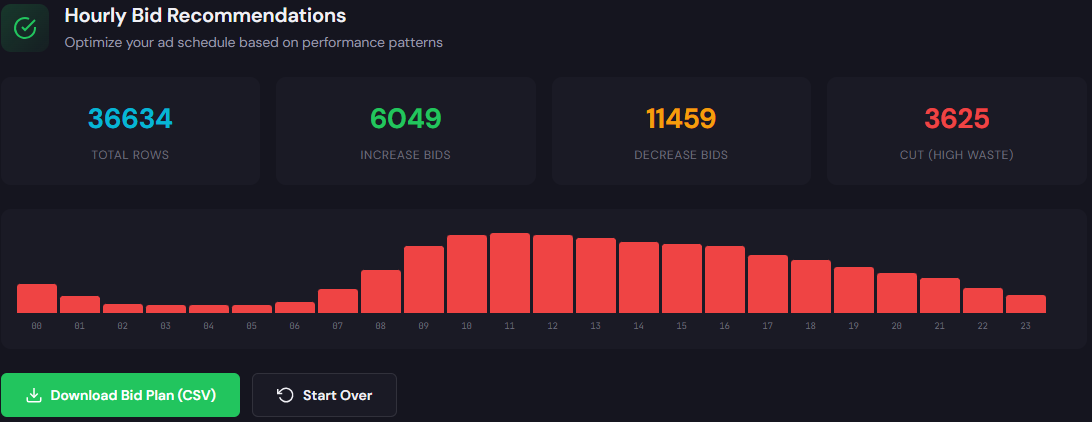
- Apply simple dayparting or hour-based bid adjustments where CPA swings >25% by hour.
Why PPC feels harder now
Advertisers face more noise, weaker signals, and faster auction dynamics. Privacy changes have thinned conversion data. Automation can help, but it amplifies weak inputs — meaning small data quality problems become big spend problems.
The 5 biggest PPC problems marketers face
1) Invisible wasted spend (you don’t know where budget leaks)
- Symptoms: High spend with flat conversions, many low-value clicks, unexplained daily budget burn.
Why it happens: Accounts accumulate structural issues — broad keywords, unsuppressed match-types, and campaigns that never had negative keyword hygiene. Over time these small bleed points add up.
- Export search terms for the last 30 days and identify low-converting, high-spend queries.
- Pause or reduce bids on queries with cost-per-conversion >2x target and no strategic value.
- Build a negative keyword list and add to relevant campaigns/ad groups.
2) Poor search-term-to-ad relevance
- Symptoms: Low click-through rate (CTR), low Quality Score, high CPCs, low conversion rate despite traffic.
Why it happens: Ad groups become catch-alls, creative drifts from landing pages, and experiments change messaging without aligning landing pages.
- Segment top queries into tightly themed ad groups (intent buckets).
- Rewrite top-performing ad copy to include exact high-intent terms.
- Match headlines and primary landing-page H1 to the ad group’s intent.
3) Auction timing and dayparting mismatch
- Symptoms: CPA or ROAS swings dramatically by hour or day, underutilized budget when conversion windows are open.
Why it happens: Default ad schedules and standard bidding ignore temporal patterns. Even with automated bidding, time-based multipliers can recover efficiency when data is sparse.
- Pull hour-of-day performance for last 30–90 days and calculate CPA delta vs baseline.
- Apply conservative bid +/− adjustments for hours where CPA differs by ±25%.
- Monitor for 7 days and revert if conversion volume collapses.
4) Keyword structure drift and orphaned SKAGs
- Symptoms: Overlapping keywords, duplicated queries across campaigns, internal competition, unpredictable CPCs.
Why it happens: Rapid edits, multiple managers, and experiments create overlap. Without periodic normalization, the account becomes inefficient.
- Consolidate exact-match copy into intent buckets and remove duplicates across campaigns.
- Create negative lists to prevent cross-campaign competition for the same queries.
- Export to Editor and run a dedupe/merge pass for high-spend terms.
5) Automation amplifying poor signals
- Symptoms: Smart bids pushing spend to low-quality traffic, erratic conversion trends after rule changes.
Why it happens: Machine learning needs clean signals. Feeding it noisy conversion data or inconsistent conversion windows trains bad behavior.
- Switch critical campaigns to manual CPC or enhanced CPC while you clean data.
- Standardize conversion action settings and attribution windows across the account.
- Pause automated rules until baseline performance stabilizes.
Fixes you can apply this week
- Run a waste snapshot to quantify leakage areas and list top corrective actions.
- Export search terms, tag high-cost/low-value queries, and add them as negatives or reduce bids.
- Apply hourly/daypart adjustments where CPA deviates more than 25%.
- Consolidate overlapping keywords and use negative lists to prevent auction cannibalization.
- Temporarily switch key campaigns off smart bidding while you clean signals.
Start with a one-click audit to find the top leakage — then export prioritized fixes and recover spend.
Tool-based workflow — map problems to tools

What it outputs: A dashboard that quantifies wasted spend, lists top leakage areas, and generates an ordered recovery plan with suggested negative terms, budget reallocations, and quick bid fixes.
How to use it — 3 steps
- Upload a 30–90 day data extract (or connect via API) to get a snapshot of waste by campaign, ad group, and search term.
- Review the top 10 leakage items and accept the suggested fixes (negatives, pauses, budget moves).
- Export actions as a CSV or apply fixes directly to campaigns using the tool’s recovery plan.

What it outputs: A ranked table of search terms with spend, conversions, CPA, and recommended bid adjustments or negative actions.
How to use it — 3 steps
- Upload your search-term export for the date range you care about (30–90 days recommended).
- Use the analyzer to tag high-spend/low-value queries and accept automated bid actions (raise, lower, or negative).
- Export the bid action list into Google Ads Editor or apply via the tool to update bids quickly.
90-minute account triage playbook
- Minute 0–10: Snapshot. Run a Wastage Snapshot to identify top 5 leakage items (campaigns, ad groups, search terms).
- Minute 10–30: Search-term hygiene. Run the Search Term Analyzer and tag negatives for immediate blocking.
- Minute 30–50: Pause and protect. Pause any campaigns or assets driving majority waste; switch high-risk campaigns from smart bidding to manual.
- Minute 50–70: Quick structural fixes. Merge duplicated keywords, apply negative lists, and consolidate overlapping ad groups.
- Minute 70–85: Dayparting check. Pull hour-of-day performance and apply conservative bid modifiers for high-CPA hours.
- Minute 85–90: Execute and monitor. Apply exports to Google Ads Editor, start a 7-day watch window with tight KPIs, and document changes.
Use the two tools above as your triage backbone — snapshot first, then normalize bids and search terms. Get results in days, not weeks.
FAQ
You can expect to see measurable CPM/CPC and CPA improvement within 7–14 days if you apply the top 5 recovery actions; immediate effects occur when you block high-leakage terms.
Not always. We recommend switching critical campaigns to manual while cleaning data, then re-enabling automation once signals are stable.
The tools generate exported action lists you can apply in Google Ads Editor. Some integrations allow direct application — confirm permissions before using direct updates.
ExecWrite offers free and paid tiers. The Search Term Analyzer has a free version for quick audits; the Snapshot provides deeper recovery plans with paid options.
Sources
- Google Ads Benchmarks — WordStream — benchmark context for CTR, CPC, conversion rate.
- Search Engine Land — auction dynamics and automation coverage — ongoing coverage of signal changes and automation effects.
- Google Ads Help — ad schedule & dayparting documentation — official guidance on ad scheduling and bid adjustments.
- Google Ads Developer Documentation — technical notes on exports, Editor, and API limitations.