Author: Ahsan Qureshi

  • Why is PPC Getting Harder to Scale?

    PPC Google Ads Marketing Ops

    Paid media is noisier, tracking is noisier, and budgets leak. This guide shows a practical, operator-level approach to triage and fix accounts quickly — with step-by-step actions and two ExecWrite tools you can run today. Learn more at ExecWrite.

    TL;DR
    • Most wasted spend comes from structure, negative keywords, and ad-to-landing mismatch — not just bidding.
    • Run a fast wastage snapshot and a targeted bid-adjustment audit to recover spend and stabilize CPA.
    • Use the 90-minute triage playbook to prioritize fixes, then iterate weekly.

    Why PPC feels harder now

    Scaling paid media is harder because three forces stack: auction competition and CPC pressure, fragmented measurement and attribution, and increased account complexity (automated bidding + layered audiences). That means simple budget increases no longer equate to scale — you need surgical fixes: cut leakage, tighten intent, and time bids precisely.

    The 5 biggest PPC problems marketers face

    1. Wasted spend and budget leakage

    Symptoms
    • High spend on low- or zero-converting queries.
    • Branded and irrelevant traffic consuming budget.
    • Rising CPA with flat conversions despite increased spend.
    Why it happens

    Accounts accumulate non-converting queries, duplicated keywords, and weak negatives. Automated bidding amplifies waste if the signal set is noisy.

    Fix this week
    • Export top search terms by spend and tag low-intent queries.
    • Apply negatives for common waste patterns (e.g., research vs. purchase modifiers).
    • Pause or reduce bids on low-conversion campaigns; reallocate to clean, high-intent segments.

    2. Poor keyword/account structure and ad-group drift

    Symptoms
    • Broad ad groups with mixed intent keywords.
    • Low CTR and weak ad relevance scores.
    • Hard-to-interpret performance by ad group.
    Why it happens

    Quick launches and reactive edits create ‘keyword soup.’ That reduces relevance and bidding precision, and makes automated strategies unstable.

    Fix this week
    • Split ad groups into single-theme groups (3–10 keywords each).
    • Create matching ads and landing page paths per group.
    • Use negative keyword lists to prevent cross-contamination.

    3. Bid timing and dayparting that don’t match demand

    Symptoms
    • Hour-of-day CPA swings 2x–4x.
    • Unnecessary spend in off-hours with poor conversion rates.
    • Bidding rules that ignore hourly performance.
    Why it happens

    Default ad schedules and automated bidding ignore intra-day behavior. Without dayparting, you overpay during slow windows and under-invest when intent peaks.

    Fix this week
    • Analyze hour-by-hour CPA/ROAS for core campaigns.
    • Apply -20% to -50% adjustments on low-performing hours; shift budget to top windows.
    • Test ad schedules for 7–14 days and iterate.

    4. Low Quality Score / landing page mismatch

    Symptoms
    • Low expected CTR, low landing page experience scores.
    • High CPC but low conversion rate.
    Why it happens

    If ad messaging, keywords, and landing pages are misaligned, Google lowers relevance. That increases CPC and reduces ad rank — you pay more for less traffic.

    Fix this week
    • Audit top-ad/landing page pairs and align headlines with primary keywords.
    • Fix major UX issues: load time, CTA clarity, form friction.
    • Run an A/B headline test on the highest-traffic ad groups.

    5. Creative stagnation and poor testing cadence

    Symptoms
    • Same ads running for months with declining CTR.
    • No formal test plan or sample size calculations.
    Why it happens

    Teams prioritize launches over optimization. Without a testing cadence, you miss incremental lifts that compound at scale.

    Fix this week
    • Rotate 3 new headlines and 2 descriptions per ad group; measure CTR lift after 7–14 days.
    • Document winners and roll into similar groups.
    • Use high-intent keyword language in top-performing headlines.

    Fixes you can apply this week

    • Run a search-term spend export and add negatives for irrelevant top spenders.
    • Split 10 worst-performing ad groups into tighter themes and create matching ads.
    • Apply hour-of-day bid adjustments based on last 90 days of data.
    • Prioritize landing-page fixes for top 20% traffic pages (headlines, load speed, CTA).
    • Launch 3 creative variants per priority ad group and measure CTR/CR over 14 days.
    Ready to find waste and quick wins?

    Run a rapid account snapshot at ExecWrite and get an itemized recovery plan that highlights wasted spend and negative keyword opportunities.

    Run an account snapshot at ExecWrite

    Tool-based workflow: map pain to ExecWrite tools

    Tool: Wastage Snapshot & Recovery (what it outputs)

    Wastage snapshot dashboard showing waste totals and recovery plan

    The Wastage Snapshot produces a dashboard-style audit: total wasted spend, top leakage areas by query/campaign, negative keyword suggestions, and a recovery plan with prioritized actions.

    How to use it (3 steps):

    1. Upload your Google Ads export or connect your account to the snapshot tool.
    2. Review the top-10 leakage items and apply the suggested negatives and campaign pauses.
    3. Download the recovery plan and schedule the top 3 fixes for the next 7 days.

    Open the Wastage Snapshot & Recovery tool

    Tool: Bid Adjustment by Search Term — Search Term Analyzer (what it outputs)

    Search term analyzer output table showing spend, conversions, tags, and recommended bid actions

    The Search Term Analyzer outputs a per-query table: spend, conversions, conversion rate, recommended bid action (increase / decrease / negative), and tags for quick filtering.

    How to use it (3 steps):

    1. Export search term report and load into the analyzer.
    2. Quick-tag queries by intent (purchase, research, competitor) and accept recommended bid adjustments for purchase intent queries.
    3. Push adjustments back to Ads Editor or implement via scripts; retest after 7 days.

    Run the Search Term Analyzer

    90-minute account triage playbook

    • 0–10 min: Top-line check — account spend, CPA trend, conversion count, major anomalies.
    • 10–30 min: Run Wastage Snapshot and export search-term spend (identify top 20 leakage items).
    • 30–50 min: Apply high-confidence negatives and pause non-brand low-converting queries.
    • 50–70 min: Run Search Term Analyzer to generate bid adjustments and tag intents; apply hour-of-day recommendations for top campaigns.
    • 70–90 min: Prioritize landing-page fixes and schedule creative tests; document changes and expected impact.
    Start your account recovery

    Use the two tools above to cut waste and retune bids quickly. If you want a guided run-through, start at ExecWrite to generate a recovery plan in minutes.

    Get started at ExecWrite

    FAQ

    Do these tools require developer access?

    No — you can upload exports for a snapshot and search-term analysis. Direct account connections speed the process but are optional.

    How fast will I see CPA improvements?

    Fixes like negatives and hour-of-day adjustments often yield measurable CPA improvement within 7–14 days. Structural changes and landing page updates compound over several weeks.

    Will automated bidding undo manual adjustments?

    Automated bidding adapts to new signals. Make changes in controlled tests and monitor. Use bid adjustments and cleaner signal sets to help automated strategies converge faster.

    What data range should I use for hour-of-day analysis?

    Use at least 60–90 days when available to smooth weekly seasonality; if your account has low volume, use 6–12 weeks to ensure statistical relevance.

    Sources

  • Why is PPC getting harder — what paid media fixes actually work?

    PPC Google Ads Marketing Ops

    Paid media teams are under pressure: rising CPCs, automation that hides problems, and budgets that leak. ExecWrite has tools and playbooks that let operators triage accounts and reclaim wasted spend — start with a free scan at execwrite.com to find the low-hanging fruit.

    TL;DR — what you can do in one week
    • Stop 10–30% of wasted spend by running a rapid wastage snapshot and applying negatives.
    • Fix structure and intent leaks with a generated keyword set that separates high-intent modifiers.
    • Use an hourly bid adjuster to stabilize CPA swings and prevent overspend during bad hours.

    Why PPC feels harder now

    Automation and machine learning promised efficiency, but they also raise the bar for account hygiene. Automation optimizes within your setup — it won’t fix structural issues, incorrect match-type mixes, or untagged landing pages. That means many teams are paying for machine-scale errors: bid algorithms amplifying leakage, inefficient keywords scaled across campaigns, and time-of-day CPA spikes that go uncorrected.

    The 5 biggest PPC problems marketers face

    1) Wasted spend from irrelevant search queries

    Symptoms

    • High spend on many search queries with zero or one conversion.
    • Broad match keywords pulling unrelated intent.
    • Negative keyword lists that haven’t been updated in months.

    Why it happens

    Broad match + automated bidding yields volume — but not always quality. Without regular search-term analysis and negative hygiene, ad spend flows to low-intent or irrelevant queries that algorithms then bid up.

    Fix this week

    • Export last 30 days of Search Terms and tag top spend/no-conversion queries as negatives.
    • Pause broad keywords where exacts outperform by CPA/ROAS.
    • Create a temporary low-bid ‘test’ ad group to isolate questionable broad terms.

    2) Poor ad-to-landing-page relevance (Quality Score leaks)

    Symptoms

    • High impressions but low CTR and lower conversion rate on specific ad groups.
    • Quality Score gaps vs. competitors for top keywords.

    Why it happens

    Creative and landing pages drift from keyword intent. Ads promise something the landing page doesn’t deliver; Google responds by lowering expected CTR and raising CPCs.

    Fix this week

    • Audit top 10 keywords by spend for headline/landing mismatch; update headlines to match primary keyword.
    • Push landing page copy that mirrors ad language and test one control change per page.
    • Use dynamic keyword insertion cautiously — prefer explicit relevance.

    3) Campaign structure that mixes intents

    Symptoms

    • Single campaign contains high-intent purchase terms and awareness keywords.
    • Difficulty setting bids or budgets because performance varies widely within the campaign.

    Why it happens

    Ad groups or campaigns built over time become catchalls. Automation then optimizes at the wrong granularity and misallocates budgets across intents.

    Fix this week

    • Split campaigns by intent: purchase vs. research vs. brand-protect.
    • Move high-spend, high-converting keywords into dedicated campaigns for stricter bid control.

    4) Time-of-day and day-of-week CPA swings

    Symptoms

    • CPA doubles or more during certain hours or days.
    • Automated bidding increases spend during poor-performing windows.

    Why it happens

    Bidding algorithms react to immediate signals and can amplify patterns. If you don’t constrain bids by hour, the system may scale into costly periods.

    Fix this week

    • Apply ad schedule bid modifiers to reduce bids during the worst hours.
    • Monitor hourly CPA for 3–5 days to validate adjustments.

    5) Keyword list fragmentation and missing negatives

    Symptoms

    • Many duplicate or overlapping keywords across ad groups.
    • High impression share loss to irrelevant queries.

    Why it happens

    Growth over time without governance leads to duplication. Without a consistent structure, negatives and match types aren’t enforced across campaigns.

    Fix this week

    • Run a quick dedupe: export keywords across accounts and collapse overlaps into single controlled ad groups.
    • Create a global negative list for known irrelevant modifiers.

    Fixes you can apply this week

    • Run a wastage scan to identify top leakage queries and wasted budgets.
    • Apply immediate negatives for high-spend/no-conversion search terms.
    • Split campaigns by intent and move top-converting keywords to controlled campaigns.
    • Update headlines and landing pages for your top 20 keywords to improve Quality Score.
    • Set ad schedule modifiers to cut bids during hours with poor CPA.
    • Generate a structured keyword list (high intent, modifiers, negatives) to replace ad hoc keywords.
    Run a rapid wastage snapshot

    Start by finding the largest leaks in 15 minutes with an automated scan.

    Start a wastage scan

    Tool-based workflow

    Below are two practical ExecWrite tools chosen to fix the problems above: a Wastage Snapshot to stop leaks and a Free AI Keyword Generator to rebuild structure and negatives.

    Wastage snapshot dashboard showing waste totals and recovery plan

    Wastage Snapshot & Recovery — what it outputs

    Outputs a dashboard-style snapshot showing wasted spend totals, top leakage areas (search queries, campaigns, devices), and a prioritized recovery plan with recommended negative keywords and immediate pausing candidates.

    How to use it in 3 steps

    1. Upload your last 30 days of Search Terms and performance data to the snapshot tool: Wastage Snapshot.
    2. Review the top 10 leakage queries and apply the suggested negatives or pause offending keywords.
    3. Export the recovery plan and implement the high-impact changes in your account; re-run after 7 days to measure reclaimed spend.
    Keyword generator output list with modifiers and negatives

    Free AI Keyword Generator — what it outputs

    Generates structured keyword lists: grouped ad groups, high-intent variations, recommended negatives, and export-ready CSVs for Google Ads Editor.

    How to use it in 3 steps

    1. Enter your top product/service focus and landing page URL into the generator: Free AI Keyword Generator.
    2. Review grouped outputs (purchase intent, research intent, modifiers) and accept the recommended negatives.
    3. Export the campaign CSV and upload via Google Ads Editor to replace fragmented keyword sets with structured campaigns.

    90-minute account triage playbook

    Follow this timed sequence to get meaningful wins in one session.

    • 0–10 min: Pull top 30 search terms by spend (last 30 days).
    • 10–30 min: Run a Wastage Snapshot; tag the top 15 waste terms as negatives or move them to a test group.
    • 30–50 min: Export top 20 keywords by spend and conversions. Identify headline/landing mismatches and draft 2 headline swaps per ad group.
    • 50–70 min: Run the AI Keyword Generator for your primary product pages and prepare grouped keyword CSVs for import.
    • 70–85 min: Apply ad schedule modifiers reducing bids during worst hours and set a dashboard to watch CPA hourly.
    • 85–90 min: Snapshot the account and save the recovery/export files. Schedule a 7-day recheck.
    Recover wasted ad spend and rebuild keyword structure

    Use the Wastage Snapshot and free keyword generator together to stop leaks and rebuild campaigns. Start at ExecWrite.

    Go to ExecWrite

    FAQ

    How fast will I see savings?

    Most accounts see measurable reclaimed spend within 3–7 days after applying negatives and pausing the largest leakage queries. The Wastage Snapshot prioritizes these actions for immediate impact.

    Will automation undo these fixes?

    Automation optimizes within your configuration. These fixes change the configuration (negatives, structure, schedules), so automation will then operate on cleaner data and deliver better results.

    Can I use the keyword generator for multiple product lines?

    Yes. Run the generator per landing page or product and merge outputs into separate campaigns by intent. Export-ready CSVs make uploads via Google Ads Editor straightforward.

    Is the wastage tool safe to run on client accounts?

    The snapshot only analyzes your exported data to produce recommendations. It does not change your account; you control which recommendations to apply.

    Sources

  • Why is my PPC getting more expensive in Google Ads — and what can I fix this week?

    PPCGoogle AdsMarketing Ops

    Why is my PPC getting more expensive in Google Ads — and what can I fix this week?

    If your CPC, CPA, or ROAS slipped and you can’t point to seasonality, this guide gives a practical triage path, quick fixes you can run this week, and two focused ExecWrite tools to recover wasted spend and tighten bids. For fast exports and quick scans, see https://execwrite.com for the tools referenced below.

    TL;DR
    • Major leaks: wasted search terms, time-of-day swings, poor ad-to-LP relevance, and conversion/attribution gaps.
    • Weekly fixes: negative keyword pushes, campaign structure cleanup, simple daypart rules, and a landing-page headline check.
    • Tools: run the Wastage Snapshot to quantify waste, use Search Term Analyzer to set bid actions by term within an hour.

    Why PPC feels harder now

    Platforms have matured: automated bidding, audience signals, and privacy changes shift control away from manual levers. That makes campaigns more efficient when configured correctly — and opaque when they aren’t. Small structural errors (bad keywords, poor funnels, wrong schedules) compound quickly, turning healthy accounts into money pits. The operators who win are the ones who map symptoms to surgical fixes and automate repeatable audits.

    The 5 biggest PPC problems marketers face

    1. Wasted spend on low-intent search terms

    Symptoms:

    • High impressions with zero conversions on many search queries.
    • Spend concentrated in long tail queries that never convert.
    • CTR or conversion rate falls while clicks remain stable.

    Why it happens: Broad match + smart bidding expands to queries that match at keyword level but lack purchase intent. Without systematic search term pruning or negatives, you pay for irrelevant traffic.

    Fix this week:

    • Export last 30 days of search terms, sort by cost, and add top non-converting queries as negatives.
    • Change broad-match + smart-bidding keywords with poor intent to phrase or exact, or pause them.
    • Create a negative keyword list and apply it across campaigns; update weekly.

    2. Poor ad-to-landing-page relevance (Quality Score leaks)

    Symptoms:

    • Low Quality Scores or high CPCs on specific ad groups.
    • Low landing-page conversion rate relative to traffic quality.
    • High bounce rates from ad clicks that used the same headlines as ads.

    Why it happens: Ads promise one thing and landing pages deliver another. Even with automated bidding, low relevance forces higher bids to maintain position.

    Fix this week:

    • Audit top 10 ad groups by spend: align ad headlines with landing-page H1 and primary CTA.
    • Run a basic A/B headline swap on the top-converting landing page for the worst QS ad group.
    • Use a landing-page rewrite checklist: headline, offer clarity, and above-the-fold CTA.

    3. Time-of-day and dayparting mismatches

    Symptoms:

    • Hourly CPA swings — cheap clicks at night with zero conversions.
    • Campaigns spend evenly even though conversions cluster in working hours.
    • Automated bid strategies ignore predictable hourly patterns.

    Why it happens: Aggregated automated bidding often flattens hour-of-day signals when conversion volume is low, leading to wasted budget during low-intent hours.

    Fix this week:

    • Pull hour-of-day performance for the last 60 days and identify conversion peaks.
    • Create simple ad schedule adjustments: reduce bids by 20–50% for low-conversion hours.
    • Use hourly bid modifiers for campaigns with steady volume.

    4. Broken or misaligned conversion tracking

    Symptoms:

    • Conversion count drops without traffic drops.
    • Discrepancies between Analytics and Google Ads conversions.
    • Bidding algorithms show poor learning or oscillation.

    Why it happens: Tracking tags get removed, page events change, or cross-domain settings break. Automated bidding then optimizes to flawed signals.

    Fix this week:

    • Verify page-level conversion events for top funnels (form submit, thank-you page hits).
    • Compare last 14 days between Analytics and Ads; document discrepancies.
    • Set up a fallback event (e.g., clicks to thank-you page) to keep bidding stable.

    5. Campaign structure that mixes intents

    Symptoms:

    • Same ad group contains both discovery and transactional keywords.
    • Automated bidding can’t find a consistent CPA because intent is mixed.
    • Reporting shows broad variance in conversion rates inside ad groups.

    Why it happens: Rapid scaling, aggressive automation, or incomplete keyword mapping create mixed intent buckets. That confuses bidding algorithms and wastes budget on low-value searches.

    Fix this week:

    • Segment keywords into separate ad groups by intent (bottom-funnel, mid-funnel, research).
    • Assign distinct landing pages or final URLs by intent segment.
    • Apply different bidding strategies per segment: target CPA for bottom-funnel, maximize clicks for discovery.

    Fixes you can apply this week

    • Export search terms, tag top waste and negatives, and deploy a cross-campaign negative list.
    • Run a 10-minute headline alignment check between top ads and landing pages; publish quick fixes.
    • Pull last 60 days hour-of-day data and set three simple bid-mod rules (peak, shoulder, off-hours).
    • Validate top conversion paths and set a fallback conversion to stabilize bidding.
    • Split one mixed-intent ad group into two and watch performance for 7 days.
    Run a rapid waste audit

    Quantify wasted spend, recover budget, and get a prioritized recovery plan in minutes with ExecWrite’s Wastage Snapshot.

    Start a free scan at ExecWrite

    Tool-based workflow: map problems to ExecWrite tools

    Only two tools are required to get immediate, repeatable impact: the Wastage Snapshot & Recovery and the Search Term Analyzer. Use them together: one finds systemic leaks and the other turns waste into precise bid/negative actions.

    Wastage Snapshot & Recovery

    Wastage snapshot dashboard showing leak totals

    What it outputs: A dashboard that quantifies wasted spend, lists top leakage sources (search terms, campaigns, keywords), and a prioritized recovery plan with action items.

    How to use it — 3 steps:

    1. Upload or connect your account and run the snapshot (5–15 minutes).
    2. Review the top 10 leakage areas the tool surfaces and export the recovery checklist.
    3. Apply the top recommended negatives, pause the worst-performing keywords, and reallocate budget to high-performing segments.

    Open the Wastage Snapshot & Recovery tool

    Search Term Analyzer (Bid Adjustment by Search Term)

    Search term analyzer output table showing spend, conversions, tags, and recommended bid actions

    What it outputs: A term-level table with spend, conversions, CPA/ROAS, tags, and recommended bid actions (raise, lower, negative).

    How to use it — 3 steps:

    1. Run the analyzer for the campaign or account and filter to the last 30–60 days.
    2. Tag terms: recoverable (raise bids), pause/negative (exclude), and reassign (move to separate ad groups).
    3. Export recommended bid adjustments and apply via Editor or API; schedule a follow-up run in 7 days.

    Open the Search Term Analyzer

    90-minute account triage playbook

    Run this exactly as written to find the fastest wins.

    1. Minutes 0–10: High-level metrics — compare last 7/30/90 days for CPA, ROAS, spend, and clicks. Note which metrics moved first.
    2. Minutes 10–30: Run the Wastage Snapshot & Recovery (connect and snapshot). Export top leakage report.
    3. Minutes 30–50: Pull top 200 search terms by spend and run the Search Term Analyzer on that list. Tag negatives and bid actions.
    4. Minutes 50–70: Fix quick hits — apply the top 20 negatives, pause the highest-cost no-conversion keywords, and set simple ad schedules from the hour-of-day findings.
    5. Minutes 70–90: Validate conversions and set a fallback event. Document changes and earmark tests (headline swap, landing-page rewrite) to measure next 7 days.

    FAQ

    How fast will I see results?

    Expect immediate spend reduction from negatives and pauses (within 24–48 hours). Bidding improvements and ROAS lift typically materialize in 7–14 days as automated strategies re-learn on cleaner signals.

    Do I need to stop automated bidding?

    Not usually. Use targeted fixes (negatives, structure, landing pages) first. If automated strategies oscillate, set a short learning pause or switch to portfolio strategies while you stabilize signals.

    Which metric should I prioritize?

    Prioritize conversion quality (value/conv) over raw conversion count. If low-quality conversions increase, your CPA and ROAS will look better but business outcomes suffer.

    Can these tools run without a developer?

    Yes. Both the Wastage Snapshot and Search Term Analyzer are designed for analysts and marketers; connections and exports are straightforward and include step-by-step prompts.

    Will these fixes scale?

    Yes — the goal is to turn one-off triage into a weekly cadence: run a wastage snapshot and term analysis, push negatives, and monitor changes. That process scales across accounts and teams.

    Recover wasted budget and tighten bids

    Start a targeted recovery: run a Wastage Snapshot, apply the Search Term Analyzer recommendations, and lock in weekly audits. Get started at ExecWrite to automate these steps.

    Run a recovery scan on ExecWrite

    Sources

  • Why is my PPC performance dropping on Google Ads?

    PPCGoogle AdsMarketing Ops

    If your account feels slower, more expensive, or less predictable than last quarter, this post gives an operator-grade triage plan you can run in 90 minutes. Use quick fixes and two targeted ExecWrite tools to recover wasted spend and fix bidding leaks — start at ExecWrite.

    TL;DR
    • Major causes: wasted spend, poor ad-to-page relevance, and time-of-day bid misalignment.
    • Immediate wins: pause low-converting queries, tighten audiences, and reallocate by hour.
    • Tools to use: Wastage Snapshot for recovery and Hourly Bid Adjuster for dayparting — audits and recommendations in minutes.

    Why PPC feels harder now

    Everyone sees it: higher CPCs, more automation, and thinner signals from privacy changes. That combination turns predictable playbooks into noisy signals. You can no longer rely on single levers (increase budget, raise bids) because the leaks and misalignments compound fast.

    This guide assumes you want concrete steps — not theory — to stop waste and stabilize performance this week.

    The 5 biggest PPC problems marketers face

    1) Wasted spend on irrelevant or low-intent queries

    Symptoms

    • High spend on many search terms with zero conversions.
    • Low click-to-conversion rate from broad or discovery queries.
    • Negative keyword lists that never see updates.

    Why it happens — Over-reliance on automated matching and infrequent search-term reviews create steady leakage: impressions convert into clicks but not into business outcomes.

    Fix this week

    • Export last 30‑90 days of search terms, sort by spend and conversions; pause top-spend terms with zero conversions.
    • Add exact-match negatives for obvious irrelevant modifiers.
    • Create a ‘watch’ ad group for borderline queries instead of broad matching everywhere.

    2) Ad-to-landing page relevance gap (Quality Score loss)

    Symptoms

    • High CPC despite steady CTR; landing page conversion rate drops.
    • Ad groups with mixed messaging; multiple offers in one group.

    Why it happens — Messaging misalignment between ad copy and landing page reduces Quality Score and increases CPCs; automated bidding can’t fix creative mismatch.

    Fix this week

    • Pinpoint ad groups with CTR/CVR divergence and map them to single landing page variants.
    • Rewrite headlines to use the exact intent modifiers users searched for.
    • Run a shortlist A/B test for top-converting ad-to-page pairs.

    3) Time-of-day (daypart) performance swings

    Symptoms

    • Huge CPA or ROAS variance by hour or day.
    • Bids are uniform across hours despite clear peaks and troughs.

    Why it happens — Aggregated bidding ignores intra-day performance swings. Without hourly analysis you bid up during low-quality hours and under-invest during peak windows.

    Fix this week

    • Pull last 30 days of performance by hour for cost, conversions, CPA, and ROAS.
    • Apply +/− bid modifiers for the worst and best hours (start conservative, ±10–20%).
    • Monitor one week and iterate; don’t flip all hours at once.

    4) Misconfigured audiences and overlap

    Symptoms

    • Audience bids cannibalize search budget; overlapping audiences receive similar bids.
    • High impression share loss in key segments despite spending.

    Why it happens — Audience lists grow unmanaged; bidding rules don’t reflect intent or funnel stage. Overlap increases competition against yourself.

    Fix this week

    • Audit active audiences, remove or merge low-value lists, and enforce mutual exclusivity where needed.
    • Create clear bid tiers for funnels (brand > retargeting > prospecting).

    5) Campaign structure entropy

    Symptoms

    • One campaign contains mismatched goals, budgets, and conversion actions.
    • Reporting is noisy; it’s unclear which elements drive conversions.

    Why it happens — Fast fixes, rushed launch, and multiple editors introduce structural drift. Granularity matters: one-size-fits-all campaigns break optimization.

    Fix this week

    • Segment campaigns by objective (acquisition vs retention) and ROAS target.
    • Standardize naming conventions and document conversion mappings in a central sheet.

    Fixes you can apply this week

    • Run a 30‑90 day search term export; pause top-spend zero-conversion terms.
    • Apply hourly bid modifiers for the 4 worst and 4 best hours.
    • Audit top 10 ad groups for ad-to-page mismatch; rewrite headlines to match intent.
    • Consolidate audiences into three bid tiers and remove overlaps.
    • Set one owner for campaign structure and naming; implement a weekly 15-minute review.
    Run a fast audit with ExecWrite

    Recover wasted spend and get recommended bid actions in minutes using automation-built reports.

    Start an audit at ExecWrite

    Tool-based workflow

    Below are two practical ExecWrite tools that map directly to the problems above. Each tool includes what it outputs and three steps to act on its recommendations. Preview images show sample outputs.

    Wastage Snapshot & Recovery — What it outputs

    Wastage snapshot dashboard showing waste totals and recovery plan

    The Wastage Snapshot creates a dashboard-style audit that highlights spend leakage, top wasted queries, and a prioritized recovery plan with negative keyword and budget fixes.

    How to use it — 3 steps

    • Upload your 30–90 day account export to the Wastage Snapshot.
    • Review the top 10 leakage categories and accept the recommended negatives or pauses.
    • Export the recovery plan and implement changes in Google Ads (or via Editor) — measure impact over 7 days.

    Open Wastage Snapshot & Recovery

    Hourly Bid Adjuster — What it outputs

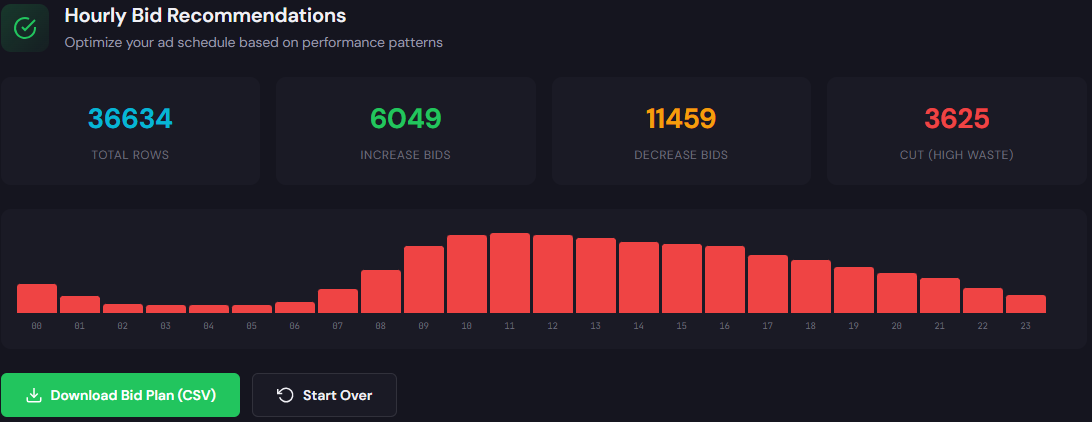
    Table showing hour-of-day rows with cost, conversions, CPA, and bid adjustment recommendations

    The Hourly Bid Adjuster analyzes hour-of-day performance and recommends bid modifiers for ad schedules to maximize conversion efficiency and ROAS.

    How to use it — 3 steps

    • Feed 30 days of hourly performance into the Hourly Bid Adjuster.
    • Review suggested bid modifiers for the worst and best hours; adjust modifiers conservatively (±10–20%).
    • Apply modifiers to campaign ad schedules and monitor CPA/ROAS over 7 days; iterate on the next cycle.

    Open Hourly Bid Adjuster

    90-minute account triage playbook

    1. 0–10 min: Export search terms, hourly report, and top-converting ad groups (30–90 days).
    2. 10–30 min: Run Wastage Snapshot. Pause the top 5 zero-conversion, high-spend queries it flags.
    3. 30–50 min: Run Hourly Bid Adjuster. Apply conservative modifiers for clearly bad/good hours.
    4. 50–70 min: Audit top 10 ad groups for landing-page mismatch; draft headline swaps and add to test queue.
    5. 70–85 min: Consolidate audiences into three bid tiers and remove overlaps.
    6. 85–90 min: Document changes, set 7‑day check-in, and schedule a 15‑minute weekly review for structure drift.
    Implement the triage now

    Run both the Wastage Snapshot and Hourly Bid Adjuster within a single session and get export-ready recovery steps.

    Run tools at ExecWrite

    FAQ

    How fast will I see results?

    Expect immediate reductions in wasted spend within 24–72 hours after applying negatives and pauses. Bidding and landing-page changes typically stabilize performance over one to two weeks.

    Will automation fight my manual bid modifiers?

    Not if you set clear bid tiers and document objectives. Apply conservative modifiers and monitor; allow automated strategies time to re-learn after structural changes.

    Can I trust the tool recommendations?

    ExecWrite tools produce data-driven recommendations based on your account exports. Treat them as prioritized suggestions: review, test, and implement the highest-impact items first.

    What if my account is too large to run a single audit?

    Partition by top-performing campaigns or business units and apply the 90-minute triage to one partition at a time. Focus on the highest-spend or highest-variance areas first.

    Sources

  • Why is my Google Ads wasting budget—and how can PPC tools fix it?

    PPCGoogle AdsMarketing Ops

    If your Google Ads account leaks budget every month, this article gives an operator-level triage and practical fixes. Use the free and paid tools at ExecWrite to run fast audits, recover waste, and stop recurring leaks.

    TL;DR
    • Most wasted spend comes from mismatches (search terms, bids, times) and unmanaged automation—find it with a wastage snapshot.
    • Quick stops: prune bad search terms, fix low-quality landing pages, and apply hour-of-day bid moves.
    • Use ExecWrite’s Wastage Snapshot and Search Term Analyzer to find fixes, then run a 90-minute triage to lock in wins.

    Why PPC feels harder now

    Advertisers face more signals, less transparency, and more automation decisions. That creates three operational problems: invisible waste, over-optimization by rules/algorithms, and scale pressure to spend rather than to improve return. The result: accounts that grow cost but not revenue.

    The 5 biggest PPC problems marketers face

    Pain 1: Wasted spend from irrelevant search terms

    • Symptoms: High impressions, low clicks-to-conversion, lots of unrelated search terms in the Search Terms report.

    Why it happens: Broad match and loosely structured ad groups let low-intent queries trigger expensive clicks. Negative keywords aren’t maintained.

    • Fix this week:
      • Export the last 90 days of Search Terms and tag top irrelevant queries for negatives.
      • Create refined exact/ad-group-specific match types for high-cost keywords.
      • Set a weekly negative upkeep routine (10–20 mins).

    Pain 2: Bid schedules and time-of-day CPA swings

    • Symptoms: CPA varies wildly by hour; conversions cluster in specific windows; automated bidding overspends outside top hours.

    Why it happens: Advertisers ignore dayparting signals or apply blanket bidding when conversion probability is time-dependent.

    • Fix this week:
      • Analyze hour-of-day conversion rates and cost-per-conversion by campaign.
      • Apply ad schedule adjustments (bid modifiers) for low-performing windows.
      • Test an hourly bid adjustment sheet for one campaign before scaling.

    Pain 3: Landing page mismatch and Quality Score drops

    • Symptoms: Declining CTR, rising CPC, low conversion rate despite steady traffic.

    Why it happens: Ad copy and landing pages drift apart; audiences land on irrelevant pages and bounce, hurting Quality Score and price per click.

    • Fix this week:
      • Audit top-performing ad groups for headline/landing page relevance.
      • Implement quick headline/CTA A/Bs and update landing headlines to match top queries.
      • Measure conversion-rate lift and roll successful changes account-wide.

    Pain 4: Unchecked automated bidding and rule conflicts

    • Symptoms: Bids flip frequently, cost spikes after rule runs, automation fights human changes.

    Why it happens: Multiple automations (smart bidding, rules, scripts) operate without a single source of truth, creating bid thrash.

    • Fix this week:
      • Document active automations and pause non-critical rules for 7 days.
      • Run manual bid tests on a control campaign to observe behavior.
      • Set guardrails: max CPC, ROAS floors, and conversion windows.

    Pain 5: Slow keyword expansion and poor structure

    • Symptoms: Overbroad ad groups, poor match-type strategy, and missed high-intent queries.

    Why it happens: Teams rely on manual keyword lists or stale research instead of generating intent-segmented keyword sets quickly.

    • Fix this week:
      • Generate a targeted keyword set for one product using intent modifiers.
      • Build ad groups around landing page themes and export to Google Ads Editor.
      • Create a negative keyword list from search term negatives and add to shared library.

    Fixes you can apply this week

    • Run a wastage snapshot to identify top leakage areas (search terms, audiences, devices).
    • Export Search Terms; add top 50 irrelevant queries to negatives and re-match exact vs broad.
    • Analyze hour-of-day CPA and apply +/− bid mods for worst/best windows.
    • Check top landing pages for headline mismatch; deploy three headline variations tied to query intent.
    • Pause conflicting automation, document rules, and set a single bidding strategy per campaign type.
    Run a quick audit

    Start with a Wastage Snapshot to find where dollars leak. The tool highlights recovery opportunities and negative keyword suggestions.

    Open ExecWrite

    Tool-based workflow

    Below are two tools that map directly to the problems above. Use them in sequence: snapshot → search terms → hourly bid adjustments → landing page fixes.

    Wastage Snapshot & Recovery

    Wastage snapshot showing waste totals and recovery plan

    What it outputs
    • Dashboard with total wasted spend, top leakage buckets (search terms, devices, campaigns), and a prioritized recovery plan.
    • Negative keyword candidates and quick-line items you can action in minutes.
    How to use it — 3 steps
    1. Upload account data or connect your CSV export to the Snapshot tool.
    2. Review the top 10 leakage items and export the negative keyword list.
    3. Apply recoveries: add negatives, pause low-value campaigns, and track reclaimed spend over 14 days.

    Tool link: Wastage Snapshot & Recovery

    Search Term Analyzer (Bid Adjustment by Search Term)

    Search term analyzer output table showing spend, conversions, tags, and recommended bid actions

    What it outputs
    • Row-level search term metrics with spend, convs, CPA/ROAS and actionable tags (negative/add/keep).
    • Recommended bid adjustments by search term and grouped export for Google Ads Editor.
    How to use it — 3 steps
    1. Upload your Search Terms report CSV for the chosen time window.
    2. Review tags and apply negatives or bid actions to the highest-cost low-conversion terms.
    3. Export the bid action CSV and import into Google Ads Editor for fast deployment.

    Tool link: Search Term Analyzer


    90-minute account triage playbook

    Follow this timed playbook to convert findings into fixes in one block.

    • 0–10 minutes: Pull account-level reports — search terms (90 days), campaign performance, hour-of-day, landing page URLs.
    • 10–30 minutes: Run the Wastage Snapshot to get the top leakage buckets and recovery checklist.
    • 30–50 minutes: Upload Search Terms to the Analyzer; tag and export negatives and bid moves.
    • 50–70 minutes: Apply quick changes — negatives, ad schedule bid mods, pause worst spenders, and record changes.
    • 70–90 minutes: Implement landing page headline fixes and set a 14-day measurement window with conversion tracking checks.
    Start your triage now

    Use the tools above to run the 90-minute playbook and produce an actionable recovery plan. Get started at ExecWrite.

    Open ExecWrite

    FAQ

    How fast will I see recovered budget?

    Small fixes (negatives, pauses, ad schedule mods) typically show impact within 7–14 days. Structural fixes like landing page changes may take longer to validate.

    Can I use the tools without developer support?

    Yes. Exports and CSV uploads are the primary workflows. For live API connections, a one-time setup by an admin is recommended.

    Will these tools break automated bidding?

    No. Use the tools to produce recommended actions and create guardrails—pause conflicting rules first, then apply changes in a controlled manner.

    Do the tools handle multiple accounts?

    Yes. Upload individual account exports or aggregate CSVs. The Snapshot highlights top leaks per account and combined recovery opportunities.

    Sources

  • Why is my Google Ads performance stalling? Practical PPC fixes and tools

    PPCGoogle AdsMarketing Ops

    If your Google Ads account feels like it’s drifting—flat conversion rates, rising CPA, creeping wasted spend—this is a tactical playbook, not theory. Use these steps with the tools on ExecWrite to find, fix, and reclaim performance in days.

    TL;DR
    • Fast diagnose: audit spend leakage, poor keywords, and time-of-day swings.
    • Quick fixes: pause waste, tighten match types, rebuild 3 poorly performing ad groups.
    • Use tools to scale: recovery snapshot + bid-adjustment analysis to automate next steps.

    Why PPC feels harder now

    Google Ads hasn’t become mystical overnight. Two trends make everyday management more brittle: automation hides problems until they compound, and cross-channel attribution dilutes signal. Ad budgets are finite; if a few leaky levers aren’t fixed, automation amplifies waste.

    That’s why manual triage and targeted tooling are still essential. This post gives concrete symptoms, one-week fixes, and a tool-led workflow to recover spend and stabilize CPA.

    The 5 biggest PPC problems marketers face

    Poor keyword-level ROI (wasted spend)

    • Symptoms:
      • High-spend search terms with zero conversions
      • Broad match spending spikes with poor CPAs
      • High clicks but low conversion rates

    Why it happens

    Match-type creep, weak negative keyword lists, and generic query traffic cause leakage. Automated bidding can keep funding these terms until CPA blows out.

    Fix this week

    • Pull top 100 search terms by spend; tag non-converting ones.
    • Apply negatives for irrelevant modifiers and pause top wasted terms.
    • Shift broad-match traffic to phrase/exact in high-cost ad groups.

    Quality Score & landing page mismatch

    • Symptoms:
      • Low ad relevance or low expected CTR messages in UI
      • High impression share but low conversions
      • Large ad-to-landing-page message gap

    Why it happens

    Ads and landing pages drift apart after campaign edits, or the creative doesn’t match search intent. That increases CPCs and lowers rank.

    Fix this week

    • Flag ad groups with QS below account median.
    • Align 3 headlines and the landing page hero copy to the top 5 queries.
    • Run an A/B headline test on highest-volume ad groups.

    Time-of-day and dayparting inefficiencies

    • Symptoms:
      • Large hourly swings in CPA or ROAS
      • Budget exhausted early in the day with poor late-day performance

    Why it happens

    Default schedules or automated bidding without hour-level inputs can over/under-invest across the day. Missing hour-by-hour data means bidding at the wrong times.

    Fix this week

    • Export hourly performance for the last 30 days.
    • Apply -20% to hours with CPA 30%+ above average; +15% where CPA is 30% below average.
    • Monitor and iterate weekly, not daily.

    Campaign structure entropy

    • Symptoms:
      • Overloaded ad groups with unrelated keywords
      • Repeated keywords across campaigns causing internal competition

    Why it happens

    Quick edits and pressure to scale often lead to loose grouping. This dilutes relevance and hurts Quality Score and bidding signals.

    Fix this week

    • Identify 5 worst-performing ad groups and split by intent.
    • Create focused ad groups with 10–20 tightly-related keywords.
    • Export for Editor and upload structured CSVs to streamline edits.

    Attribution and conversion tracking drift

    • Symptoms:
      • Reported conversions drop after site changes
      • Discrepancies between GA4 and Google Ads conversion counts

    Why it happens

    Tracking updates, tag changes, or new GTM containers can break conversions. When signal weakens, automated bidding makes worse decisions.

    Fix this week

    • Verify conversion actions and recent edits in Google Ads.
    • Reconcile event counts in GA/Tag Manager; restore missing events.
    • Use a conservative bidding strategy until signals are fixed.

    Fixes you can apply this week

    • Run a 30-day spend-by-search-term report; add negatives and pause the top 5 waste drivers.
    • Prioritize improving Quality Score for top-spend ad groups (headlines, landing page alignment).
    • Implement hour-of-day bid adjustments where CPA deviates ±30% from account average.
    • Split messy ad groups into focused groups and upload via Editor CSVs.
    • Validate conversions and revert automated bidding to manual target CPA if signals are broken.
    Ready to run a rapid waste audit?

    Use a snapshot tool to identify wasted spend and recover budget fast.

    Run the ExecWrite tools


    Tool-based workflow (map each pain point to ExecWrite tools)

    Wastage Snapshot & Recovery

    Wastage snapshot dashboard preview

    What it outputs: A dashboard-style snapshot listing total wasted spend, top leakage areas (search terms, placements, devices), and a prioritized recovery plan.

    How to use it (3 steps)

    1. Upload or connect your account and run the snapshot to get the waste summary (Wastage Snapshot).
    2. Export the top wasted search terms and apply negatives or pause offending keywords immediately.
    3. Follow the recovery plan: reassign budgets from waste to high-ROI campaigns and re-run in 7 days to measure impact.
    Bid Adjustment Suite — Hourly & Search-Term Analyzer

    Search term analyzer output table showing spend, conversions, tags, and recommended bid actions
    Hourly bid adjuster table with hour-of-day CPA and bid recs

    What it outputs: Hour-of-day performance with recommended bid adjustments and a searchable table of terms tagged by ROI and suggested bid actions.

    How to use it (3 steps)

    1. Run the Hourly Bid Adjuster to spot stable windows for aggressive bids and hours to cut spend (Hourly Bid Adjuster).
    2. Use the Search Term Analyzer to tag high-cost, non-converting queries and generate exact-match candidates (Search Term Analyzer).
    3. Export the recommended bid actions and upload as campaign-level adjustments or use automated rules to implement during peak windows.

    These two tools address the largest levers—waste identification and hour/term-level bid control—so you fix root causes rather than patch symptoms.


    90-minute account triage playbook

    Follow this timed sequence to stabilize an underperforming account in 90 minutes.

    • 0–15 min: Pull last 30 days: spend by campaign, search terms by spend, hourly CPA, and conversion actions.
    • 15–35 min: Run the ExecWrite Wastage Snapshot to identify top leakage and generate the negative keyword list.
    • 35–55 min: Use the Search Term Analyzer and pause/negate the top 10 waste drivers; move broad-match heavy keywords to phrase/exact where appropriate.
    • 55–70 min: Run the Hourly Bid Adjuster; apply conservative +/- adjustments to hours that deviate by 30%+ from average CPA.
    • 70–85 min: Fix the top 3 ad groups with poor Quality Score: update headlines, align landing page hero text, and enable an ad test.
    • 85–90 min: Set a 7-day monitoring check and revert automated bidding to manual or target CPA with a conservative cap if conversions are unstable.
    Start your account triage

    Run the snapshot and bid-adjustment tools now to turn these 90-minute steps into automated reports and exports.

    Open ExecWrite tools


    FAQ

    How fast will I see improvements after pausing waste?

    Most accounts see immediate CPA improvements within 3–7 days because budget shifts from unproductive terms to higher-ROI areas. Continue monitoring hourly and daily to avoid automation reintroducing waste.

    Can tools fully automate fixes without manual review?

    Tools speed diagnosis and produce recommended actions, but a human should review high-impact pauses and bid changes. Automation without governance can hide new leakages.

    What if my conversion tracking is broken?

    Fallback to conservative bidding and manual CPA caps. Fix or rebuild conversion events in GTM/GA4, then allow automated strategies to ramp back up once signal stabilizes.

    How often should I run these audits?

    Run a deep snapshot monthly and a lightweight waste/term check weekly. Hourly bid reviews can be monthly unless you have large intraday swings.


    Sources

  • Why is my PPC account losing budget and conversions?

    PPC Google Ads Marketing Ops

    If your paid media numbers feel like they’re sliding, this is a tactical playbook. We walk through five root causes, quick fixes you can apply this week, and a tool-based workflow using ExecWrite to reclaim wasted budget and steady performance. For tool access and exports, visit ExecWrite.

    TL;DR
    • Most account problems are: wasted spend, automation mismatch, search-term noise, landing-page relevance, and slow testing.
    • Quick wins: pause high-cost non-converting queries, set hour-level bids, map ads to landing pages, and run a 90-minute triage.
    • Use two tools—Wastage Snapshot & Recovery and Bid Adjustment by Search Term—to generate prioritized actions and CSV-ready fixes.

    Why PPC feels harder now

    Platforms change fast: automation, privacy, and cost inflation mean historical rules don’t always work. That amplifies three predictable outcomes—less visibility at the query level, more wasted spend, and slower learning from tests. You can still act decisively; the fix is better data triage and targeted interventions, not wide-scale bidding panic.

    The 5 biggest PPC problems marketers face

    1) Wasted spend and budget leakage

    Symptoms

    • High cost but zero or very low conversions in a campaign or ad group.
    • Large volume of low-intent search terms consuming budget.
    • Spending clustered in few keywords with poor CTR or conversion rate.

    Why it happens

    Without frequent search-term audits and negative keyword hygiene, low-intent queries eat budget. Automation can amplify the problem by scaling performance signals linked to noise instead of business outcomes.

    Fix this week

    • Pull top 1,000 search terms by spend and tag non-converting queries.
    • Apply negatives for broad-match leakage and known irrelevant modifiers.
    • Reallocate budget away from campaigns with CPA > 2x target until remediated.

    2) Automation misconfiguration

    Symptoms

    • Rapid swings in CPC/CPA after automated bid or portfolio strategy changes.
    • Conversions drop despite stable traffic volume.
    • Learning windows that never converge because goals/costs are inconsistent.

    Why it happens

    Automated strategies require clean signals and consistent goals. If conversion tagging, attribution windows, or campaign objectives shift, machine learning chases noise and inflates spend.

    Fix this week

    • Freeze automated bidding on the worst-performing campaigns for 48–72 hours.
    • Confirm conversion and attribution settings match business goals.
    • Run short manual bid tests on top keywords to re-establish baselines.

    3) Poor search-term-level bidding

    Symptoms

    • Wide hour-to-hour CPA swings.
    • Top queries that convert at dramatically different ROAS but have same bid.
    • No clear dayparting or hour-level adjustments in place.

    Why it happens

    Most accounts treat keywords as static. Without search-term-level and hour-by-hour adjustments you miss when users are most likely to convert, so you either overbid for low-value times or underbid during peak intent.

    Fix this week

    • Export hourly performance for top campaigns and mark high/low CPA hours.
    • Apply ad-schedule bid modifiers for expensive off-hours.
    • Create a short list of search-terms that merit +10–30% bids by hour.

    4) Landing page relevance and Quality Score decay

    Symptoms

    • High impressions but low CTR and poor conversion rate.
    • Quality Score drops across keywords tied to a page.
    • Ad messaging doesn’t match landing page headlines.

    Why it happens

    Ad-to-page mismatch reduces Quality Score and forces higher CPCs for the same traffic. Small copy and layout mismatches can create large conversion gaps.

    Fix this week

    • Map top ad variations to the exact landing page version they should send to.
    • A/B test a headline and hero CTA aligned to the ad promise.
    • Check tracking and form events for recent implementation issues.

    5) Slow testing and poor experiment hygiene

    Symptoms

    • Tests run too long or without enough traffic to be decisive.
    • Multiple experiments overlap with confounding variables.
    • No clear success criteria for a test—decisions are subjective.

    Why it happens

    Teams skip upfront power calculations and proper segmentation, so tests consume time and budget without producing actionable outcomes.

    Fix this week

    • Define primary KPI and minimum detectable effect for each test.
    • Run one clean test per audience or campaign pool at a time.
    • Use short-duration tactical tests (7–14 days) for copy/landing tweaks.

    Fixes you can apply this week

    • Export last 30 days of search terms, sort by spend, and apply negatives to irrelevant, high-spend, non-converting queries.
    • Run a quick conversion-tag audit: validate events, attribution windows, and duplicate conversions.
    • Pause automated bidding where CPA is >2x target; run manual bids on top 20 keywords for calibration.
    • Map ads to specific landing pages and align headlines; launch a 7–14 day headline A/B test.
    • Apply hour-of-day bid modifiers based on observed CPA swings.
    Reclaim wasted spend faster

    Run a quick wastage snapshot to find budget leakage and prioritized recovery steps—export negatives and recovery CSVs in minutes.

    Open ExecWrite

    Tool-based workflow: map each pain point to ExecWrite tools

    Wastage Snapshot & Recovery

    Wastage snapshot showing waste totals and top leakage areas

    What it outputs: Dashboard snapshot of wasted spend, top leakage categories, prioritized negative keyword suggestions, and a recovery plan you can export as CSV.

    How to use it (3 steps)

    • Upload historical account data or connect via the UI and run the snapshot.
    • Review the prioritized leakage list and select negatives to apply.
    • Export recovery CSVs or download a recovery plan to implement changes in Google Ads Editor.

    Why use it: it converts a time-consuming manual audit into an ordered action list so you can stop the biggest drains first. Tool: Wastage Snapshot & Recovery.


    Bid Adjustment by Search Term (Search Term Analyzer + Hourly Bid Adjuster)

    Search term analyzer output table showing spend, conversions, tags, and recommended bid actions

    What it outputs: Search-term tables with spend, conversions, recommended bid changes, and hour-of-day adjustments for dayparting decisions.

    How to use it (3 steps)

    • Run the Search Term Analyzer on your campaign/ad group set to tag high-cost, low-conversion queries.
    • Review recommended bid actions and export a bid-adjustment CSV for Google Ads Editor or your bidding platform.
    • Use the Hourly Bid Adjuster report to set ad-schedule modifiers and capture hour-level ROAS swings.

    Why use it: brings search-term granularity and time-based bidding into one workflow so you can stop broad-stroke bidding mistakes. Tools: Search Term Analyzer and Hourly Bid Adjuster.

    90-minute account triage playbook

    • 0–10 min: Top-level check—confirm conversions, budgets, and attribution settings.
    • 10–30 min: Run Wastage Snapshot & Recovery and export the prioritized negatives list.
    • 30–50 min: Export top 1,000 search terms by spend and run Search Term Analyzer on that list.
    • 50–70 min: Apply immediate negatives and pause campaigns spending without conversions.
    • 70–85 min: Use Hourly Bid Adjuster output to set ad-schedule modifiers for high CPA hours.
    • 85–90 min: Document actions, schedule follow-up tests (7–14 days), and export change CSVs for Editor upload.
    Start the 90-minute triage

    Run both the Wastage Snapshot and Search Term Analyzer to produce prioritized fixes and CSV-ready exports you can apply immediately.

    Run ExecWrite tools now

    FAQ

    Do I need to pause all automation before fixes?

    Not always. Pause or limit automation only where CPA diverges strongly from targets. Use short manual tests to re-establish reliable signals before re-enabling automated strategies.

    How quickly will negatives improve CPA?

    Expect immediate traffic reduction from irrelevant queries; CPA improvement may take 7–14 days as learning stabilizes and conversions accumulate.

    Can I apply ExecWrite exports in Google Ads Editor?

    Yes. ExecWrite exports recovery and bid-adjustment CSVs formatted for bulk upload to Google Ads Editor or your preferred management tool.

    Which metric should I prioritize for short-term fixes?

    Short-term: CPA (or cost per lead). Medium-term: ROAS and conversion rate. Use CPA to decide immediate pauses and negatives, then optimize for ROAS after recovery.

    Sources

  • Why is my Google Ads PPC account wasting budget—and how do I fix it?

    PPCGoogle AdsMarketing Ops

    Most accounts leak spend across keywords, schedules, and landing pages. This post shows measurable fixes and a tool-based workflow using ExecWrite to reclaim budget fast — learn more at ExecWrite.

    TL;DR — Cut wasted spend in three moves
    • Run a 90-minute triage and recover quick wins (negatives, hour bids, low-QS ad groups).
    • Use the Wastage Snapshot to quantify leakage and the Search Term Analyzer to set bid actions.
    • Apply a weekly checklist: negative keywords, ad-to-LP alignment, and hour-of-day bid adjustments.

    Why PPC feels harder now

    Three forces make paid media feel like spinning plates: rising CPCs, stricter privacy-driven signal loss, and smarter but brittle automation. That combination magnifies small setup mistakes into large monthly waste. Instead of guessing, operators need fast diagnostics and repeatable fixes that uncover the real money leaks.

    The 5 biggest PPC problems marketers face

    1) Wasted spend from non-converting queries

    Symptoms

    • High spend on long-tail queries with zero conversions.
    • Low CTR but steady impressions on many search terms.
    • Rising CPA without clear conversion quality issues.

    Why it happens

    Broad match expansions and loose keyword match types surface low-intent queries. Without a fast search-term audit you’re bidding on noise.

    Fix this week

    • Export last 30–90 days of search terms by cost and conversions.
    • Apply negatives for high-cost zero-conversion queries (cost threshold + minimum impressions).
    • Move recurring low-intent queries into a negative keyword list tied to the campaign.

    2) Poor ad-to-landing-page relevance (low Quality Score)

    Symptoms

    • Low CTR vs impression share competitors for similar keywords.
    • Large gaps between ad messaging and landing page headlines.
    • Declining conversion rate after a creative launch.

    Why it happens

    Teams iterate ads and landing pages separately; small message mismatches kill Quality Score and increase CPC.

    Fix this week

    • Group ad copy by landing-page theme; ensure top 3 headlines match main LP headline and CTA.
    • Run a QS diagnostic on worst-performing ad groups and prioritize headlines.
    • Test a single LP headline update for the largest ad group and measure CTR/CR over 7 days.

    3) Time-of-day and dayparting inefficiencies

    Symptoms

    • CPA swings wildly by hour but bidding is uniform.
    • Manual bid increases during ‘peak’ hours that don’t match actual conversion rate.
    • Limited or no ad schedule applied.

    Why it happens

    Most teams set flat bids or rely on broad automation without hour-level granularity. Opportunities exist when conversion rates vary by time.

    Fix this week

    • Pull hour-of-day performance for the last 30 days and calculate hourly CPA/ROAS.
    • Reduce bids for hours with consistently poor CPA; raise where ROAS is favorable.
    • Apply ad schedule adjustments in small increments and monitor for 7–14 days.

    4) Campaign structure drift and orphaned keywords

    Symptoms

    • Ad groups with >50 keywords or generic catch-all headlines.
    • Untracked test keywords or auto-added keywords in broad campaigns.
    • Mismatch between campaign goals and landing pages.

    Why it happens

    Over-time edits, experimentation, and broad match expansions create messy structures that hurt relevance and reporting clarity.

    Fix this week

    • Identify ad groups over keyword thresholds and split into focused groups.
    • Move high-spend, low-relevance keywords into a paused test campaign for analysis.
    • Document one expected landing page per ad group and align ads accordingly.

    5) Automation consuming budget on low-value conversions

    Symptoms

    • Smart bidding driven by a conversion event that isn’t tied to revenue.
    • Sudden spend increases after automation changes.
    • High CPA on lead forms that don’t convert downstream.

    Why it happens

    Automation optimizes for the signal you give it. If that signal is low-value or noisy, bids get miscalibrated and waste grows.

    Fix this week

    • Audit conversion events and remove low-quality triggers from automated bidding.
    • Switch to manual or portfolio automated strategies on priority campaigns while you clean signals.
    • Implement a conversion-value model or import revenue where possible.

    Fixes you can apply this week

    • Export search terms (30–90 days). Tag top waste and add negatives.
    • Run a Quality Score headline-to-LP alignment check and update headlines for worst ad groups.
    • Pull hour-of-day CPA/ROAS and set +/- adjustments by 10–20% where patterns are consistent.
    • Segment ad groups with >30 keywords and assign single landing pages.
    • Pause automation on noisy conversion signals; prioritize campaigns for manual control during clean-up.
    Reclaim wasted budget faster

    Run a quick recovery snapshot to see top leakage areas and get a prioritized recovery plan.

    Run the snapshot at ExecWrite


    Tool-based workflow — map problems to ExecWrite tools

    Below are two focused ExecWrite tools that map directly to the pain points above. Each tool section shows what the tool outputs and a compact 3-step use workflow. Preview images are included left-aligned.

    Wastage Snapshot & Recovery

    Wastage snapshot dashboard showing waste totals and recovery plan

    What it outputs: A dashboard-style snapshot that quantifies wasted spend, ranks leakage areas (search terms, campaigns, placements), and produces a short recovery plan you can act on immediately.

    How to use it — 3 steps

    • Upload cost/conversion data or connect account snapshot and run the recovery scan.
    • Review the top 5 leakage categories the tool surfaces (negatives, low-QS, schedule waste).
    • Export the recovery plan and implement the highest-impact items (negatives & budget shifts) in the next 90 minutes.

    Open the Wastage Snapshot

    Search Term Analyzer (Bid Adjustment by Search Term)

    Search term analyzer output table showing spend, conversions, tags, and recommended bid actions

    What it outputs: A table with spend, conversions, CPA/ROAS by search term plus recommended bid actions and tags for negatives or bid-adjustment candidates.

    How to use it — 3 steps

    • Feed in search-term-level data (30–90 days) and run the analyzer.
    • Tag rows as negative, bid-down, bid-up, or monitor; apply batch negative lists for repeated waste.
    • Export the bid-adjustment CSV or apply recommendations to campaigns and re-check after 7 days.

    Open the Search Term Analyzer


    90-minute account triage playbook

    1. 0–15 min — Pull data: Search-term report, hourly performance, top campaigns by spend/conversions, conversion events list.
    2. 15–35 min — Run Wastage Snapshot to get a prioritized leak list (negatives, campaigns, ad groups).
    3. 35–55 min — Export top zero-conversion search terms and apply negative keywords for immediate stops.
    4. 55–70 min — Use Search Term Analyzer to create bid action tags and a small bid-adjustment CSV focused on high-spend terms.
    5. 70–85 min — Pause or adjust campaigns with noisy conversion signals; align top ad groups to matching LP headlines.
    6. 85–90 min — Document actions, assign owners for 7-day validation, and set a follow-up check at day 7 for CPA/ROAS impact.

    FAQ

    Do I need to pause automation before running these tools?

    Short answer: audit first.

    Run the Wastage Snapshot and Search Term Analyzer to identify whether automation is optimizing for low-value conversions. If automation is clearly amplifying waste, pause or reduce budgets on affected campaigns while you fix signals.

    How quickly will negatives reduce spend?

    Often immediate.

    High-cost zero-conversion search terms can cut spend within 24 hours once the negative list is applied. The largest wins are often a small set of terms driving disproportionate cost.

    Can these tools export direct uploads for Ads Editor?

    Yes — export-friendly formats.

    Both the Search Term Analyzer and the Wastage Snapshot export CSVs that you can push via Google Ads Editor or apply through scripts for batch changes.

    What if my conversion tracking is unreliable?

    Fix tracking early in the triage.

    If conversions are noisy, prioritize fixing tracking (server-side where needed) and use revenue-import or offline conversion uploads before trusting automation.


    Start your recovery plan now

    Run a Wastage Snapshot and apply a prioritized recovery plan in under 90 minutes.

    Run a snapshot at ExecWrite

    Sources

  • Why is my Google Ads wasting budget — how do I fix PPC leakage?

    PPC Google Ads Marketing Ops

    Many teams treat wasted spend as a long-term problem. It’s not—most accounts have predictable leak points you can diagnose and stop in hours. ExecWrite’s tools accelerate the triage and recovery process; learn the exact checklist and a tool-led workflow to recover budget this week at ExecWrite.

    Quick summary

    TL;DR
    • Wasted spend usually comes from wrong intent, bad match types, and time-of-day bidding—findable in a 90-minute triage.
    • Fixes you can do this week: prune search terms, lock down match types, pause low-converting hours, and recover budget with negative keywords.
    • Use two ExecWrite tools—Wastage Snapshot & Search Term Analyzer—to automate diagnosis, prioritize fixes, and generate actions you can upload in minutes.

    Why PPC feels harder now

    Paid channels are more competitive and noisier. Automation in ad platforms hides problems until you lose scale: smart bidding optimizes to data you feed it, not to hidden leakage. Privacy changes and fewer signals make noisy clicks costlier. The result: conversion rates stagnate while spend drifts up.

    The 5 biggest PPC problems marketers face

    Problem 1: Wasted spend on non-converting search terms

    Symptoms
    • High spend with zero or few conversions on many search terms
    • Broad-match or phrase-match keywords pulling irrelevant queries
    • Low CTR and high bounce rates from search-driven landing traffic

    Why it happens: Broad or poorly structured keyword lists invite low-intent queries. Without regular search term pruning, smart bidding rewards volume, not intent.

    Fix this week
    • Export recent search terms (last 30 days)
    • Tag or pause the top 20 non-converting, high-spend queries
    • Add them as negatives at campaign or account level

    Problem 2: Poor match-type hygiene

    Symptoms
    • Campaigns mix broad, phrase, and exact without structure
    • Unclear ad group intent and overlapping keywords
    • High keyword duplication across campaigns

    Why it happens: Teams copy keywords across campaigns to chase impressions. Overlap creates internal competition and drives up CPCs while confusing automated bidding.

    Fix this week
    • Segment broad-match keywords into their own campaigns
    • Lock down exact-match ad groups for high-intent terms
    • Use negatives to prevent overlap between campaign tiers

    Problem 3: Time-of-day and dayparting losses

    Symptoms
    • Large conditional swings in CPA by hour
    • High spend during off-hours with low conversion rate
    • Default 24/7 schedules with no testing

    Why it happens: Many accounts leave schedules default. Bids optimized to average performance miss hourly extremes; you overpay when conversions are rare.

    Fix this week
    • Review last 30 days by hour for cost and conversions
    • Cut bids or pause hours with CPA materially worse than target
    • Test aggressive dayparting for 2–4 weeks and measure lift

    Problem 4: Landing page mismatch and quality score drag

    Symptoms
    • High CPCs and low ad relevance scores
    • High impression share lost to rank
    • Conversion funnel leakage on arrival pages

    Why it happens: Ads promise one message while landing pages deliver another. Quality Score penalties increase CPCs and reduce impression share.

    Fix this week
    • Compare top ad headlines to landing page H1s and CTA copy
    • Fix the top 1–2 messaging mismatches per high-volume ad group
    • Run a quick A/B test with tightened headline alignment

    Problem 5: Budget fragmentation and wasted overlap

    Symptoms
    • Multiple small campaigns cannibalizing spend
    • Daily budget caps hitting early while other campaigns underspend
    • Poor conversion attribution between campaigns

    Why it happens: Teams replicate campaigns for control, but without prioritization, budgets fight each other. Result is suboptimal CPA and incomplete learnings.

    Fix this week
    • Identify top 10 campaigns by spend and ROI
    • Merge low-volume duplicate campaigns or set shared budgets strategically
    • Apply exclusion lists to prevent internal competition

    Fixes you can apply this week

    • Pull last 30 days of search terms, sort by spend, and flag non-converting queries
    • Apply negatives and re-run smart bidding with cleaned signals
    • Run an hourly performance scan and pause or reduce bids for worst-performing hours
    • Tighten match-type structure: segregate broad match and protect exact-match ad groups
    • Audit top landing pages for headline and CTA relevance; implement one quick copy update per page
    Recover wasted spend faster

    ExecWrite automates the search-term diagnosis and produces prioritized actions you can upload into Google Ads. Get a snapshot and recovery plan in minutes.

    Start a recovery snapshot at ExecWrite

    Tool-based workflow (map problems to ExecWrite tools)

    We recommend using two focused tools to triage and act: the Wastage Snapshot & Recovery and the Search Term Analyzer. Use them together to diagnose, prioritize, and generate upload-ready changes.

    Tool: Wastage Snapshot & Recovery

    Wastage snapshot preview showing waste totals and recovery planWhat it outputs: a dashboard-style snapshot with total wasted spend, top leakage areas, and a recovery plan with ranked fixes (negatives, budget shifts, and quick copy tips).

    How to use it (3 steps):

    • Upload or connect your account and run the snapshot to get instant waste totals and top leakage areas.
    • Review the prioritized recovery list and export the negative keyword and pause recommendations.
    • Apply the top 10 actions in Google Ads or via Google Ads Editor, then re-run after 7–14 days to measure changes.

    Open Wastage Snapshot & Recovery

    Tool: Bid Adjustment by Search Term (Search Term Analyzer)

    Search term analyzer output table showing spend, conversions, tags, and recommended bid actionsWhat it outputs: an annotated table of search terms with spend, conversions, recommended bid actions, and suggested negatives—exportable for quick uploads.

    How to use it (3 steps):

    • Upload your search term report or connect your account and filter to the last 30 days.
    • Use the analyzer to tag terms as negative, keep, or bid-adjust—prioritize by spend and conversion velocity.
    • Export the recommendations to CSV and upload via Google Ads Editor to apply bulk negatives and bid adjustments.

    Open Search Term Analyzer


    90-minute account triage playbook

    Run this in order—allocate one hour to data, 30 minutes to quick actions
    1. 0–10 min: Pull core reports—search terms (30 days), hour-of-day, campaign spend & conv data, top landing pages.
    2. 10–35 min: Run Wastage Snapshot to surface top leakage and suggested negatives.
    3. 35–60 min: Run Search Term Analyzer on high-spend campaigns; tag top negatives and bid-cuts.
    4. 60–80 min: Apply top 10 negatives and pause worst-performing hours/campaigns. Export and upload via Google Ads Editor.
    5. 80–90 min: Document actions, set a 7-day check, and schedule a 14-day follow-up to review impact.
    Run a fast triage with ExecWrite

    If you want automation to do the heavy lifting, run a Wastage Snapshot and Search Term Analyzer now to get prioritized fixes and exportable actions.

    Run your account snapshot

    FAQ

    Do I need to pause broad match keywords entirely?

    Not necessarily. Broad match can be useful if paired with strong negatives and proper campaign structure. If broad match is producing high spend with zero conversions, move it to a containment campaign and monitor closely.

    How many negatives should I add at once?

    Start with the highest-impact negatives (top 10–20 by spend) and apply them at the campaign level. Large negative lists can be applied after testing to avoid accidental blocking of converting traffic.

    Will these fixes damage long-term performance?

    Short-term pruning improves signal quality. Pausing low-quality hours and removing bad queries increases conversion-rate signal for smart bidding and typically improves long-term performance if you re-evaluate regularly.

    How often should I run the snapshot?

    Run a full snapshot after major changes and on a 14–30 day cadence for active accounts. For accounts with fast-moving spend, weekly snapshots are reasonable.

    Sources

  • Why is PPC performance slipping on Google Ads?

    PPC Google Ads Marketing Ops

    If your Google Ads account is losing efficiency—rising CPA, shrinking conversions, or odd swings in spend—this tactical guide tells you what to check this week. Use the playbooks below plus lightweight scans from ExecWrite to turn quick wins into sustained gains.

    TL;DR
    • Common causes: wasted spend, poor keyword intent, ad/landing mismatch, bid timing, and structure drift.
    • Immediate actions: run a wastage snapshot, fix high-spend low-intent queries, re-align ad-to-landing copy, and apply daypart bid moves.
    • Tools: use the Wastage Snapshot to prioritize recovery and the AI Keyword Generator to rebuild intent-driven ad groups.

    Why PPC feels harder now

    Platforms evolve, competition increases, and attribution becomes noisier. A handful of structural shifts make managing paid media more operational and less intuitive:

    • Auction complexity: more automated bidding, broader match behavior, and layered machine learning mean human signals get drowned unless data is clean.
    • Audience and intent drift: queries that once converted now arrive with different intent or new competitors that undercut ROI.
    • Measurement friction: cross-device and cross-channel attribution gaps conceal true conversion paths, so you see symptoms but not root causes.

    The 5 biggest PPC problems marketers face

    Pain 1 — Wasted spend: high cost, low return

    Symptoms

    • High spend spikes with flat or falling conversions.
    • Large tail of search terms with spend but zero conversions.
    • Frequent broad-match or smart-bidding surprises you with volume you didn’t expect.

    Why it happens

    Automation plus broad/modified match types can surface unrelated queries. Without regular negative keyword hygiene and leak checks, budgets flow to low-intent traffic.

    Fix this week

    • Run a search-term-level scan for last 30 days and tag high-spend/zero-conversion terms.
    • Apply negatives for irrelevant modifiers and single-query leak sources.
    • Pause or cap low-converting broad-match ad groups until you restructure them.

    Pain 2 — Keyword intent mismatch

    Symptoms

    • High clicks but low conversion rate on specific queries.
    • Landing pages that don’t answer the user’s question.
    • Ad copy promises differ from destination content.

    Why it happens

    Over time, ad groups collect noisy keywords. Without intent labeling, you bid the same on researchers and buyers.

    Fix this week

    • Split keywords into intent buckets: high-intent (purchase/convert), mid-intent (compare), low-intent (research).
    • Re-write ad headlines to match the bucket intent; point high-intent ads to conversion-optimized pages.
    • Create negatives to keep research queries out of purchase-focused ad groups.

    Pain 3 — Ad-to-landing misalignment (Quality Score drops)

    Symptoms

    • Quality Score or IS metrics slip while CPCs rise.
    • CTR declines even when impressions are stable.
    • Conversion rates drop despite similar traffic volume.

    Why it happens

    Search engines reward relevance. If the landing page or headlines don’t deliver on the ad’s promise, quality and conversion suffer.

    Fix this week

    • Audit top-performing and worst-performing ads for headline/landing mismatch.
    • Deploy short A/B tests: headline swap and single-page CTA change.
    • Prioritize page speed and key CTA above the fold for high-intent traffic.

    Pain 4 — Bad structure and campaign drift

    Symptoms

    • Overlapping keywords and duplicated ads across campaigns.
    • Conflicting bid strategies in similar audience windows.
    • Hard to isolate which change moved performance metrics.

    Why it happens

    Accounts accumulate tactical changes. Without guardrails, structure collapses and the learning systems get noisy signals.

    Fix this week

    • Audit for overlap using a simple search-term vs. keyword map and consolidate duplicates.
    • Standardize naming and tag campaigns by objective and funnel stage.
    • Simplify bidding: one clear strategy per campaign.

    Pain 5 — Time-of-day and daypart inefficiency

    Symptoms

    • Huge CPA variance by hour or day.
    • Manual ad schedule changes that don’t move core KPIs.
    • Reactive bid changes that confuse automated bidding models.

    Why it happens

    Different hours attract different intents or competitors. Without granular hour-level controls, bids can be too high during low-intent periods.

    Fix this week

    • Pull hour-of-day performance and set conservative bid adjustments for low-performing windows.
    • Use shorter test windows (48–72 hours) for aggressive hour shifts, then revert or keep changes based on CPA.
    • Coordinate schedule changes with your bidding windows to avoid conflicting signals.

    Fixes you can apply this week

    • Run a wastage snapshot to get prioritized leak areas (search terms, placements, match types).
    • Apply negatives for top 5 irrelevant search terms immediately.
    • Group keywords into 3 intent buckets and relaunch high-intent ad copy to matching landing pages.
    • Audit ad headlines vs landing pages for the top 10 converting ad groups and align them.
    • Pull hour-of-day CPA and set -20% to -50% bids for the worst-performing 3 hours; monitor impact over 72 hours.
    • Document changes and roll back anything that worsens CPA in 7 days.
    Run a fast recovery scan

    Start with a prioritized Wastage Snapshot to see where budget leaks. The scan surfaces top negative opportunities and a short recovery plan.

    Run a recovery scan at ExecWrite

    Tool-based workflow: map problems to ExecWrite tools

    Wastage Snapshot & Recovery

    Wastage snapshot dashboard showing waste totals

    What it outputs: A dashboard-style snapshot with total wasted spend, top leakage areas (search terms, placements, devices), and a recovery plan with recommended negatives and budget moves.

    How to use it (3 steps)

    1. Run the Wastage Snapshot for the last 30 days to surface high-spend zero-conversion queries.
    2. Export the top 10 leak items, apply negatives and pause the worst-performing placements/ad groups.
    3. Monitor CPA for 72 hours and apply the recommended recovery budget reallocation.

    Open the Wastage Snapshot

    Free AI Keyword Generator

    AI keyword generator output with high-intent and negative lists

    What it outputs: Intent-labeled keyword lists (high, mid, low intent), negative keyword suggestions, and ad group structure ready for export.

    How to use it (3 steps)

    1. Paste a landing page or core product phrase into the AI Keyword Generator to get categorized keyword sets.
    2. Import high-intent keywords into new ad groups and attach matching headlines and landing pages.
    3. Download the campaign CSV for Google Ads Editor to apply structure and reduce overlap.

    Try the AI Keyword Generator (free)


    90-minute account triage playbook

    Use this as a timed checklist to stabilize performance fast.

    • 0–15 min: Run a Wastage Snapshot and export top 20 search terms by spend and zero conversions.
    • 15–30 min: Apply immediate negatives for the top 5 irrelevant queries and pause any auto-bid ad groups with runaway spend.
    • 30–45 min: Pull hour-of-day report; set conservative -30% bid adjustments for worst 3 hours.
    • 45–60 min: Use the AI Keyword Generator on 3 high-volume landing pages; create focused high-intent ad groups.
    • 60–75 min: Align ad headlines to landing pages for 10 priority ad groups and push a small A/B test.
    • 75–90 min: Document every change, set 72-hour check-ins, and schedule a full structure audit next week.
    Start the triage with ExecWrite

    Begin with a Wastage Snapshot and follow the 90-minute playbook. The tool shows exactly where to apply negatives and which campaigns to cut first.

    Start a recovery scan at ExecWrite

    FAQ

    How fast will I see results after applying negatives?

    Usually within 24–72 hours. You’ll notice lower spend and clearer signal for bidding models; use 72 hours to validate before rolling out more changes.

    Can I use the AI Keyword Generator for large catalogs?

    Yes. Feed product categories or landing pages in batches to generate intent-labeled keyword sets and export-ready structures for Google Ads Editor.

    Will pausing broad-match ad groups hurt scale?

    Short-term pause reduces noise. Replace paused groups with tightly themed ad groups using generated high-intent keywords to retain scale with control.

    How do I measure if the recovery worked?

    Track CPA, conversion rate, and wasted spend delta from the snapshot. A successful recovery reduces wasted spend and improves conversion rate or lowers CPA within a 7–14 day window.

    Sources

    • Google Ads Help — official platform guidance on bidding, quality, and ad relevance.
    • Search Engine Journal — industry coverage on dayparting and ad scheduling best practices.
    • WordStream — insights on wasted ad spend and optimization tactics.