If your account feels stuck — high CPA, wasted spend, or rising CPCs with no return — this playbook gives operator-level steps and tool-driven workflows. Use the quick checks below and leverage ExecWrite tools to move from triage to recovery: ExecWrite.
- Most problems are structural: weak match & ad-group structure, leakage (poor negatives), and bad ad-to-landing relevance.
- Do a 90-minute triage that finds the top 20% of waste and unlocks quick savings and learnings.
- Use focused tools (wastage snapshot, search-term analyzer, hourly bid adjuster, quality-score optimizer) to automate diagnostics and apply fixes this week.
Why PPC feels harder now
Platforms keep automating, but automation doesn’t replace fundamentals. Teams spend more time babysitting signals (conversions, seasonality, privacy changes) while the basic levers that drive performance — structure, relevance, and negative keyword hygiene — get deprioritized. The result: surface-level optimization (bids and smart bidding settings) without fixing leakage and messaging mismatch.
The 5 biggest PPC problems marketers face
Pain 1 — Wasted spend from irrelevant search terms
Symptoms
- High impression volume on low-converting queries
- CTR is okay but conversion rate is low
- Campaigns with mixed intent keywords
Why it happens
Search terms that trigger ads aren’t regularly reviewed or added as negatives. Broad and phrase matches multiply irrelevant traffic unless you pair them with negative lists and structured ad groups.
Fix this week
- Export top 1–2% of spending search terms by cost; mark negatives.
- Create thematic ad groups for high-volume intents and move keywords out of mixed groups.
- Apply negative lists at campaign or manager level.
Pain 2 — Ad-to-landing-page mismatch (low conversion rate)
Symptoms
- High CTR but conversion rate drops after a landing click
- Quality Score headlines or ad relevance warnings
- High bounce on paid landing pages
Why it happens
Ads promise something the landing page doesn’t deliver: different offers, vague CTAs, or poor messaging alignment. That kills both Quality Score and conversion rate.
Fix this week
- Run a headline-to-landing alignment checklist: headline, subheadline, offer, CTA match.
- Duplicate top-performing ads to new landing page variants and A/B test.
- Use a Quality Score audit to prioritize page copy fixes.
Pain 3 — Hourly and dayparting swings that leak budget
Symptoms
- CPA or ROAS varies wildly by hour
- Uniform bid strategy across all hours despite performance differences
- Overdelivery during low-quality hours
Why it happens
Accounts inherit flat schedules or use account-wide smart bidding without granular hourly adjustments. Performance often clusters into high- and low-quality hours that need different bids.
Fix this week
- Analyze hour-by-hour CPA/ROAS for the last 30 days.
- Set ad schedule exclusions for clearly bad hours and reduce bids where CPA spikes.
- Test bid multipliers for peak hours instead of changing overall budgets.
Pain 4 — Poor keyword grouping and structure
Symptoms
- Broad keywords lumped with specific long-tail terms
- High overlap in search terms across ad groups
- Optimization actions on the campaign level don’t improve ad group performance
Why it happens
Account sprawl and quick fixes lead to messy structure. Smart bidding needs clean signals from tightly themed ad groups to perform well.
Fix this week
- Split out high-volume keywords into dedicated ad groups with dedicated ads and landing pages.
- Use keyword-generator tools to rebuild tightly themed ad group lists.
- Pause broad match keywords until negatives and structure are in place.
Pain 5 — Missing negative keyword hygiene at scale
Symptoms
- Recurring irrelevant queries even after manual negative additions
- Multiple campaigns competing for the same query
- Low ROAS despite traffic volume control
Why it happens
Negative keywords are added ad-hoc, never rolled into shared negative lists or reviewed for new patterns. Without centralized hygiene, leakage repeats.
Fix this week
- Create or update shared negative lists and apply them across relevant campaigns.
- Schedule a weekly 30-minute review of new search terms and add negatives.
- Build an exclusion list for low-intent modifiers (e.g., “free”, “cheap”, “jobs”) if irrelevant to your offer.
Fixes you can apply this week
- Run a top-10 waste report: sort search terms by cost, flag irrelevant ones, add to negatives.
- Segment performance by hour and set ad schedule modifiers for worst-performing hours.
- Group top-converting keywords into dedicated ad groups with matching landing pages.
- Run a Quality Score headline check and implement the top 3 messaging fixes on the landing page.
- Export campaigns to Editor and make structural changes offline for safer testing.
Run an instant waste snapshot, analyze search terms, and generate prioritized bid or landing-page fixes.
Tool-based workflow: map pain points to ExecWrite tools
Below are the core tools and how to use them to move from diagnosis to action. Each tool listing shows what it outputs and a short 3-step use pattern with preview images.
What it outputs: Dashboard-style waste totals, top leakage areas, and a prioritized recovery plan.

How to use (3 steps)
- Upload your account CSV or connect via MCC and run the snapshot.
- Review the top 3 leakage sources and export the negative keyword candidates.
- Apply the prioritized recovery plan: negatives, campaign pauses, and budget reallocation.
What it outputs: Table showing spend, conversions, tags, and recommended bid actions per search term.

How to use (3 steps)
- Drop in your search-term report and filter by cost or low CVR.
- Tag top offenders and export negative lists or bid-reduction suggestions.
- Apply campaign-level negatives and test adjusted bids in a sandboxed campaign.
What it outputs: Hour-of-day table with cost, conversions, CPA, and bid adjustment recommendations.
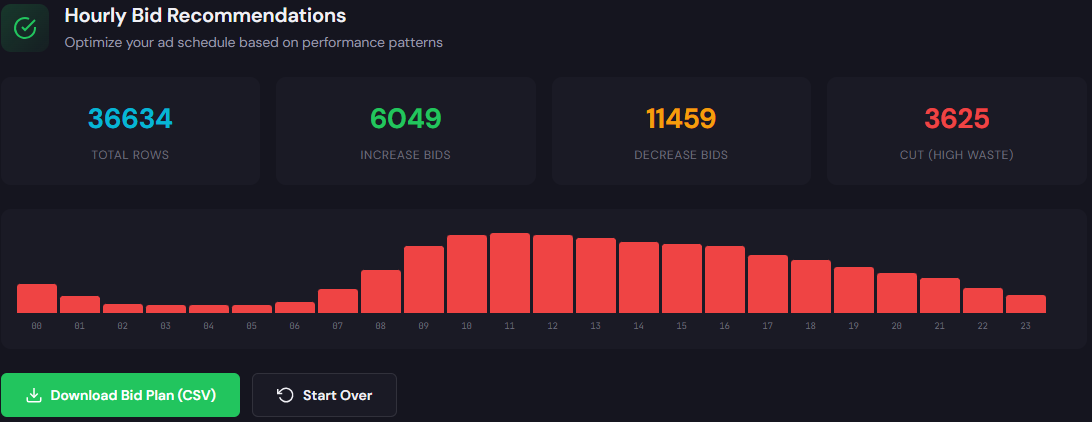
How to use (3 steps)
- Upload performance by hour or connect account and pick the last 30 days.
- Review hours with CPA > target and apply negative bid adjustments.
- Export schedule or implement ad schedule bid multipliers in Google Ads.
What it outputs: Quality Score diagnostic with optimized headlines and landing-page suggestions.
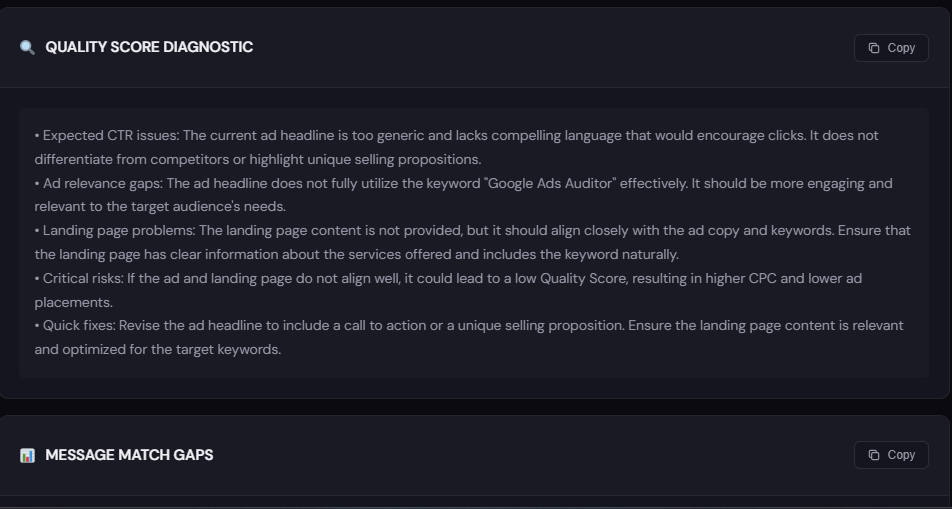
How to use (3 steps)
- Paste your ad copy and landing page URL into the tool.
- Review the relevance gaps and suggested headlines/CTAs.
- Apply the top 2 headline and CTA changes and measure lift.
What it outputs: Structured keyword lists (high-intent, modifiers, negatives) and ad-group suggestions.

How to use (3 steps)
- Enter your landing page and 2 seed keywords.
- Generate grouped keyword lists and copy-ready ad group sets.
- Export to Google Ads Editor or import manually into clean ad groups.
What it outputs: Campaign/ad-group structure and Google Ads Editor-ready CSV exports.
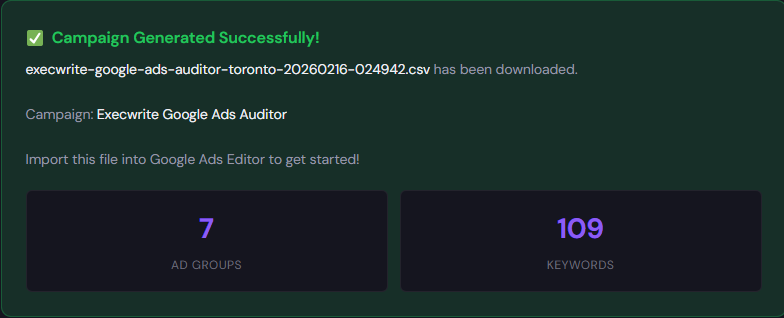
How to use (3 steps)
- Choose a landing page and target intent buckets from generated keywords.
- Generate campaign structure and review suggested bids.
- Export CSV and import into Google Ads Editor for testing.
90-minute account triage playbook
Follow this timed checklist to find the biggest wins quickly.
- 0–10m: Snapshot. Run the Wastage Snapshot to identify top leakage areas by spend.
- 10–30m: Search-term triage. Run the Search Term Analyzer, export the top 20 cost terms, and add immediate negatives.
- 30–50m: Hourly review. Use the Hourly Bid Adjuster to flag hours with CPA spikes; set schedule adjustments.
- 50–70m: Structure check. Use the AI Keyword Generator to group top performers into clean ad groups and plan landing alignment.
- 70–85m: Landing fix. Run the Quality Score Optimizer on 1–2 worst-performing ad groups and implement headline fixes.
- 85–90m: Deploy and monitor. Push changes to a test campaign or use Google Ads Editor and set a 7-day monitoring window with tighter budgets.
Get the prioritized recovery plan and apply fixes in hours — not weeks.
FAQ
You can expect cost reductions from negative keywords and schedule edits within 2–7 days; conversion lifts from landing work typically show in 1–3 weeks.
Temporarily pausing broad match reduces low-intent volume. Use campaign tests and keyword generators to rebuild controlled, intent-driven lists before re-enabling broad match.
Prioritize by spend and by conversion volume: fix the top 20% of campaigns that drive 80% of your wasted spend first.
They can, but performance is limited. Smart bidding needs clean signals from tightly themed ad groups and reliable conversion data to work optimally.
Sources
Need help running the snapshot or exporting ready-to-apply fixes? Start with ExecWrite’s free tools and move from symptom-spotting to fix deployment: https://execwrite.com.
Leave a Reply