If your account used to hit target CPA/ROAS and now it doesn’t, this guide gives a practical, week-based playbook and tool workflow that maps each problem to an ExecWrite automation you can run today. For tool links and previews, see the tool workflow below or visit ExecWrite for hands-on utilities.
- Five recurring failure modes explain most performance drops: waste, mismatch, bad keywords, timing, and creative fatigue.
- Apply seven quick checks this week to reclaim budget and stabilize CPA/ROAS.
- Map each problem to an ExecWrite tool to automate analysis, recovery, and campaign generation.
Why PPC feels harder now
Platforms change, auction dynamics shift, and attribution windows blur — but most declines trace to execution gaps, not mystery. Teams often inherit accounts without documentation, budgets are thin, and manual triage is slow. Fixing the right things quickly matters more than chasing every metric change.
The 5 biggest PPC problems marketers face
1) Wasted spend and budget leakage
Symptoms
- High clicks with no conversions from multiple search terms.
- Daily spend spikes without corresponding leads or revenue.
- Negative keywords list is sparse or unmanaged.
Why it happens
Unfiltered search terms, broad match overuse, and missing negatives let low-intent queries drain budget. Overlapping campaigns and poor campaign structure leak impressions to inefficient placements.
Fix this week
- Run a 7–14 day search-term audit; identify top waste terms by spend with zero conversions.
- Add obvious negatives and move high-cost low-intent terms to negative lists.
- Pause or reduce budgets on campaigns driving the waste while you clean the query set.
2) Ad-to-landing mismatch (Quality Score & conversion rate issues)
Symptoms
- Low or dropping Quality Score vs historical baseline.
- Good CTR but poor conversion rate on specific ad groups.
- High impression share but low conversion volume.
Why it happens
Messaging disconnects—headlines, ad copy, and landing pages out of sync—reduce relevance. Even subtle headline or offer changes can hurt conversion if landing pages don’t match intent.
Fix this week
- Pick the worst-performing ad groups and check ad headline vs landing page headline alignment.
- Test a single landing-page headline rewrite that matches the top ad variant’s promise.
- Ensure tracking events and conversion tags are firing correctly on the landing pages.
3) Keyword structure and search-term noise
Symptoms
- Broad-match terms attracting irrelevant queries.
- Ad groups with dozens of unrelated keywords.
- Negative keyword conflicts missing between campaigns.
Why it happens
Fast growth or rushed account builds often skip a disciplined SKAG/ad-group structure and lack intent-based categorization. This makes bidding and relevance impossible to optimize cleanly.
Fix this week
- Segment keywords by intent (buy vs research) and adjust match types conservatively.
- Create priority negative lists and apply them account-wide.
- Move top-spend low-intent queries into separate campaigns for controlled bidding or exclusion.
4) Hourly/dayparting and bid timing issues
Symptoms
- Significant hour-of-day CPA/ROAS swings.
- Campaigns that convert well at specific times but run flat budgets.
- Manual bid changes failing to capture short windows of opportunity.
Why it happens
Marketers often set static schedules or rely on broad dayparting without granular hour-level data. That leaves conversion volume on the table during peak hours and wastes spend in low-performance windows.
Fix this week
- Pull a 24-hour performance table by campaign or ad group to identify high/low hours.
- Apply temporary bid modifiers +/- for high/low hours and monitor 48–72 hours.
- Consider pausing low-performing hours where CPA is consistently above target.
5) Creative fatigue and weak testing cadence
Symptoms
- CTR and conversion rate decline despite stable impression share.
- Few ad variants; no structured A/B plan.
- Slow ad approval or manual creative production delaying tests.
Why it happens
Creative is often treated as a one-off. Without a rotation plan, ads stale and the account loses relevance signals. Teams also under-resource fast iterations, so tests never finish.
Fix this week
- Create 3 new ad variants per top ad group focusing on different value props.
- Run each for a minimum of 7–10 days or until statistical significance is plausible.
- Replace the worst variant and iterate—don’t wait months to refresh creative.
Fixes you can apply this week
- Day 1: Export search-terms for last 14 days; add top waste terms to negatives.
- Day 2: Run a Quality Score / landing-page headline check for 5 worst ad groups; deploy 1 headline rewrite each.
- Day 3: Segment keywords by intent, tighten match types on high-spend keywords.
- Day 4: Pull hour-of-day performance and apply provisional bid modifiers for top campaigns.
- Day 5: Create and launch 3 new ad variants for top-converting ad groups.
- Ongoing: Monitor a 72-hour window after changes and roll back anything that increases CPA materially.
Run the same checks faster using ExecWrite tools for waste recovery, search-term analysis, and bid adjustments.
Tool-based workflow: map each pain point to an ExecWrite tool
Below are the core tools I use to convert the checklist above into repeatable actions. Each entry shows output, a 3-step usage pattern, and a preview.
Use for: Wasted spend audits, top leakage areas, recovery plan.
Outputs: Dashboard-style totals, top waste queries, recovery checklist.
How to use (3 steps):
- Upload your search-term and spend data for the period you want to audit.
- Review the automatic waste totals and the top leakage categories.
- Export negative keyword lists and apply the recovery plan recommendations.

Use for: Pinpointing low-conversion high-spend terms and tagging queries for action.
Outputs: Search term table with spend, conversions, tags, and recommended bid actions.
How to use (3 steps):
- Upload the query report for a 14-day window.
- Scan the table for high-spend zero-conversion rows and apply tags (exclude, adjust, move).
- Export recommended actions to apply as negatives or campaign moves.

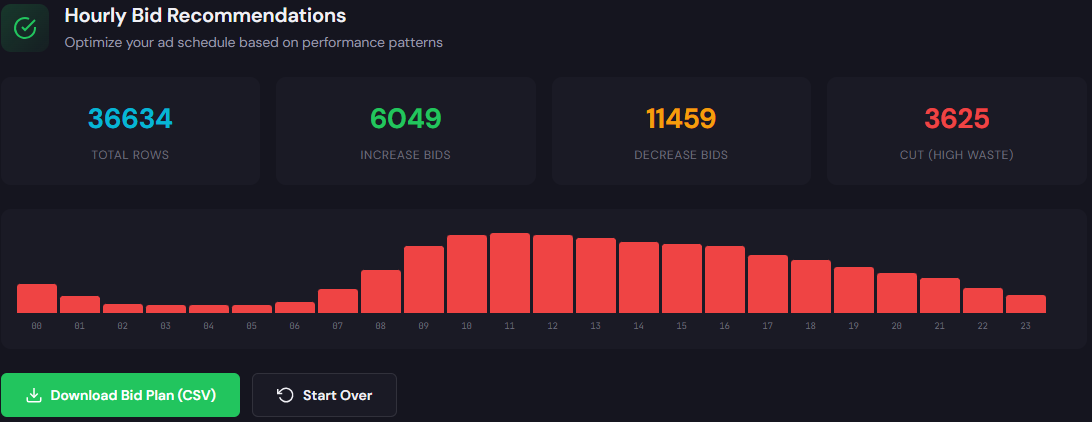
Use for: Dayparting and hourly bid recommendations.
Outputs: Hour-by-hour CPA/ROAS table with suggested bid up/down actions.
How to use (3 steps):
- Pull hourly performance for the last 30 days and upload to the tool.
- Review hours that beat target CPA or ROAS and approve suggested bid multipliers.
- Apply multipliers in Ads UI or via scripts and monitor 48–72 hours.
Use for: Diagnostic of ad-to-page relevance and headline alignment; generates optimized headlines and landing suggestions.
Outputs: QS gaps, recommended headline/CTA rewrites, landing page snippet suggestions.
How to use (3 steps):
- Supply a headline, ad copy, and landing page URL for the low-performing ad group.
- Review the diagnostic gaps and generated headline variants.
- Publish the winning headline and track conversion impact for 7–10 days.

Use for: Keyword expansion, structuring ad groups, and generating negative keyword ideas.
Outputs: Organized keyword lists by intent plus negatives and modifiers.
How to use (3 steps):
- Enter a landing page URL or seed keyword.
- Pick intent buckets you want (purchase, research, brand protection).
- Export structured lists into campaign editor or CSV for Google Ads Editor.

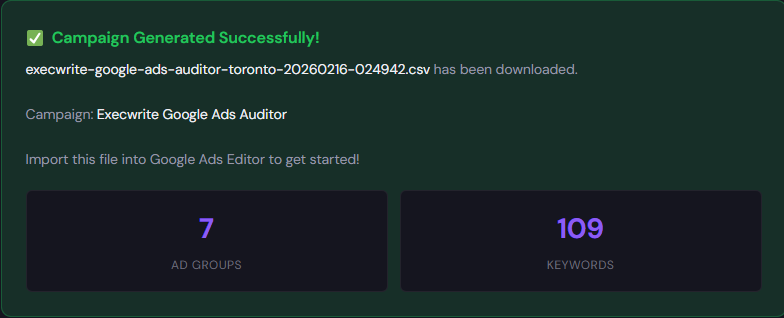
Use for: Rapid campaign builds with export-ready structure for Google Ads Editor.
Outputs: Campaign/ad group structures, sample ads, and CSV exports.
How to use (3 steps):
- Provide a landing page or product description and choose campaign goals.
- Review generated ad groups, keywords, and suggested bids.
- Export CSV and import into Google Ads Editor to deploy.
90-minute account triage playbook
This is the condensed triage you can run in 90 minutes to prioritize next actions.
- Minute 0–10: Pull top-level KPIs (CPA, conversions, spend) by campaign for last 14 days.
- Minute 10–30: Run Wastage Snapshot & Recovery and Search Term Analyzer on the top 3 spend campaigns.
- Minute 30–50: Apply immediate negatives from the analyzer and pause obvious waste campaigns.
- Minute 50–70: Run Hourly Bid Adjuster on one priority campaign and apply provisional hour multipliers.
- Minute 70–90: Run Quality Score Optimizer for the two worst ad groups and deploy a headline rewrite. Document changes and set a 72-hour review.
Run the primary audit and generate negatives, bids, and headline tests in minutes using ExecWrite tools.
FAQ
Short answers usually show within 48–72 hours for spend and waste reductions; conversion rate improvements from landing-page changes generally need 7–10 days to stabilize.
Yes. Use the tools to clean noise and set better inputs—negative keywords, better headlines, and hourly bid modifiers—then let Smart Bidding operate on cleaned data for best results.
ExecWrite offers both free and paid utilities. The AI Keyword Generator and Campaign Generator have free access; other tools provide snapshots and structured exports that speed up audits.
No—if you review suggested negatives before applying. The tools mark high-risk terms so you can approve or move them to separate campaigns for testing.
Leave a Reply