If conversion rates, CPA, or ROAS have slipped, this post gives an operator-level triage path: symptoms, why it happens, checklists you can execute this week, and exact ExecWrite tools to recover wasted spend and rebuild predictability. Run quick snapshots and exports at ExecWrite to turn theory into action.
- Five recurring problems cause most performance decay: bad keywords, leaking budget, mismatched landing pages, poor dayparting, and hidden wasted spend.
- There are measurable, 1-week fixes you can apply (negative keyword sweeps, ad-to-LP alignment, hourly bid adjustments, QA on scripts and audiences).
- Use ExecWrite tools — Wastage Snapshot, Search Term Analyzer, Hourly Bid Adjuster, Quality Score Optimizer, and Campaign Generator — to automate diagnostics and lock in wins.
Why PPC feels harder now
Google Ads hasn’t become mystical overnight; the ecosystem shifted. Less keyword visibility, rising CPCs, tighter privacy controls, and aggressive automation mean small structural issues now compound faster. If you rely on manual tweaks or dashboards that only surface high-level metrics, you miss the leakage behind rising CPA and falling ROAS.
The 5 biggest PPC problems marketers face
Problem 1 — Leaking budget from non-converting search terms
- High spend on many low-intent queries with zero or poor conversions.
- Search term reports show long tails driving cost but not value.
Broad match, poorly structured modifier use, and stale negative keyword lists let irrelevant queries run. Over time, automation bids more aggressively on volume that looks promising superficially but converts poorly.
- Export last 30–90 days of search terms grouped by spend and conversions.
- Add the top 100 no-convert queries as negatives (start with exact and phrase).
- Switch high-spend low-value keywords to more restrictive match types and test.
Problem 2 — Ad-to-landing-page mismatch (Quality Score decay)
- CTR and QS drop while CPC climbs.
- Landing page conversion rate falls even when ad impressions stay steady.
Messaging drift between ad creative and landing pages, or recent page edits that broke relevance, cause lower expected click-through and landing experience scores. Automated bidding then increases CPC to maintain volume.
- Map top-performing ad headlines to landing page H1s and CTAs; align messaging.
- Run a headline/CTA swap test on at-risk ad groups.
- Validate page load and mobile UX—drop any slow templates immediately.
Problem 3 — Bad dayparting and hourly CPA swings
- CPA varies dramatically by hour; conversions cluster in narrow windows.
- Automated schedules are too broad or unchanged from legacy assumptions.
User behavior evolves; holidays, promotions, or partner traffic sources change peak windows. Without hour-level analysis, bids are inefficient during low-value hours and too low during spikes.
- Pull last 60–90 days hourly conversion and CPA data by campaign.
- Implement an ad schedule that bids down low-value hours and shifts budget to peak hours.
- Monitor for 7 days and refine with +/- 10–20% adjustments.
Problem 4 — Account-level wasted spend and structure debt
- Campaign overlap, duplicate keywords, or unnecessary audience targeting.
- High impression share loss for efficient campaigns, while inefficient ones eat budget.
Accounts that evolved by layering tactics accumulate structural debt: duplicates, misrouted intents, and orphaned ad groups. That debt produces internal competition and stealth waste.
- Run a campaign overlap audit and consolidate overlapping keywords/ad groups.
- Pause low-quality campaigns and reassign budgets to top performers.
- Standardize naming conventions and lock down who can create campaigns.
Problem 5 — Missing negative keywords and signals from new creatives
- Sudden traffic spikes from unexpected queries after creative or landing page changes.
- Conversion rate drops while clicks rise.
New creatives can attract broader intent or clickbait traffic. When you don’t translate those signals into negative keyword updates and audience exclusions, the system keeps buying the wrong clicks.
- Schedule a weekly search-term sweep and tag queries for negative additions or new ad groups.
- Create a running negative keyword shared list and assign it to vulnerable campaigns.
- Use creative-level reports to spot high-click, low-convert ads and pause until fixes are live.
Fixes you can apply this week
- Run a 30/60/90-day search term export; add negatives for zero-convert high-spend queries.
- Use an automated Quality Score headline alignment (swap top performing ad headlines into LP H1s).
- Build an hourly CPA report and enforce a conservative ad schedule for low-value hours.
- Do a structure sweep: merge duplicate keywords, pause losing campaigns, standardize naming.
- Implement a weekly negative-keyword grooming routine and assign one owner.
Run a Wastage Snapshot to find immediate budget leaks and a prioritized recovery checklist in minutes.
Tool-based workflow: map problems to ExecWrite tools
Below are the ExecWrite tools to diagnose and fix each issue, what each outputs, and a 3-step usage workflow. Previews show the exact outputs you’ll get.
Wastage Snapshot & Recovery

What it outputs: Dashboard-style waste totals, top leakage areas, and prioritized recovery items.
How to use (3 steps):
- Upload your account CSV or connect via file exports and run the Wastage Snapshot: Open Wastage Snapshot.
- Review top leakage categories (search terms, overlapping keywords, budget leaks) and export the recovery checklist.
- Apply the recommended negatives and campaign pauses, then re-run the snapshot in 7 days to measure recovered budget.
Search Term Analyzer (Bid Adjustment by Search Term)

What it outputs: A table of search terms with spend, convs, CPA, and suggested bid actions or negative tagging.
How to use (3 steps):
- Run the Search Term Analyzer for the last 30–90 days: Open Search Term Analyzer.
- Tag top no-convert terms as negatives and export exact/phrase lists.
- For marginal terms, apply conservative bid adjustments or move them into dedicated ad groups for tailored creative.
Hourly Bid Adjuster (Aggregate Hour-of-Day Data)
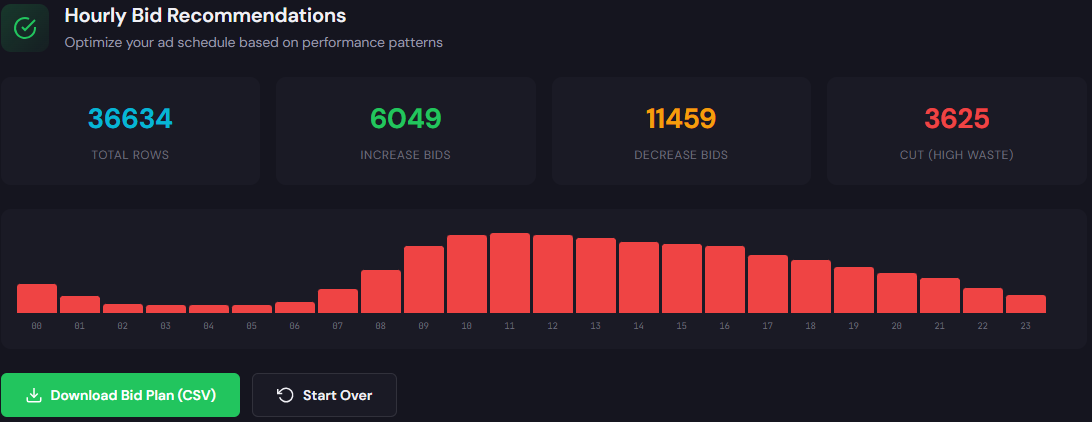
What it outputs: Hour-by-hour CPA/ROAS trends with recommended bid multipliers for ad schedules.
How to use (3 steps):
- Load 60–90 days of campaign data into the Hourly Bid Adjuster: Open Hourly Bid Adjuster.
- Apply the suggested schedule adjustments (bid +/− recommendations) to low-risk campaigns first.
- Monitor 7 days, then scale changes account-wide once CPA stabilizes.
Quality Score Optimizer (Landing Page Rewriter)
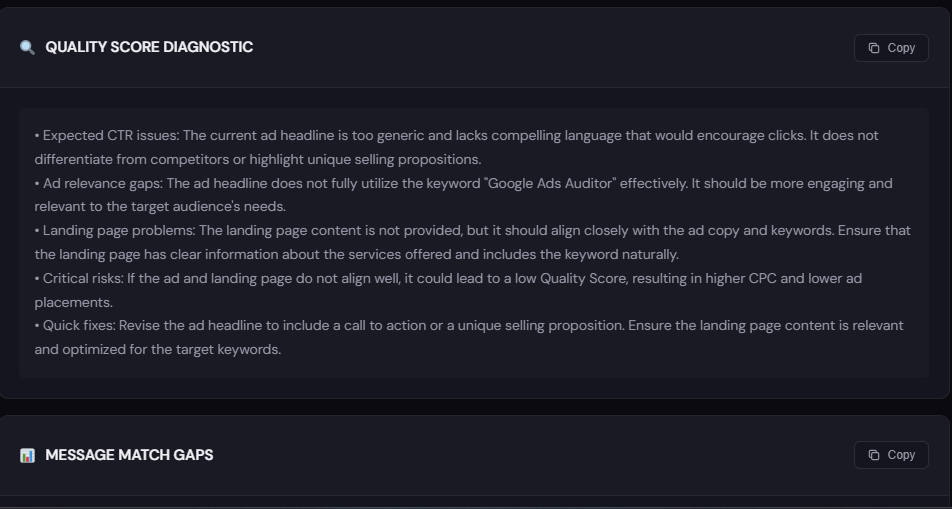
What it outputs: Diagnostic gaps between ad copy and landing pages plus rewritten headlines and CTA suggestions to improve relevance.
How to use (3 steps):
- Point the optimizer at the landing page for your top ad groups: Open Quality Score Optimizer.
- Review suggested headlines, H1 swaps, and CTA tweaks; publish the highest-impact swaps as A/B tests.
- Re-measure QS and CTR after 7–14 days and iterate.
Free AI Keyword Generator & Campaign Generator

What it outputs: Structured keyword lists (high intent, modifiers, negatives) and export-ready campaign/ad-group structures.
How to use (3 steps):
- Generate keyword clusters around your landing pages: Open AI Keyword Generator.
- Export campaign structure from the Google Ads Campaign Generator for fast Editor import: Open Campaign Generator.
- Import into Google Ads Editor, add top-performing creatives, and monitor for early negative-keyword signals.
90-minute account triage playbook
Follow this timed checklist for a focused audit you can do in 90 minutes.
- 0–10 min: Run a Wastage Snapshot and export top 10 leakage items.
- 10–30 min: Run Search Term Analyzer; add top 50 zero-convert/high-spend negatives.
- 30–50 min: Pull hourly conversion/CPA and load Hourly Bid Adjuster; implement temporary ad schedule changes.
- 50–70 min: Run Quality Score Optimizer on top 5 low-QS ad groups; swap headlines to match LPs.
- 70–80 min: Use Campaign Generator to rebuild any orphaned or messy ad groups into clean structures.
- 80–90 min: Document changes, apply shared negative lists, and set a 7-day review reminder.
Execute the 90-minute playbook with data exports and automated reports from ExecWrite. Quick wins are actionable in the same session.
FAQ
Most structural fixes (negatives, ad-to-LP swaps, ad schedule changes) surface within 3–14 days. Expect immediate CTR changes for ad headline swaps; conversion trends need a full learning window.
Use automation for diagnostics and recommendations. Apply conservative changes manually or to low-risk campaigns first. ExecWrite tools prioritize actionable items rather than blind automation.
60–90 days is recommended to smooth weekly seasonality. If volume is low, combine similar campaigns or extend the window to 180 days.
Removing or adding negatives reduces waste and improves budget efficiency. If a keyword is truly valuable, move it to a tightly themed ad group rather than keeping it in a broad, unfocused shell.
Leave a Reply