If your account feels slower, more expensive, or less predictable than last quarter, this post gives an operator-grade triage plan you can run in 90 minutes. Use quick fixes and two targeted ExecWrite tools to recover wasted spend and fix bidding leaks — start at ExecWrite.
- Major causes: wasted spend, poor ad-to-page relevance, and time-of-day bid misalignment.
- Immediate wins: pause low-converting queries, tighten audiences, and reallocate by hour.
- Tools to use: Wastage Snapshot for recovery and Hourly Bid Adjuster for dayparting — audits and recommendations in minutes.
Why PPC feels harder now
Everyone sees it: higher CPCs, more automation, and thinner signals from privacy changes. That combination turns predictable playbooks into noisy signals. You can no longer rely on single levers (increase budget, raise bids) because the leaks and misalignments compound fast.
This guide assumes you want concrete steps — not theory — to stop waste and stabilize performance this week.
The 5 biggest PPC problems marketers face
1) Wasted spend on irrelevant or low-intent queries
Symptoms
- High spend on many search terms with zero conversions.
- Low click-to-conversion rate from broad or discovery queries.
- Negative keyword lists that never see updates.
Why it happens — Over-reliance on automated matching and infrequent search-term reviews create steady leakage: impressions convert into clicks but not into business outcomes.
Fix this week
- Export last 30‑90 days of search terms, sort by spend and conversions; pause top-spend terms with zero conversions.
- Add exact-match negatives for obvious irrelevant modifiers.
- Create a ‘watch’ ad group for borderline queries instead of broad matching everywhere.
2) Ad-to-landing page relevance gap (Quality Score loss)
Symptoms
- High CPC despite steady CTR; landing page conversion rate drops.
- Ad groups with mixed messaging; multiple offers in one group.
Why it happens — Messaging misalignment between ad copy and landing page reduces Quality Score and increases CPCs; automated bidding can’t fix creative mismatch.
Fix this week
- Pinpoint ad groups with CTR/CVR divergence and map them to single landing page variants.
- Rewrite headlines to use the exact intent modifiers users searched for.
- Run a shortlist A/B test for top-converting ad-to-page pairs.
3) Time-of-day (daypart) performance swings
Symptoms
- Huge CPA or ROAS variance by hour or day.
- Bids are uniform across hours despite clear peaks and troughs.
Why it happens — Aggregated bidding ignores intra-day performance swings. Without hourly analysis you bid up during low-quality hours and under-invest during peak windows.
Fix this week
- Pull last 30 days of performance by hour for cost, conversions, CPA, and ROAS.
- Apply +/− bid modifiers for the worst and best hours (start conservative, ±10–20%).
- Monitor one week and iterate; don’t flip all hours at once.
4) Misconfigured audiences and overlap
Symptoms
- Audience bids cannibalize search budget; overlapping audiences receive similar bids.
- High impression share loss in key segments despite spending.
Why it happens — Audience lists grow unmanaged; bidding rules don’t reflect intent or funnel stage. Overlap increases competition against yourself.
Fix this week
- Audit active audiences, remove or merge low-value lists, and enforce mutual exclusivity where needed.
- Create clear bid tiers for funnels (brand > retargeting > prospecting).
5) Campaign structure entropy
Symptoms
- One campaign contains mismatched goals, budgets, and conversion actions.
- Reporting is noisy; it’s unclear which elements drive conversions.
Why it happens — Fast fixes, rushed launch, and multiple editors introduce structural drift. Granularity matters: one-size-fits-all campaigns break optimization.
Fix this week
- Segment campaigns by objective (acquisition vs retention) and ROAS target.
- Standardize naming conventions and document conversion mappings in a central sheet.
Fixes you can apply this week
- Run a 30‑90 day search term export; pause top-spend zero-conversion terms.
- Apply hourly bid modifiers for the 4 worst and 4 best hours.
- Audit top 10 ad groups for ad-to-page mismatch; rewrite headlines to match intent.
- Consolidate audiences into three bid tiers and remove overlaps.
- Set one owner for campaign structure and naming; implement a weekly 15-minute review.
Recover wasted spend and get recommended bid actions in minutes using automation-built reports.
Tool-based workflow
Below are two practical ExecWrite tools that map directly to the problems above. Each tool includes what it outputs and three steps to act on its recommendations. Preview images show sample outputs.

The Wastage Snapshot creates a dashboard-style audit that highlights spend leakage, top wasted queries, and a prioritized recovery plan with negative keyword and budget fixes.
How to use it — 3 steps
- Upload your 30–90 day account export to the Wastage Snapshot.
- Review the top 10 leakage categories and accept the recommended negatives or pauses.
- Export the recovery plan and implement changes in Google Ads (or via Editor) — measure impact over 7 days.
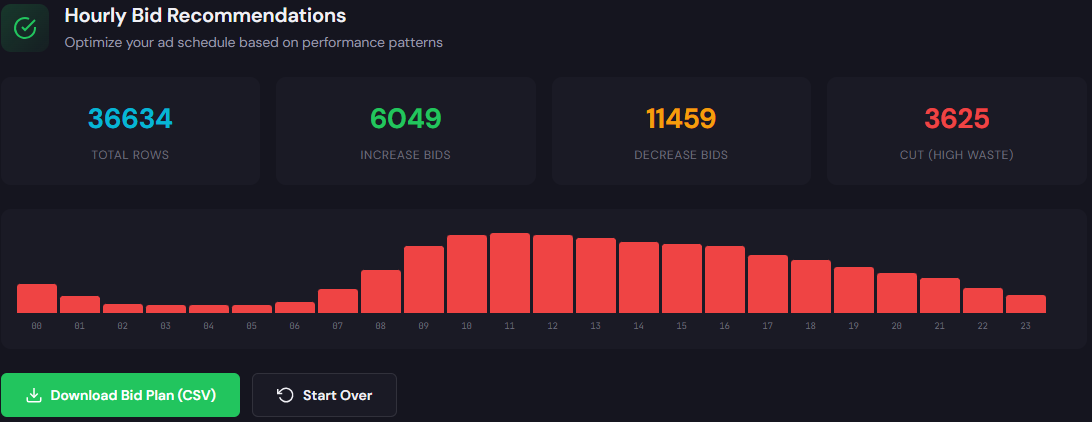
The Hourly Bid Adjuster analyzes hour-of-day performance and recommends bid modifiers for ad schedules to maximize conversion efficiency and ROAS.
How to use it — 3 steps
- Feed 30 days of hourly performance into the Hourly Bid Adjuster.
- Review suggested bid modifiers for the worst and best hours; adjust modifiers conservatively (±10–20%).
- Apply modifiers to campaign ad schedules and monitor CPA/ROAS over 7 days; iterate on the next cycle.
90-minute account triage playbook
- 0–10 min: Export search terms, hourly report, and top-converting ad groups (30–90 days).
- 10–30 min: Run Wastage Snapshot. Pause the top 5 zero-conversion, high-spend queries it flags.
- 30–50 min: Run Hourly Bid Adjuster. Apply conservative modifiers for clearly bad/good hours.
- 50–70 min: Audit top 10 ad groups for landing-page mismatch; draft headline swaps and add to test queue.
- 70–85 min: Consolidate audiences into three bid tiers and remove overlaps.
- 85–90 min: Document changes, set 7‑day check-in, and schedule a 15‑minute weekly review for structure drift.
Run both the Wastage Snapshot and Hourly Bid Adjuster within a single session and get export-ready recovery steps.
FAQ
Expect immediate reductions in wasted spend within 24–72 hours after applying negatives and pauses. Bidding and landing-page changes typically stabilize performance over one to two weeks.
Not if you set clear bid tiers and document objectives. Apply conservative modifiers and monitor; allow automated strategies time to re-learn after structural changes.
ExecWrite tools produce data-driven recommendations based on your account exports. Treat them as prioritized suggestions: review, test, and implement the highest-impact items first.
Partition by top-performing campaigns or business units and apply the 90-minute triage to one partition at a time. Focus on the highest-spend or highest-variance areas first.
Sources
- Google Ads Help — Improve Quality Score — Guidance on ad relevance and landing page experience.
- Search Engine Land — Rising paid search costs and mitigation — Context on CPC trends and practical mitigation.
- WordStream — Dayparting strategies for Google Ads — Best practices for time-of-day bidding.
Leave a Reply