Google Ads feels more complex than ever: automation, rising CPCs, and noisy signals make it tough to diagnose root causes. This article gives a clear, repeatable triage process and shows how ExecWrite tools can turn hours of analysis into immediate, high-value actions — try tools at ExecWrite for fast results.
- Five recurring problems are consuming budgets: wasted spend, bad match between ads and landing pages, bid timing, poor keywords, and automation drift.
- Apply a short weekly checklist and a 90-minute triage playbook to capture quick wins and prioritize fixes.
- Use two ExecWrite tools — Wastage Snapshot & Recovery and Bid Adjustment (Hourly Bid Adjuster/Search Term Analyzer) — to find waste and reallocate bids fast.
Why PPC feels harder now
Advertisers are juggling more automation, less reliable micro-signal data, and increased competition. Automated bids and broad matching can help scale, but they also hide why performance changed. Add new privacy constraints and shifting query intent, and you’ve got systems that require different operating routines than five years ago.
The 5 biggest PPC problems marketers face
1) Wasted spend on low-intent queries
Symptoms
- High spend with minimal conversions for specific query clusters.
- Lots of clicks coming from broad or modified broad match keywords.
- Search terms report shows irrelevant or unrelated queries.
Why it happens
Broad match + automated bidding expands reach but can harvest low-quality traffic. Without regular negative keyword hygiene or cluster-level controls, budgets bleed into queries that never convert.
Fix this week
- Export last 30 days of search terms; flag top spend but zero-conversion queries.
- Add negatives in bulk by theme (product vs. research vs. competitor).
- Move problematic keywords into a low-bid, experiment campaign for observation.
2) Ad-to-landing page mismatch (conversion drop)
Symptoms
- High CTR but low conversion rate.
- Quality Score declines while impressions stay steady.
- Landing page bounce and session time increase on paid traffic.
Why it happens
Ads promise an experience the landing page fails to deliver — messaging, offers, or even page speed mismatch undermines conversions. Automation can amplify the problem because it keeps sending traffic to poorly matched assets.
Fix this week
- Audit top-converting ad groups and compare ad headlines to landing page H1/offers.
- Run one A/B headline swap on the landing page aligned to your top ad headline.
- Check load time and mobile UX for the paid landing pages (target <3s).
3) Bad bidding timing (dayparting losses)
Symptoms
- CPA/ROAS swings wildly by hour or day.
- Conversions cluster in narrow time windows, but bids are flat.
- Automated bid rules underperform because the model averages across hours.
Why it happens
Many accounts rely on daily or campaign-level bidding without granular hour-of-day adjustments. When conversion likelihood varies by hour, uniform bids waste spend during low-value windows and miss opportunities during peaks.
Fix this week
- Pull hour-of-day performance for the last 90 days to spot peak windows.
- Apply conservative bid modifiers (±10–30%) for clear peaks/troughs and monitor 7 days.
- Test an ad schedule with narrow high-bid windows for top-converting hours.
4) Keyword structure and ad group noise
Symptoms
- Large, mixed ad groups with many intents and inconsistent ad messaging.
- Low ad relevance and poor Quality Score for higher-volume groups.
- Difficulty attributing which keywords truly drive conversions.
Why it happens
Accounts accumulate keywords over time. Broad ad groups are convenient, but they dilute relevance and reduce optimization granularity, hurting both Quality Score and conversion rates.
Fix this week
- Split the five largest ad groups by intent into narrower groups (purchase vs research).
- Create intent-focused ads and tie them to matching landing pages.
- Export keyword performance and tag items for pause/negatives/restructure.
5) Automation drift and opaque decisioning
Symptoms
- Automated bidding changed without clear signal — conversions drop or cost rises.
- Multiple automated strategies mixed (e.g., target CPA + portfolio bidding).
- Hard to see which signals campaigns are reacting to.
Why it happens
Automation learns from imperfect data. If conversion tracking, seasonality, or audience signals shift, models can reallocate spend to suboptimal pockets.
Fix this week
- Check conversion action setup and recent changes in tracking or attribution windows.
- Isolate a campaign and switch to manual CPC for 3–7 days to observe baseline.
- Document any automated rules or experiments running and pause non-critical ones.
Fixes you can apply this week
- Run a search-terms audit and add negatives (30–60 minutes).
- Apply conservative hour-of-day bid modifiers and monitor (15–30 minutes).
- Split one large ad group into two intent-aligned groups and match landing page messaging (60–90 minutes).
- Snapshot waste and prioritize top 20% leakage that accounts for 80% of waste.
- Document recent automation changes and, if needed, pause to stabilize signals.
Run a fast wastage snapshot or hourly bid analysis to surface top leak points, then export fixes you can implement this week.
Tool-based workflow: map each pain point to ExecWrite tools

What it outputs: A dashboard-style snapshot that quantifies wasted spend, highlights top leakage (search terms, keywords, device, campaigns), and gives a prioritized recovery plan.
How to use it — 3 steps
- Upload your Google Ads data or connect your account and run the snapshot.
- Review the top 3 leakage buckets the tool surfaces (e.g., query-level waste, device mismatch, or low-converting campaigns).
- Export the negative keyword lists and recovery steps; apply the top 3 fixes this week.
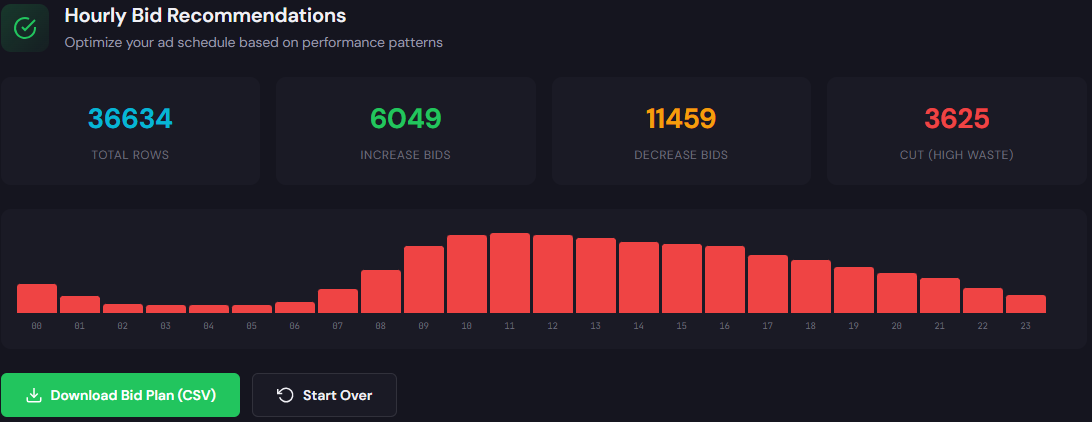
What it outputs: Hour-of-day performance tables and search-term level bid recommendations that show when to bid up or down and which queries to suppress.
How to use it — 3 steps
- Run the Hourly Bid Adjuster for your campaign set to get CPA/ROAS by hour and suggested bid modifiers.
- Apply conservative modifiers for identified peak windows and add negative queries from the Search Term Analyzer export.
- Monitor 7–14 days, iterate, and lock in the high-performing schedule.
Both tools generate export-ready lists and CSVs you can paste into Google Ads Editor — saving hours of manual cleanup and letting you focus on strategy.
90-minute account triage playbook
Follow this time-boxed playbook to get immediate, measurable improvements.
- 0–15 min: Run Wastage Snapshot & Recovery (or export recent search terms). Note top 3 leak sources.
- 15–35 min: Run Hourly Bid Adjuster and identify 2–3 hours to increase bids and 2–3 to decrease.
- 35–60 min: Apply quick policy changes — add top negative keywords, set hour modifiers, and pause worst-performing ads.
- 60–75 min: Split 1 large ad group where intent is mixed; align one ad to a dedicated landing page.
- 75–90 min: Document changes, set a 7-day monitoring cadence, and schedule a follow-up A/B test for landing page or headlines.
Use ExecWrite to run the snapshot and bid adjuster, export fixes, and implement the playbook in under 90 minutes.
FAQ
Short answer: not always. Pause only if the model’s recent changes coincide with a performance drop. Otherwise, snapshot and apply targeted fixes so automation can relearn from cleaner signals.
Run a snapshot monthly and after any major campaign change. For high-spend accounts, run weekly until waste is under control.
Yes. ExecWrite tools export CSVs and negative lists formatted for fast import into Google Ads Editor.
No — conservative modifiers guide automated bidding. Use them to protect against low-value hours while letting automation optimize within better constraints.
Leave a Reply