If your Google Ads account is underperforming, this guide walks through the root causes, quick fixes you can apply in a week, and an executable workflow using tools from ExecWrite to recover wasted spend and stabilize performance.
- Most PPC problems come from mismatch, leakage, automation blindspots, and poor campaign structure.
- Apply five tactical fixes this week (negatives, bid adjustments, ad relevance, ad schedule, and structure cleanup).
- Use ExecWrite snapshots and generators to find waste, prioritize fixes, and export campaign changes fast.
Why PPC feels harder now
Platforms evolve, but the core friction is consistent: tracking gaps, automated bidding complexity, irrelevant keywords, and noisy account structure make diagnosing and fixing problems slower. Decision-makers expect faster results while automation hides signals. That gap between expectations and diagnostic clarity is what makes PPC feel harder.
The 5 biggest PPC problems marketers face
Pain 1 — Wasted spend from low-intent search terms
Symptoms
- High impressions and clicks with near-zero conversions.
- High CPA on specific search terms or queries.
- Frequent manual pausing of poor-performing keywords.
Why it happens
Broad match and semi-automated match types surface irrelevant queries. Without systematic negative keyword coverage and search-term analysis, your budget funds curiosity clicks instead of buyers.
Fix this week
- Run a search-term report for the last 30 days and tag queries by intent.
- Add high-frequency non-converting queries to an account-level negative list.
- Pause or tighten match types on keywords with high spend and no conversions.
Pain 2 — Poor ad-to-landing relevance and low conversion rates
Symptoms
- High CTR but low conversion rate.
- Low Quality Score signals despite active traffic.
- Complaints about landing page mismatch from sales.
Why it happens
Ads promise outcomes that landing pages don’t deliver. Messaging drift between keywords, ad copy, and landing pages kills conversion rates and increases CPCs.
Fix this week
- Align top-performing keywords to dedicated landing-page variants.
- Update headlines and CTAs to mirror ad copy and primary keyword intent.
- Run a quick A/B test on the most expensive ad group landing page.
Pain 3 — Automated bidding blind spots
Symptoms
- Sudden CPA/ROAS swings without clear cause.
- Bids that ignore hour-of-day or weekday performance.
- Overreliance on automated rules with no guardrails.
Why it happens
Smart bidding improves long-term results but can misallocate when inputs are noisy or data windows are misconfigured. Without segmented adjustments (dayparting, device-level overrides), automation overspends on low-value traffic.
Fix this week
- Audit bidding strategies at the campaign level and note where manual overrides are needed.
- Add bid adjustments for hours or devices with consistently poor performance.
- Reduce budget or switch to manual bidding on campaigns with volatile automated performance.
Pain 4 — Account structure entropy
Symptoms
- Many single-keyword ad groups or too-wide ad groups.
- Duplicated keywords across campaigns creating internal competition.
- Difficulty tracking which ads and keywords drive conversions.
Why it happens
Quick fixes and ad-hoc testing accumulate. Over time the account becomes a maze where signals are diluted and attribution is noisy.
Fix this week
- Identify top 10 cost-driving ad groups and map them to targeted keyword themes.
- Merge or reorganize duplicated keywords into single source ad groups.
- Standardize naming conventions for campaigns and ad groups to improve reporting.
Pain 5 — Poor keyword coverage and missed intent modifiers
Symptoms
- Cost concentrated on a few keywords while related intent gaps remain unaddressed.
- Search queries that suggest commercial intent are not targeted.
- Landing pages receive traffic but not the right types of queries.
Why it happens
Keyword generation is often manual or based on gut. That produces gaps in intent coverage and missed opportunities to capture conversion-ready traffic.
Fix this week
- Generate a focused keyword list for one high-value campaign covering intent modifiers (buy, near me, pricing, comparison).
- Add a new ad group targeting those modifiers and launch with tailored ad copy.
- Track performance vs. control ad groups for two weeks.
Fixes you can apply this week
- Export a 30-day search term report and build an account-level negative list from the top 200 non-converting queries.
- Run a landing-page relevance check for top-spend ad groups and update headlines to match primary keywords.
- Implement hour-of-day bid adjustments where CPA or ROAS diverges by more than 30% from daily averages.
- Consolidate duplicated keywords and standardize campaign/ad group names.
- Seed one campaign with intent-modifier keyword sets and bespoke ad copy.
Use ExecWrite tools to identify wasted spend, generate negatives, and get export-ready campaign structures in minutes.
Tool-based workflow
Below are the core ExecWrite tools mapped to common pains. Each tool shows its outputs and a 3-step usage workflow. Preview images are included to help you validate results before exporting changes.
Bid Adjustment by Search Term — Search Term Analyzer

Output: Table of search terms with spend, conversions, CPA, and recommended bid actions and tags.
How to use (3 steps)
- Upload your search-term report to the Search Term Analyzer.
- Review recommended bid actions and tag low-intent queries for negatives.
- Export the negative list and upload to Google Ads; apply bid adjustments for high-intent winners.
Hourly Bid Adjuster — Hour-of-day data
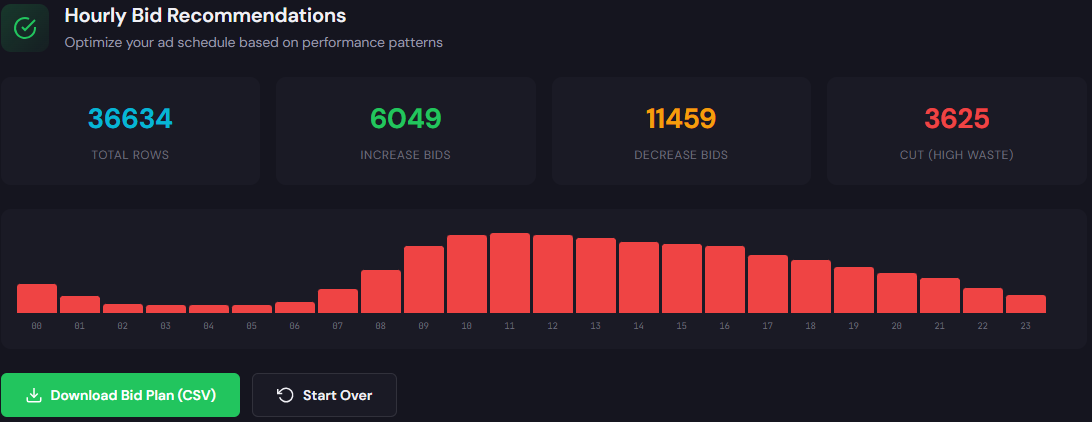
Output: Hour-by-hour performance table with suggested bid up/down percentages.
How to use (3 steps)
- Load campaign-level performance for the last 30–90 days.
- Identify hours with consistent CPA/ROAS deviation and accept suggested bid adjustments.
- Apply adjustments in Google Ads or schedule them via your platform’s bid rules.
Wastage Snapshot & Recovery

Output: Dashboard highlighting wasted spend, top leakage categories, and a prioritized recovery checklist.
How to use (3 steps)
- Run a snapshot to automatically surface top waste drivers (search terms, duplicated keywords, spent ad groups).
- Review the prioritized recovery plan and export action items.
- Execute high-impact changes (negatives, pause low-quality ad groups, budget shifts) and rerun snapshot in two weeks.
Quality Score Optimizer — Landing Page Rewriter
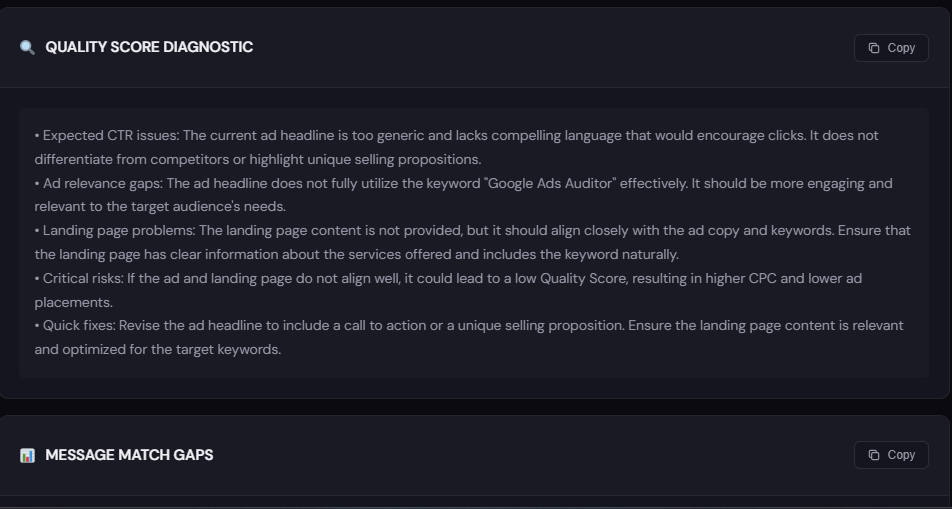
Output: Quality Score diagnostics with headline and landing-page copy suggestions to improve ad relevance and conversion rate.
How to use (3 steps)
- Paste your landing page URL and target keywords into the tool.
- Review the relevance gaps and recommended headline/CTA rewrites.
- Publish a landing-page variant and monitor conversion uplift for the ad group.
Free AI Keyword Generator

Output: Organized keyword lists segmented by intent, plus suggested negatives and modifiers.
How to use (3 steps)
- Enter core product/service terms and desired intent buckets.
- Generate keyword groups and pick high-intent lists to seed campaigns.
- Export to CSV or use with the Campaign Generator for fast campaign builds.
Free Campaign Generator
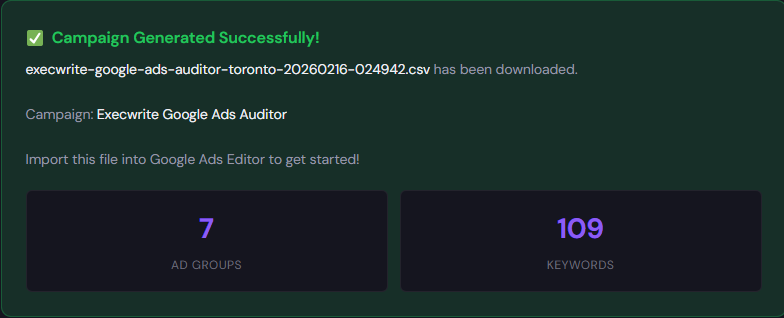
Output: Export-ready campaign and ad-group structure, with ad copy starters and Editor CSV export.
How to use (3 steps)
- Use generated keywords and landing pages as input.
- Customize naming conventions and bids, then export Google Ads Editor CSV.
- Import to Google Ads Editor and push changes live.
90-minute account triage playbook
Run this mini-audit to find high-impact fixes fast. Timebox each step.
- 0–10 min: Pull 30-day search-term, keywords, and campaign-level performance reports.
- 10–25 min: Run a Wastage Snapshot and Search Term Analyzer to surface top waste and negative candidates.
- 25–45 min: Apply an account-level negative list for the top 50 wasteful queries; pause the worst 3 ad groups.
- 45–60 min: Use Hourly Bid Adjuster for one high-cost campaign and implement conservative dayparting changes.
- 60–80 min: Run Quality Score Optimizer on two landing pages for your top-spend campaigns and publish headline changes or variants.
- 80–90 min: Export a Campaign Generator CSV for the next campaign restructuring batch and schedule follow-up for 14 days later.
FAQ
How fast will I see results after applying negatives?
Expect immediate reductions in wasted clicks; conversion rate improvements follow as intent aligns. Monitor CPC and CPA over 7–14 days to confirm impact.
Should I always trust automated bidding recommendations?
No. Use them as a baseline but validate against segments (hour, device, location). If automation lacks clean signals, add manual guards or test manual bidding on volatile campaigns.
How do I prioritize fixes when budget and time are limited?
Start with search-term negatives, pause the highest waste ad groups, and fix landing-page relevance for top-spend campaigns. Those three moves typically yield the fastest ROI.
Can I export suggestions directly to Google Ads?
Yes — ExecWrite tools provide export-ready lists and Google Ads Editor CSVs to speed execution and reduce human error.
Get an automated snapshot, negative lists, and export-ready campaign fixes in under an hour.
Sources
- Google Ads: About Quality Score
- Google Ads: Bidding strategies
- Google Ads: Negative keywords
- How to Reduce Wasted Ad Spend — HubSpot
- Negative Keywords Guide — WordStream
Leave a Reply