Author: ahsanqureshi2025

  • Why is my Google Ads performance dropping?

    PPC Google Ads Marketing Ops

    Why is my Google Ads performance dropping?

    If your account used to hit target CPA/ROAS and now it doesn’t, this guide gives a practical, week-based playbook and tool workflow that maps each problem to an ExecWrite automation you can run today. For tool links and previews, see the tool workflow below or visit ExecWrite for hands-on utilities.

    TL;DR
    • Five recurring failure modes explain most performance drops: waste, mismatch, bad keywords, timing, and creative fatigue.
    • Apply seven quick checks this week to reclaim budget and stabilize CPA/ROAS.
    • Map each problem to an ExecWrite tool to automate analysis, recovery, and campaign generation.

    Why PPC feels harder now

    Platforms change, auction dynamics shift, and attribution windows blur — but most declines trace to execution gaps, not mystery. Teams often inherit accounts without documentation, budgets are thin, and manual triage is slow. Fixing the right things quickly matters more than chasing every metric change.

    The 5 biggest PPC problems marketers face

    1) Wasted spend and budget leakage

    Symptoms

    • High clicks with no conversions from multiple search terms.
    • Daily spend spikes without corresponding leads or revenue.
    • Negative keywords list is sparse or unmanaged.

    Why it happens

    Unfiltered search terms, broad match overuse, and missing negatives let low-intent queries drain budget. Overlapping campaigns and poor campaign structure leak impressions to inefficient placements.

    Fix this week

    • Run a 7–14 day search-term audit; identify top waste terms by spend with zero conversions.
    • Add obvious negatives and move high-cost low-intent terms to negative lists.
    • Pause or reduce budgets on campaigns driving the waste while you clean the query set.

    2) Ad-to-landing mismatch (Quality Score & conversion rate issues)

    Symptoms

    • Low or dropping Quality Score vs historical baseline.
    • Good CTR but poor conversion rate on specific ad groups.
    • High impression share but low conversion volume.

    Why it happens

    Messaging disconnects—headlines, ad copy, and landing pages out of sync—reduce relevance. Even subtle headline or offer changes can hurt conversion if landing pages don’t match intent.

    Fix this week

    • Pick the worst-performing ad groups and check ad headline vs landing page headline alignment.
    • Test a single landing-page headline rewrite that matches the top ad variant’s promise.
    • Ensure tracking events and conversion tags are firing correctly on the landing pages.

    3) Keyword structure and search-term noise

    Symptoms

    • Broad-match terms attracting irrelevant queries.
    • Ad groups with dozens of unrelated keywords.
    • Negative keyword conflicts missing between campaigns.

    Why it happens

    Fast growth or rushed account builds often skip a disciplined SKAG/ad-group structure and lack intent-based categorization. This makes bidding and relevance impossible to optimize cleanly.

    Fix this week

    • Segment keywords by intent (buy vs research) and adjust match types conservatively.
    • Create priority negative lists and apply them account-wide.
    • Move top-spend low-intent queries into separate campaigns for controlled bidding or exclusion.

    4) Hourly/dayparting and bid timing issues

    Symptoms

    • Significant hour-of-day CPA/ROAS swings.
    • Campaigns that convert well at specific times but run flat budgets.
    • Manual bid changes failing to capture short windows of opportunity.

    Why it happens

    Marketers often set static schedules or rely on broad dayparting without granular hour-level data. That leaves conversion volume on the table during peak hours and wastes spend in low-performance windows.

    Fix this week

    • Pull a 24-hour performance table by campaign or ad group to identify high/low hours.
    • Apply temporary bid modifiers +/- for high/low hours and monitor 48–72 hours.
    • Consider pausing low-performing hours where CPA is consistently above target.

    5) Creative fatigue and weak testing cadence

    Symptoms

    • CTR and conversion rate decline despite stable impression share.
    • Few ad variants; no structured A/B plan.
    • Slow ad approval or manual creative production delaying tests.

    Why it happens

    Creative is often treated as a one-off. Without a rotation plan, ads stale and the account loses relevance signals. Teams also under-resource fast iterations, so tests never finish.

    Fix this week

    • Create 3 new ad variants per top ad group focusing on different value props.
    • Run each for a minimum of 7–10 days or until statistical significance is plausible.
    • Replace the worst variant and iterate—don’t wait months to refresh creative.

    Fixes you can apply this week

    • Day 1: Export search-terms for last 14 days; add top waste terms to negatives.
    • Day 2: Run a Quality Score / landing-page headline check for 5 worst ad groups; deploy 1 headline rewrite each.
    • Day 3: Segment keywords by intent, tighten match types on high-spend keywords.
    • Day 4: Pull hour-of-day performance and apply provisional bid modifiers for top campaigns.
    • Day 5: Create and launch 3 new ad variants for top-converting ad groups.
    • Ongoing: Monitor a 72-hour window after changes and roll back anything that increases CPA materially.
    Automate the audit steps

    Run the same checks faster using ExecWrite tools for waste recovery, search-term analysis, and bid adjustments.

    Run ExecWrite tools

    Tool-based workflow: map each pain point to an ExecWrite tool

    Below are the core tools I use to convert the checklist above into repeatable actions. Each entry shows output, a 3-step usage pattern, and a preview.

    Wastage Snapshot & Recovery

    Use for: Wasted spend audits, top leakage areas, recovery plan.

    Outputs: Dashboard-style totals, top waste queries, recovery checklist.

    How to use (3 steps):

    • Upload your search-term and spend data for the period you want to audit.
    • Review the automatic waste totals and the top leakage categories.
    • Export negative keyword lists and apply the recovery plan recommendations.

    Dashboard-style snapshot showing waste totals, top leakage areas, and a recovery plan summary

    Open Wastage Snapshot & Recovery

    Search Term Analyzer (Bid Adjustment by Search Term)

    Use for: Pinpointing low-conversion high-spend terms and tagging queries for action.

    Outputs: Search term table with spend, conversions, tags, and recommended bid actions.

    How to use (3 steps):

    • Upload the query report for a 14-day window.
    • Scan the table for high-spend zero-conversion rows and apply tags (exclude, adjust, move).
    • Export recommended actions to apply as negatives or campaign moves.

    Search term analyzer output table showing spend, conversions, tags, and recommended bid actions

    Open Search Term Analyzer

    Hourly Bid Adjuster (Aggregate Hour-of-Day Data)

    Use for: Dayparting and hourly bid recommendations.

    Outputs: Hour-by-hour CPA/ROAS table with suggested bid up/down actions.

    How to use (3 steps):

    • Pull hourly performance for the last 30 days and upload to the tool.
    • Review hours that beat target CPA or ROAS and approve suggested bid multipliers.
    • Apply multipliers in Ads UI or via scripts and monitor 48–72 hours.
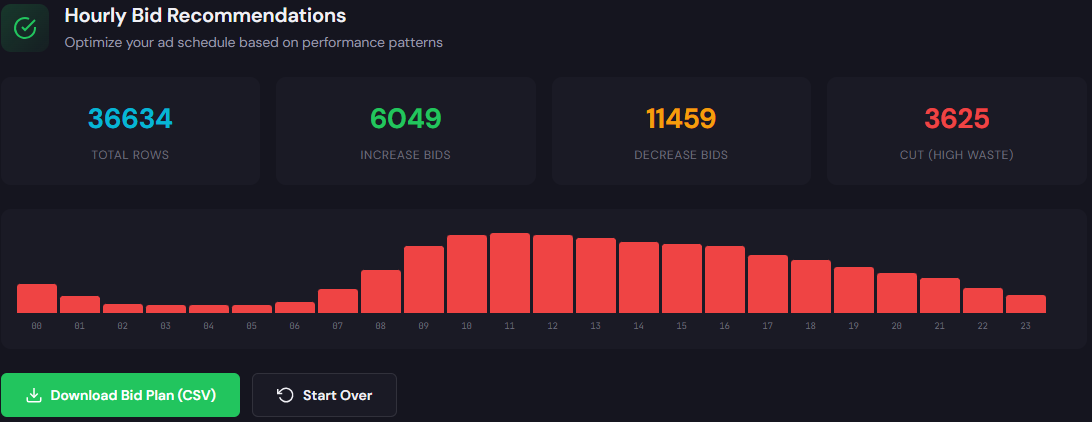
    Table showing hour-of-day rows with cost, conversions, CPA, and bid adjustment recommendations

    Open Hourly Bid Adjuster

    Quality Score Optimizer (Landing Page Rewriter)

    Use for: Diagnostic of ad-to-page relevance and headline alignment; generates optimized headlines and landing suggestions.

    Outputs: QS gaps, recommended headline/CTA rewrites, landing page snippet suggestions.

    How to use (3 steps):

    • Supply a headline, ad copy, and landing page URL for the low-performing ad group.
    • Review the diagnostic gaps and generated headline variants.
    • Publish the winning headline and track conversion impact for 7–10 days.

    Preview showing QS diagnostic/gap analysis + optimized headlines/landing page suggestions

    Open Quality Score Optimizer

    AI Keyword Generator (Free)

    Use for: Keyword expansion, structuring ad groups, and generating negative keyword ideas.

    Outputs: Organized keyword lists by intent plus negatives and modifiers.

    How to use (3 steps):

    • Enter a landing page URL or seed keyword.
    • Pick intent buckets you want (purchase, research, brand protection).
    • Export structured lists into campaign editor or CSV for Google Ads Editor.

    Preview showing generated keyword list sections (high intent, negatives, modifiers) with copy/download controls

    Open AI Keyword Generator

    Campaign Generator (Free)

    Use for: Rapid campaign builds with export-ready structure for Google Ads Editor.

    Outputs: Campaign/ad group structures, sample ads, and CSV exports.

    How to use (3 steps):

    • Provide a landing page or product description and choose campaign goals.
    • Review generated ad groups, keywords, and suggested bids.
    • Export CSV and import into Google Ads Editor to deploy.
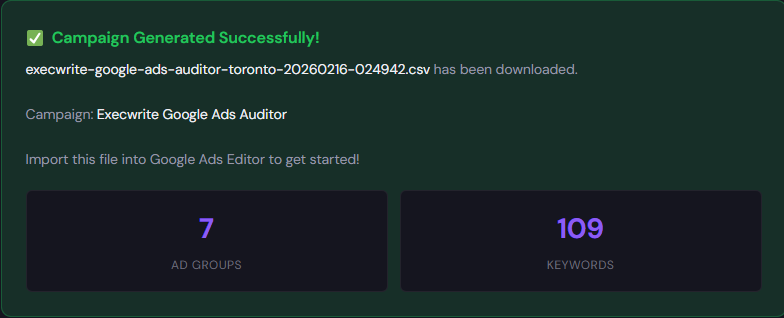
    Preview showing campaign/ad group output summary + export-ready structure

    Open Campaign Generator

    90-minute account triage playbook

    This is the condensed triage you can run in 90 minutes to prioritize next actions.

    • Minute 0–10: Pull top-level KPIs (CPA, conversions, spend) by campaign for last 14 days.
    • Minute 10–30: Run Wastage Snapshot & Recovery and Search Term Analyzer on the top 3 spend campaigns.
    • Minute 30–50: Apply immediate negatives from the analyzer and pause obvious waste campaigns.
    • Minute 50–70: Run Hourly Bid Adjuster on one priority campaign and apply provisional hour multipliers.
    • Minute 70–90: Run Quality Score Optimizer for the two worst ad groups and deploy a headline rewrite. Document changes and set a 72-hour review.
    Start the triage with ExecWrite

    Run the primary audit and generate negatives, bids, and headline tests in minutes using ExecWrite tools.

    Start your audit

    FAQ

    Q: How fast will I see improvements after applying these fixes?

    Short answers usually show within 48–72 hours for spend and waste reductions; conversion rate improvements from landing-page changes generally need 7–10 days to stabilize.

    Q: Can I use these tools with Smart Bidding?

    Yes. Use the tools to clean noise and set better inputs—negative keywords, better headlines, and hourly bid modifiers—then let Smart Bidding operate on cleaned data for best results.

    Q: Are these tools free?

    ExecWrite offers both free and paid utilities. The AI Keyword Generator and Campaign Generator have free access; other tools provide snapshots and structured exports that speed up audits.

    Q: Will automated negatives break my campaigns?

    No—if you review suggested negatives before applying. The tools mark high-risk terms so you can approve or move them to separate campaigns for testing.

    Sources

  • Why is my Google Ads PPC performance getting worse — and how do I fix it?

    PPC Google Ads Marketing Ops

    Why your Google Ads account feels like it’s slipping — and a practical recovery plan

    If your CPL is drifting up and ROAS is down, this guide gives operator-level steps and a tool-first workflow you can run this week. If you want to jump to tools, start at ExecWrite — the toolbox I reference below: execwrite.com.

    TL;DR
    • Most performance drops are reversible: find waste, correct bids, fix relevance, and restructure campaigns.
    • Use a short triage to capture quick wins, then move to a tooling-backed workflow for ongoing fixes.
    • Tools referenced: Search Term Analyzer, Hourly Bid Adjuster, Wastage Snapshot, Quality Score Optimizer, AI Keyword & Campaign Generators.

    Why PPC feels harder now

    Three evergreen dynamics make paid media feel tougher: competing automation, more noisy search behavior, and higher platform complexity. Automation moves bid pressure and auction dynamics faster than manual checks. Search behavior fragments into long-tail and low-intent queries that leak budget. Finally, account complexity grows — campaigns, audiences, and tracking layers multiply — creating more places for leaks.

    The 5 biggest PPC problems marketers face

    1) Wasted spend from irrelevant or low-intent search terms

    Symptoms

    • High spend on many search terms but low conversion rates
    • Large lists of one-off search queries in your reports
    • Negative keyword lists not reducing spend

    Why it happens: Broad match and automated match types expand reach quickly and surface low-intent traffic. If search-term monitoring is manual or infrequent, waste compounds.

    Fix this week

    • Export latest 30 days of search terms and tag anything with zero conversions.
    • Apply negative keywords at campaign/ad group level for the top 20% of low-value queries by spend.
    • Switch high-waste queries to phrase/exact match in controlled ad groups.

    2) Bidding automation blind spots & time-of-day swings

    Symptoms

    • Big hourly variance in CPA or ROAS within the same campaign
    • Automated bidding misses peak hours or overbids lower-value times
    • Pacing is uneven despite daily budget caps

    Why it happens: Most automated strategies optimize toward aggregate signals. If your performance changes by hour or day, the algorithm averages those differences and creates wasted bids during weak windows.

    Fix this week

    • Run an hour-of-day performance report for the last 30 days.
    • Temporarily set ad schedule reductions where CPA exceeds target by 30%+.
    • Apply conservative bid modifiers for underperforming hours and increase where CPA is favorable.

    3) Ad-to-landing-page mismatch and Quality Score drops

    Symptoms

    • CTR and conversion rates decline while average CPC drifts up
    • Quality Score falls on keywords with previously stable performance
    • Landing pages show higher bounce rates from paid traffic

    Why it happens: Landing page messaging and creative drift apart from ad copy, or site changes break relevance. Quality Score penalizes relevancy gaps and raises CPCs.

    Fix this week

    • Audit top 10 keywords by spend for ad headline/landing page mismatch.
    • Test 1-2 headline and CTA variants that align explicitly with top intent signals.
    • Adjust landing page messaging or create dedicated landing pages for mismatched ad groups.

    4) Disorganized keyword structure and ad group fragmentation

    Symptoms

    • One ad group contains many unrelated keywords
    • Duplicative keywords across campaigns cause internal bidding conflict
    • Low CTR and low ad relevance metrics

    Why it happens: Rapid campaign creation and legacy imports leave an account with inconsistent SKUs and ad group rules. This reduces relevance and hampers automated bidding.

    Fix this week

    • Use a keyword generator to rebuild focused ad groups around intent buckets.
    • Consolidate duplicate keywords into single-owner campaigns/ad groups.
    • Create naming conventions and lock them into a campaign template for future builds.

    5) Tracking and conversion attribution blind spots

    Symptoms

    • Conversions drop but site analytics traffic is steady
    • Conversion counts vary wildly between GA/analytics and Google Ads
    • Last-click attribution hides assisted conversions

    Why it happens: Tracking tags, recent site changes, or incorrect event mapping can cause underreporting. Misaligned attribution settings can also make performance look worse than it is.

    Fix this week

    • Validate your primary conversion tags and a sample of form submissions or purchases.
    • Compare click-to-conversion windows and attribution models; align them to your sales cycle.
    • Temporarily treat account decisions by both reported conversions and last-click revenue to avoid overreacting to data drift.

    Fixes you can apply this week

    • Run a search-term audit (30 days) and apply negatives for top-waste queries.
    • Pull hourly performance and bake ad schedule changes for poor-performing hours.
    • Align top ad headlines with landing-page headlines for your highest-spend keywords.
    • Generate focused keyword/ad-group structures and export to Google Ads Editor.
    • Verify conversion tags and reconcile numbers across systems before making big structural changes.
    Run quick audits with ExecWrite tools

    Use the free and pro tools on ExecWrite to find waste and apply fixes this week.

    Open ExecWrite toolbox

    Tool-based workflow — map problems to ExecWrite tools

    Search Term Analyzer — what it outputs

    Outputs an exportable table with spend, conversions, tags, and recommended bid actions for each search term.

    How to use it (3 steps)

    • Upload your search-term report or connect your account on the Search Term Analyzer.
    • Filter to zero- or low-converting terms and tag for negative or phrase match migration.
    • Export the negative keywords and apply them at campaign level; move high-potential long-tail terms into new ad groups.

    Preview: Search term analyzer output table

    Hourly Bid Adjuster — what it outputs

    Generates hour-of-day rows with cost, conversions, CPA, and suggested bid adjustments to inform ad schedules and modifiers.

    How to use it (3 steps)

    • Upload your hourly performance CSV to the Hourly Bid Adjuster.
    • Review hours where CPA exceeds target and accept suggested down-modifiers.
    • Apply an ad schedule and monitor 7–14 days; iterate using fresh hourly data.

    Preview: Hourly performance table

    Wastage Snapshot & Recovery — what it outputs

    Provides a dashboard snapshot showing waste totals, top leakage areas, and a prioritized recovery plan with negative keyword and budget recommendations.

    How to use it (3 steps)

    • Run the Wastage Snapshot for a recent 30–90 day window.
    • Implement the top 5 negative keyword recommendations and the highest-impact budget caps.
    • Re-run the snapshot after 14 days to measure recovered spend and adjust the plan.

    Preview: Wastage dashboard

    Quality Score Optimizer — what it outputs

    Delivers a Quality Score diagnostic and headline/landing-page recommendations to improve ad relevance and CTR.

    How to use it (3 steps)

    • Feed top keywords and corresponding landing pages into the Quality Score Optimizer.
    • Review suggested headlines and landing page copy; pick 1–2 variants to test immediately.
    • Deploy headline variants in ads and publish a dedicated landing page for the most important keyword group.

    Preview: Quality Score recommendations

    AI Keyword Generator & Campaign Generator — what they output

    Generates organized keyword lists, negative suggestions, and export-ready campaign/ad group structures for fast imports.

    How to use them (3 steps)

    • Enter top intent signals into the AI Keyword Generator to get focused keyword buckets and negatives.
    • Use the Campaign Generator to create an exportable Google Ads Editor CSV with ad groups and headlines.
    • Import to Editor, review match types and bids, then push changes to live with your naming conventions.

    Preview: Generated keyword bucketsPreview: Campaign export

    90-minute account triage playbook (step-by-step)

    A focused triage to recover key conversion volume in a single sprint.

    1. Minutes 0–15: Pull top-level KPIs (30 days vs prior period) and confirm the primary metric that matters (CPA, ROAS, or cost per lead).
    2. Minutes 15–35: Run the Wastage Snapshot to identify top leakage areas and export the top 25 wasted search terms.
    3. Minutes 35–55: Apply top negatives and a temporary 10–20% ad schedule reduction on flagged hours (use Hourly Bid Adjuster outputs).
    4. Minutes 55–75: Run Search Term Analyzer on remaining queries; extract high-potential long-tail terms and isolate them into a new ad group.
    5. Minutes 75–90: Quick Quality Score check on top 10 cost-driving keywords; deploy a headline/landing-page variant for immediate A/B testing.
    6. After 7 days: Re-run snapshots, measure reclaimed spend, and move from emergency fixes to structured rebuilds using Campaign Generator.
    Start a triage now with ExecWrite

    Run the snapshots, analyzers, and generators referenced above — fast. Execute the 90-minute playbook and lock in quick wins.

    Start the toolkit at ExecWrite

    FAQ

    Q: How fast will I see results?

    Most accounts see measurable improvement in spend efficiency within 7–14 days after applying negatives, ad schedule changes, and the top Quality Score fixes.

    Q: Can I trust automated recommendations?

    Use automation recommendations as signals, not commands. Review recommended negatives and bid changes in the context of business rules before applying them account-wide.

    Q: Which tool should I run first?

    Start with the Wastage Snapshot to set priorities, then run the Search Term Analyzer for negative keywords, and the Hourly Bid Adjuster for scheduling fixes.

    Q: Are the generators safe for scaling campaigns?

    Yes — the AI Keyword and Campaign Generators produce export-ready structures. Always validate match types, bids, and naming, and run small tests before full-scale pushes.

    Sources

  • Why is my Google Ads account underperforming?

    PPC Google Ads Marketing Ops

    If your Google Ads or paid media numbers look fine one week and tank the next, you need a repeatable diagnostic and fixes you can actually execute. This guide gives a practical playbook and links to tools on ExecWrite to recover wasted spend, tighten targeting, and scale reliably.


    TL;DR
    • Most account erosion comes from unmanaged bids, poor keyword coverage, weak ad-landpage fit, and low-quality traffic.
    • Use a short checklist to triage in 90 minutes, then fix low-effort, high-impact items this week.
    • ExecWrite tools accelerate recovery: bid timing, wasted spend snapshots, keyword generation, and landing page rewrites.

    Why PPC feels harder now

    Two forces make modern paid media unforgiving: the scale and speed of auction changes, and fragmented signals. Automation hides issues instead of exposing them; platforms optimize for short-term CTR unless you constrain them. That means small configuration drift or creative decay becomes performance rot. The rest of this article focuses on repeatable diagnostics and pragmatic fixes you can apply in days, not months.

    The 5 biggest PPC problems marketers face

    Pain #1 — Wasted spend from irrelevant queries

    • Symptoms:
      • High impressions and low conversions from Search Network.
      • Surge in low-intent queries triggering broad match keywords.
      • Cost per conversion rising while click-through rate holds steady.

    Why it happens: Broad match and automated bidding can bring in marginal traffic if negative keywords and search-term controls aren’t continuously applied. Manual exclusion often lags behind query patterns.

    • Fix this week:
      • Pull last 30 days of Search Terms and flag high-cost, zero-conversion queries.
      • Add those queries as negatives at campaign or shared list level.
      • Prioritize match-type tightening on the top 10% spend keywords.

    Pain #2 — Bid timing and hour-of-day inefficiency

    • Symptoms:
      • Conversions concentrated in specific hours but bids stay flat across the day.
      • Unpredictable CPA swings that align to time of day.

    Why it happens: Most accounts set simple dayparting or use automated bidding without hour-of-day granularity. Conversion performance often clusters, and not leveraging that window wastes budget on low-value hours.

    • Fix this week:
      • Analyze conversions by hour-of-day for the last 90 days.
      • Apply bid adjustments to favor high-conversion hours and reduce bids in the trough.
      • Monitor results for 7 days and iterate.

    Pain #3 — Weak keyword coverage and creative mismatch

    • Symptoms:
      • High bounce rates on landing pages for paid traffic.
      • Ad copy promises that don’t match landing page content or offer.

    Why it happens: Keyword and ad generation often rely on one-off brainstorming rather than systematic coverage. Over time, ads become generic and landing pages fail to reflect search intent.

    • Fix this week:
      • Generate a prioritized keyword list for top themes and gaps.
      • Rewrite top ad groups with headlines that match top queries.
      • Sync landing page headlines to the ad message for top 10 ad groups.

    Pain #4 — Low-quality traffic and poor audience targeting

    • Symptoms:
      • High clicks from unusual geos or device types with no conversions.
      • Remarketing lists aging without refresh.

    Why it happens: Audiences and exclusions are set once and forgotten. Programmatic amplification and broad targeting bring in irrelevant segments unless regularly pruned.

    • Fix this week:
      • Audit top 10 geo and device combinations by spend and conversion rate.
      • Exclude poor-performing geos or set conservative bids on devices.
      • Refresh or resegment remarketing lists to reflect current intent.

    Pain #5 — Landing page conversion friction

    • Symptoms:
      • Low form fills despite high traffic and reasonable CPCs.
      • High ad-to-page mismatch and poor micro-conversion rates.

    Why it happens: Landing pages are often designed for organic discovery, not paid intent. A mismatch between ad promise and page content kills conversion rates.

    • Fix this week:
      • Create a dedicated variant for paid traffic that repeats the ad headline and CTA.
      • Strip unnecessary navigation and reduce form fields.
      • Run a single A/B test and measure lift on form submissions.

    Fixes you can apply this week

    • Export Search Terms (last 30–90 days). Add top harmful phrases to shared negative lists.
    • Break out top-converting keywords into dedicated ad groups and write 2–3 tailored ads each.
    • Analyze hour-of-day conversion patterns and set bid multipliers for the top 6 hours.
    • Audit top geographies and device splits; move underperforming ones to exclusion lists or cut bids by 20–40%.
    • Spin up a paid-specific landing page that mirrors the primary ad headline and CTA.
    • Schedule a 90-minute triage (playbook below) and assign owners for the next 7-day test window.
    Quick start with ExecWrite

    Use ExecWrite tools to automate the tedious parts: get a wastage snapshot, generate keywords, and apply bid-hour adjustments faster.

    Open ExecWrite

    Tool-based workflow: map problems to ExecWrite tools

    Bid timing & hour-of-day analysis — Bid Adjustment Suite

    What it outputs: An aggregate hour-of-day bid adjustment plan and CSV you can upload to Google Ads.

    How to use (3 steps):

    • Run the Bid Adjustment Suite to analyze 90-day hour-of-day performance: https://execwrite.com/bid-adjustment-by-search-term/bid-adjustment-suite-aggregate-hour-of-day-data/
    • Review suggested multipliers and export the adjustment CSV.
    • Upload to Google Ads as schedule bid adjustments and monitor the first-week delta.
    Search-term negatives & quick bids — Bid Adjustment by Search Term (Free)

    What it outputs: Search-term-level bid suggestions and a shortlist of queries to add to negatives.

    How to use (3 steps):

    • Run the free tool to identify high-cost, no-conversion search terms: https://execwrite.com/bid-adjustment-by-search-term/
    • Export the list and add negatives to shared lists in your account.
    • Tighten match types on the top spend keywords identified.
    Wastage snapshots & recovery — Google Ads Wastage Recovery Snapshot

    What it outputs: A snapshot of likely wasted spend pockets (high cost, low conversion) with actionable groupings.

    How to use (3 steps):

    • Run the wastage snapshot to surface campaigns and ad groups with the worst efficiency: https://execwrite.com/google-ads-wastage-recovery-snapshot/
    • Act on the top 5 waste items: negatives, pause non-strategic keywords, or reduce budgets.
    • Schedule a follow-up snapshot after 7 days to verify recovery.
    Keyword and campaign generation — AI Keyword Generator & Campaign Generator (Free)

    What it outputs: Keyword tiers, ad group templates, and ready-to-import campaign structures.

    How to use (3 steps):

    • Generate themed keywords with the AI Keyword Generator: https://execwrite.com/ai-keyword-generator/
    • Use the Campaign Generator to build starter campaigns from those keywords: https://execwrite.com/ai-keyword-generator/google-ads-campaign-generator/
    • Import into Google Ads and attach ad variations that match the top queries.
    Landing page messaging — Landing Page Rewriter

    What it outputs: Paid-focused landing page copy variants that align with ad headlines and CTAs.

    How to use (3 steps):

    • Run the landing page rewriter on your highest-traffic paid landing page: https://execwrite.com/google-ads-wastage-recovery-snapshot/landing-page-rewriter/
    • Pick the most direct variant and publish as an experiment variant for paid traffic.
    • Measure change in conversion rate and iterate copy or CTA placement.

    90-minute account triage playbook

    • Minutes 0–10: Open account overview. Note last 7- and 30-day CPA trends and major spend shifts.
    • Minutes 10–30: Export Search Terms and top 50 spend keywords. Flag negatives and top 10 keywords by spend for breakout.
    • Minutes 30–45: Run wastage snapshot and bid adjustment suite on ExecWrite; export recommendations.
    • Minutes 45–60: Apply immediate fixes — add negatives, adjust bids for top offenders, pause clearly wasteful keywords/campaigns.
    • Minutes 60–75: Generate focused keyword lists and 2 ad variations per top ad group. Create one paid-specific landing page variant.
    • Minutes 75–90: Document actions, owners, and the 7-day measurement plan. Schedule a review to validate lifts and to run a follow-up snapshot.
    Recover wasted spend and scale wins

    Start the 90-minute triage with ExecWrite tools that produce exportable adjustments and copy in minutes.

    Start your account snapshot

    FAQ

    Do I need to pause automation to run these checks?

    Not necessarily. Run diagnostics first. Apply conservative bid multipliers and negative lists while automation continues; that avoids complete disruption while you confirm patterns.

    How quickly will I see improvements?

    You can often see measurable CPA changes in 7–14 days after applying negatives, hour-of-day adjustments, and landing page fixes. Track daily trends and avoid overreacting to single-day swings.

    Which tool should I run first?

    Start with a wastage snapshot to prioritize issues, then run the Bid Adjustment Suite for time-of-day bids and the Search Term tool for negatives.

    Are these fixes safe for enterprise accounts?

    Yes — all recommendations are prescriptive (negatives, bid multipliers, copy variants) and reversible. Use experiments for landing pages and staged uploads for bid changes.

    Sources

  • Why Is My Google Ads Performance Falling? Practical PPC Fixes

    PPCGoogle AdsMarketing Ops

    Why Is My Google Ads Performance Falling? Practical PPC Fixes

    If metrics are slipping, you need a short, structured triage—not a week of guesswork. This post gives repeatable checks, a 90-minute playbook, and tool-led fixes you can apply this week. Learn how to turn noise into actions with focused signals and tools from ExecWrite.

    TL;DR
    • Start with measurement: verify conversion tracking and attribution before changing bids.
    • Fix structure and creative gaps: low-quality traffic, bad keywords, and weak ads cause wasted spend.
    • Use short, repeatable tooling workflows to surface wasted budget and generate high-impact keywords and ads fast.

    Why PPC feels harder now

    Paid channels have matured. Auction dynamics, privacy-driven measurement changes, and creative volume expectations mean the same tactics yield lower returns unless you tighten fundamentals. Teams are asked to do more with less time, which amplifies small issues into big performance drops.

    The 5 biggest PPC problems marketers face

    Poor or missing conversion tracking

    Symptoms

    • Conversions fluctuate without matching business activity.
    • Smart bidding underperforms or bids oscillate.
    • Conversion counts differ widely between analytics platforms.

    Why it happens

    Tracking breaks from tag changes, page redirects, or attribution shifts. When conversion signals are noisy or incomplete, automated bidding and budget allocation get wrong signals.

    Fix this week

    • Confirm server- or client-side tags fire for a sample of conversions.
    • Compare last-click counts with backend receipts for 1–2 campaigns.
    • Set a temporary manual CPC guardrail if smart bidding reacts to bad data.

    Wasted keywords and high-impression low-intent search terms

    Symptoms

    • High impressions and clicks with zero conversions.
    • Poor CTR but impressions are rising.
    • Budget drained by broad, irrelevant queries.

    Why it happens

    Left unchecked, match type drift and broad match expansion bring low-intent traffic. Keyword lists grow stale, and negative keywords are often missing.

    Fix this week

    • Pull top search terms by cost for the last 30 days and add negatives for irrelevant queries.
    • Move high-spend, low-conversion queries to paused or exact-match tests.
    • Deploy phrase/exact match for high-value themes and limit broad match until you have conversion data.

    Weak ad creative and mismatch with landing pages

    Symptoms

    • Low CTR, high bounce rate, or poor conversion rate on landing pages.
    • High impressions but low engagement on ad variants.
    • High funnel drop between click and lead form completion.

    Why it happens

    Ads that promise one thing and land on a different page erode quality score and conversion rates. Volume of creative matters; stale copy loses relevance in competitive auctions.

    Fix this week

    • Map top ad groups to a single, highly relevant landing page.
    • Test two new headlines and two new descriptions per ad group.
    • Use variant URLs for top-spend groups to isolate tests.

    Account structure and budget mismatch

    Symptoms

    • High-performing keywords are buried in mixed ad groups.
    • Budgets are shared across unrelated audiences or stages of funnel.
    • Campaign priorities conflict and cannibalize spend.

    Why it happens

    Poor structure prevents precise bidding and messaging. When intent stages mix, the platform can’t allocate budget efficiently to top-of-funnel vs. bottom-of-funnel needs.

    Fix this week

    • Split campaigns by funnel stage and assign clear KPIs.
    • Create dedicated ad groups for top keywords with focused ads and landing pages.
    • Reallocate budget toward campaigns with positive ROI signals.

    Poor bid strategy configuration

    Symptoms

    • Volatile CPA, sudden CPC spikes, or wasted daily budget.
    • Smart bidding bids outside acceptable ROI ranges.
    • Strategy changes coincided with performance drops.

    Why it happens

    Mismatched objectives, insufficient conversion volume, or inconsistent seasonality make automated strategies unreliable. Without proper constraints, models overreact to short-term noise.

    Fix this week

    • Verify conversion volume meets the minimum for your chosen bid strategy.
    • Set max CPC or ROAS guardrails for automated bidding.
    • When in doubt, use manual CPC or enhanced CPC while you stabilize signals.

    Fixes you can apply this week

    • Validate conversion tracking across the highest-spend campaigns.
    • Run a 30-day wasted-spend report and add negatives for top irrelevant queries.
    • Isolate best keywords into dedicated ad groups and match them with tailored landing pages.
    • Create two fresh ad variations per high-spend ad group and test for 2 weeks.
    • Apply bidding guardrails or switch to manual CPC temporarily if signals are noisy.
    • Document changes and schedule a 90-minute triage to reset structure and rules.
    Recover wasted spend faster

    Use ExecWrite tools to find wasted queries, generate targeted keywords, and rewrite landing pages without starting from scratch.

    Get started with ExecWrite

    Tool-based workflow: map problems to ExecWrite tools

    Below are the core tools and how to run a short workflow that stops waste and creates better keywords and ads.

    Wastage Snapshot — Google Ads Wastage Recovery Snapshot

    What it outputs: A prioritized list of high-cost, low-intent search terms and campaign-level wasted-spend signals.

    How to use it (3 steps)

    • Run the snapshot on the last 30–90 days to surface top wasted queries: https://execwrite.com/google-ads-wastage-recovery-snapshot/
    • Export the list, add negatives for clearly irrelevant terms, and flag ambiguous terms for manual review.
    • Re-run after 7 days to measure immediate savings and adjust budgets accordingly.
    Landing Page Rewriter — Landing Page Rewriter

    What it outputs: Concise, conversion-focused landing page variants aligned to ad messaging.

    How to use it (3 steps)

    • Feed top-converting ad group copy and current landing page URL into the tool: https://execwrite.com/google-ads-wastage-recovery-snapshot/landing-page-rewriter/
    • Review generated variants and pick 1–2 to QA for brand and compliance.
    • Deploy variants on a tracking URL and measure conversion lift over two weeks.
    Keyword Generators — AI Keyword Generator & Campaign Generator

    What they output: Targeted keyword lists and full campaign skeletons grouped by intent and match type.

    How to use it (3 steps)

    • Start with the seed list from your wastage snapshot and run the AI Keyword Generator: https://execwrite.com/ai-keyword-generator/
    • Filter results by intent and add high-quality terms into new exact/phrase match ad groups.
    • Use the Campaign Generator to produce campaign-level structure and ad copy drafts: https://execwrite.com/ai-keyword-generator/google-ads-campaign-generator/
    Bid Adjustment Suite — Aggregate hour-of-day data & Bid Adjustment by Search Term

    What they output: Time-of-day and search-term level bid adjustment recommendations to reduce wasted spend and improve ROAS.

    How to use it (3 steps)

    • Run aggregate hour-of-day reports to find low-performing hours: https://execwrite.com/bid-adjustment-by-search-term/bid-adjustment-suite-aggregate-hour-of-day-data/
    • Apply conservative negative adjustments for off-hours and increase bids during peak performance windows.
    • Use search-term bid adjustments to throttle spend on low-intent queries: https://execwrite.com/bid-adjustment-by-search-term/

    90-minute account triage playbook

    1. 0–10 min: Snapshot – Run the wastage recovery snapshot for the last 30 days and export top 50 cost-but-no-conversion terms.
    2. 10–25 min: Tracking check – Verify conversion tags fire on confirmation pages for top 3 campaigns (use tag helper or backend receipts).
    3. 25–45 min: Keyword triage – Add negatives for obvious irrelevant queries and create a list of 10 candidate exact-match keywords to isolate into new ad groups.
    4. 45–60 min: Creative triage – Generate two headline/description variants for 3 top ad groups using the Campaign Generator; pick one landing page variant to test.
    5. 60–75 min: Bid guardrails – Apply max CPC/ROAS constraints or switch to manual CPC for unstable campaigns; implement hour-of-day bid adjustments from the aggregate report.
    6. 75–90 min: Document & schedule – Log all changes, set a two-week measurement window, and schedule a follow-up to review savings and lift.
    Run the triage with ExecWrite

    Use the combined tools above to complete the 90-minute playbook faster and lock in savings.

    Start the triage now at ExecWrite

    FAQ

    How quickly will I see results?

    Small changes like negatives and bid guardrails often reduce wasted spend within 48–72 hours. Conversion lift from new landing pages or structural changes typically needs 7–14 days to measure reliably.

    Do I need to pause smart bidding?

    Not always. Only pause if your conversion signal is broken or conversion volume falls below the minimum recommended for the strategy. Otherwise, add conservative guardrails and stabilize signals first.

    What’s the minimum data for AI-generated keywords?

    Seed lists of 20–50 high-intent terms or a representative landing page are sufficient to generate useful keyword sets. Always validate generated terms against your search-terms report before adding broad match exposure.

    Can these fixes work for low-budget accounts?

    Yes—prioritize negatives, precise match keywords, and single-purpose landing pages. Low budgets demand focus: fewer campaigns, tighter keywords, and conservative bids.

    Sources

  • PPC Account Recovery: Practical Fixes and Tool-Based Workflows for Google Ads

    PPC Google Ads Marketing Ops

    PPC Account Recovery: Practical Fixes and Tool-Based Workflows for Google Ads

    If your account is leaking budget or delivering weak conversions, this post gives a concrete, operator-level recovery plan plus tool-driven workflows you can apply immediately. Use the ExecWrite toolkit at ExecWrite to shortcut manual triage.

    TL;DR
    • Fix noisy search terms and add negatives this week to stop wasted clicks.
    • Time-based bid adjustments and ad-to-landing relevance lift efficiency quickly.
    • Use a tool-led workflow (keyword, bid, landing rewrite, campaign generator) to scale fixes without manual guesswork.

    Why PPC feels harder now

    Performance expectations and CPC pressure haven’t changed; the inputs have. Audiences fragment, search queries are noisier, and automated bidding hides micro-problems until they compound. The result: accounts that once ran well now show slow declines or sharp cost increases. The right combination of manual triage and tooling turns that trend around faster than repeated bid-only fiddles.

    The 5 biggest PPC problems marketers face

    1) Search-term waste (noisy queries)

    Symptoms

    • High impressions/clicks on low or zero conversions from long-tail queries.
    • CTR and CPC look fine but conversion rate is below historical benchmarks.
    • Search term report shows many irrelevant terms eating budget.

    Why it happens — Broad or phrase match and automated match expansion pull in queries you didn’t intend to target. Over time, these queries create noise that bid automation treats as signal.

    Fix this week

    • Export last 30 days of Search Terms; sort by spend and zero conversions.
    • Add explicit negative keywords for the top 50 irrelevant terms.
    • Move persistent converting but low-intent queries into tightly themed ad groups or exact-match keywords.

    2) Wrong bid timing and hour-of-day misses

    Symptoms

    • High spend during low-converting hours.
    • Device-hour patterns where one segment converts better but bids aren’t adjusted.
    • Campaigns using blanket daypart settings that don’t match conversion windows.

    Why it happens — Managers set bids at the campaign level and leave automation to average across hours. Without granular hour-of-day adjustments, systems optimize toward volume, not efficiency.

    Fix this week

    • Pull hour-of-day conversion rates and CPA by campaign.
    • Apply conservative bid modifiers (-20% to -50%) on hours with poor return.
    • Test an hour-targeted policy for top-performing campaigns for 7–14 days.

    3) Ad-to-landing mismatch (low quality and conversions)

    Symptoms

    • Good CTR but low conversion rate and rising bounce rate.
    • High impression share but low conversion share vs. competitors.
    • Ads promising features or offers not present on landing pages.

    Why it happens — Ads are created quickly to chase traffic. Landing pages lag or lack tailored messaging, which reduces relevance and conversion efficiency.

    Fix this week

    • Map top 10 ad headlines to landing page headlines; make them consistent.
    • Use a simple A/B of headline + CTA on one high-traffic landing page for 7 days.
    • Ensure tracking pixels and form events are firing before scaling bids.

    4) Coverage gaps and inefficient keyword expansion

    Symptoms

    • Low impression share for high-intent queries; manual keyword lists are small.
    • Relying on broad match only and hoping automation finds the winners.
    • High-cost keywords with few related, lower-cost variants.

    Why it happens — Teams either over-trim keywords to control spend or under-invest in targeted expansions. Both choices reduce the system’s ability to find efficient queries at scale.

    Fix this week

    • Generate 30–50 intent-focused keyword variants for top funnels using an AI keyword tool.
    • Create tightly themed ad groups per intent bucket to protect relevance.
    • Pause lowest-performing broad keywords and reallocate budget into exact/phrase tests.

    5) Measurement and attribution gaps

    Symptoms

    • Conversion counts drop inconsistently across channels.
    • Offline or multi-step conversions aren’t tracked, inflating CPA.
    • Cross-domain or form-tracking errors cause incomplete data.

    Why it happens — Tracking setups age while site changes and tag migrations break event firing. Incomplete data creates bad optimization signals.

    Fix this week

    • Run a tag audit and validate key conversion events in live sessions.
    • Reconcile CRM conversions to ad clicks for one campaign to estimate undercount.
    • Temporarily pause automated bid strategies where conversion signals are unreliable.

    Fixes you can apply this week

    • Export Search Terms (30 days) → Add top irrelevant terms to negative list.
    • Pull hour-of-day performance → Apply temporary bid modifiers for low-efficiency hours.
    • Audit top landing pages vs. top ads → align headlines, offers, and CTAs.
    • Generate targeted keyword variants and create tight ad groups for each intent.
    • Validate conversion pixels and reconcile with backend CRM for one campaign.
    • Run a controlled budget reallocation: -20% on problem campaigns; +20% on the best-converting tests.
    Apply fixes faster with ExecWrite

    Use automated search-term analysis and bid timing tools to stop waste and retarget effort where it moves metrics fastest.

    Start with ExecWrite

    Tool-based workflow (map each pain point to ExecWrite tools)

    Tool 1 — Hour-of-day bid adjustment (aggregate)

    URL: ExecWrite: Aggregate Hour-of-Day Bid Adjustment

    What it outputs: Hourly conversion rates and recommended bid modifiers aggregated by search term groups.

    How to use it (3 steps)

    • Upload your Search Terms + conversion data for 30 days.
    • Review recommended hour modifiers and filter by campaigns.
    • Apply conservative bid modifiers to Google Ads or use them as input to your bidding strategy.
    Tool 2 — Bid Adjustment by Search Term

    URL: ExecWrite: Bid Adjustment by Search Term

    What it outputs: Per-term bid suggestions and flags for negatives based on spend and conversion data.

    How to use it (3 steps)

    • Feed the tool your search-term report and conversion metrics.
    • Accept suggested negatives and bid changes for high-spend low-return terms.
    • Deploy changes in a paused state for safety, then unpause after validation.
    Tool 3 — Wastage Recovery Snapshot

    URL: ExecWrite: Wastage Recovery Snapshot

    What it outputs: A prioritized list of spend-draining assets (keywords, search terms, ads) and quick actions to recover budget.

    How to use it (3 steps)

    • Connect account snapshot and run the scan.
    • Review the prioritized waste items and agree on immediate changes.
    • Execute recommended negatives, pausing, and budget shifts.
    Tool 4 — AI Keyword Generator

    URL: ExecWrite: AI Keyword Generator

    What it outputs: Intent-clustered keyword variants for campaigns and ad groups.

    How to use it (3 steps)

    • Input 3–5 seed keywords or landing page URLs.
    • Choose intent buckets and generate 30–50 keyword variants.
    • Export and build tight ad groups for testing.
    Tool 5 — Landing Page Rewriter (Wastage snapshot landing page tool)

    URL: ExecWrite: Landing Page Rewriter

    What it outputs: Headline and CTA variants aligned to ad copy for rapid A/B tests.

    How to use it (3 steps)

    • Paste ad headlines and current landing page copy into the tool.
    • Generate 3–5 headline/CTA variants optimized for the ad intent.
    • Deploy as a headline test or quick variant on the landing page.
    Tool 6 — Campaign Generator (AI Keyword + Campaign Builder)

    URL: ExecWrite: Google Ads Campaign Generator

    What it outputs: Ready-to-import campaign structure (keywords, ad groups, ads) tailored to intent buckets.

    How to use it (3 steps)

    • Select the keyword clusters you want to scale.
    • Choose ad templates and landing page targets.
    • Export the campaign file and import into Google Ads as draft campaigns for testing.

    90-minute account triage playbook

    Run this sequence on a shared screen with one operator running tools and one owner making decisions.

    • 0–10 min: Snapshot check — total spend, CPA, conversion count, top 3 campaigns by spend.
    • 10–30 min: Search-term triage — export top 200 terms; flag top 50 irrelevant terms for negatives.
    • 30–45 min: Hour-of-day check — run the hour-of-day tool and set temporary bid modifiers for worst hours.
    • 45–60 min: Landing page alignment — pick the top-converting ad group and run the landing-page rewriter; prepare a headline test.
    • 60–75 min: Keyword coverage — use the AI keyword generator to create a 30-keyword expansion for the weakest funnel.
    • 75–90 min: Apply changes conservatively: negatives, bid modifiers, and upload new campaign draft. Schedule a 7–14 day review.
    Execute the triage with ExecWrite

    Run the hour-of-day and wastage snapshot tools in a single workflow and get export-ready fixes.

    Run a recovery scan

    FAQ

    Q: How quickly will negatives reduce wasted spend?

    Negatives take effect as soon as they’re applied; expect to see immediate reductions in wasted clicks. Measure impact over 3–7 days to avoid over-correcting.

    Q: Will hour-of-day modifiers break automated bidding?

    Temporary modifiers are tactical. Pause automated strategies only if conversion signals are unreliable. Use conservative modifiers (-10% to -30%) and test for 7 days.

    Q: Can AI-generated keywords hurt quality score?

    Only if you drop many unrelated keywords into broad ad groups. Use AI to generate intent clusters and build tight ad groups to preserve relevance.

    Q: How do I validate landing-page changes fast?

    Run headline/CTA A/B tests on a high-traffic page and track micro-conversions (clicks, time on page) before judging full-funnel impact.

    Q: Do I need to use all tools?

    Start with the Search Term and Wastage Snapshot tools. Add hour-of-day and landing-page work once the biggest leaks are plugged.

    Sources

    Ready to stop the leaks and scale what works? Visit ExecWrite to run a recovery workflow and get export-ready fixes in minutes.

  • PPC Recovery: 5 Practical Fixes to Stop Wasting Spend and Scale Faster

    PPC Google Ads Marketing Ops

    PPC performance stalls because small account gaps compound. This post gives a repeatable, operator-level playbook and maps each step to ExecWrite tools so you can recover wasted spend and scale faster — see our tools at ExecWrite for one-click outputs.

    PPC recovery that fits into your week

    TL;DR
    • Fix the five common leak points: search terms, overlap, bids & timing, ad creative, and landing relevance.
    • Apply quick checks this week that reduce waste and improve signal for automated bidding.
    • Use the mapped ExecWrite tools to automate audits, generate keywords, and rewrite landing pages.

    Why PPC feels harder now

    Privacy changes, automation, and rising CPCs change how accounts need to be managed. Automation reduces low-friction tasks but increases the cost of bad inputs: poor targeting, weak landing experiences, and unchecked query leakage now compound faster because machine learning optimizes what’s left. The result: teams see higher spend with less predictable uplift unless they tighten account hygiene and creative workflows.


    The 5 biggest PPC problems marketers face

    1. Wasted spend on irrelevant search terms

    Symptoms
    • CPCs rising with flat conversion volume.
    • High impressions and clicks from low-intent queries in search terms report.
    • Low CTR on broad match keywords despite high spend.

    Why it happens — Broad match, smart bidding, and expanded match types open ad exposure to many low-value queries when negative lists and search-term-level bid adjustments are missing.

    Fix this week
    • Export the last 30 days of search terms, sort by spend, and add top irrelevant queries as negatives.
    • Identify high-spend, low-conversion queries and move them to SKAGs or phrase match with tighter bids.
    • Apply search-term bid adjustments for times/segments where these queries spike.

    2. Account structure overlap and cannibalization

    Symptoms
    • Multiple ad groups bidding on similar keywords.
    • Paid search impressions split across competing ads and campaigns.
    • Confusing search term coverage with inefficient QS and higher CPCs.

    Why it happens — Rapid expansions, copied campaigns, and inconsistent naming create overlap. Automation may bid across these overlaps unpredictably, draining budget.

    Fix this week
    • Run a search-term crosswalk to spot duplicates; pause or consolidate overlapping ad groups.
    • Standardize keyword match types and naming conventions.
    • Create negative keyword lists shared across campaigns to enforce exclusivity.

    3. Bid strategy mismatch and poor dayparting

    Symptoms
    • Smart bidding oscillates with noisy conversion data.
    • Conversions concentrate in certain hours or days but bids are uniform.
    • ‘Max conversions’ or target ROAS underperforming relative to manual controls.

    Why it happens — Automated strategies respond to the signals they get. If conversion signals are sparse or timing patterns aren’t honored, bids will chase noise.

    Fix this week
    • Review hourly and day-of-week performance; apply bid modifiers for peak windows.
    • Temporarily switch to manual CPC or enhanced CPC for problem campaigns while fixing signal quality.
    • Increase conversion tracking fidelity (server-side where needed) before re-enabling full automation.

    4. Stale creative and poor ad coverage

    Symptoms
    • Ad relevance and CTR declining over time.
    • Few ad variations in responsive search or display campaigns.
    • Low-quality scores for top keywords.

    Why it happens — Teams deprioritize continuous testing. Fewer creative variations limit the auction signals that feed automated ad selection.

    Fix this week
    • Generate 3 new headlines and 2 descriptions per ad group focused on top keywords.
    • Rotate new creatives for 2 weeks, track CTR and conversion rate lift.
    • Pause underperforming ads and scale winners into similar ad groups.

    5. Landing page mismatch and weak conversion tracking

    Symptoms
    • High bounce rates from paid traffic.
    • Low conversion rates despite strong CTR.
    • Attribution gaps between GA4 and Ads conversions.

    Why it happens — Ads send users to pages that don’t match intent or lack tracking hooks. That degrades bid decisions and wastes spend on users who won’t convert.

    Fix this week
    • Audit landing pages for message match to top ad groups and add clear CTA above the fold.
    • Verify conversion pixels and server-side events align with Ads conversions.
    • Run a simple A/B test on headline and CTA for the highest-traffic landing page.

    Fixes you can apply this week

    • Export search terms (30 days), add negatives, and reassign queries to tighter match types.
    • Consolidate overlapping ad groups and apply shared negative lists.
    • Run an hourly performance check and apply bid modifiers for peak windows.
    • Create or refresh 3 ad variations per ad group; monitor CTR and conversion lift for 14 days.
    • Audit landing page message match and verify conversion tagging end-to-end.
    • Document changes and measure impact by cohort to avoid oscillation from re-enabling automation too soon.
    Automate the audits — recover wasted spend faster

    Use ExecWrite tools to extract search-term signals, generate negatives, and create landing page variants in minutes.

    Open ExecWrite


    Tool-based workflow: map problems to ExecWrite tools

    Below are the ExecWrite tools matched to the five problems above. Each entry shows what the tool outputs and a 3-step usage path.

    Wasted search-term spend — Bid Adjustment Suite (hourly aggregate)

    What it outputs: aggregated hour-of-day and day-of-week spend/conv summaries you can use to set bid modifiers.

    How to use (3 steps):

    • Upload your search-terms and performance CSV to the tool: Bid Adjustment Suite.
    • Review peak windows and export suggested hourly modifiers.
    • Apply modifiers in Google Ads and monitor CPA changes for 7–14 days.
    Search-term-level bids — Bid Adjustment by Search Term

    What it outputs: suggested bid adjustments by search term grouped by performance.

    How to use (3 steps):

    • Paste your search-term report into: Bid Adjustment by Search Term.
    • Filter for high-spend/low-conversion terms and accept suggested negative or bid changes.
    • Export an upload file for bulk edits to save time and enforce consistency.
    Wastage snapshot — Wastage Recovery Snapshot

    What it outputs: a one-page snapshot of wasted spend across campaigns and keywords.

    How to use (3 steps):

    • Run the Wastage Recovery Snapshot with your account export.
    • Prioritize top 10 waste rows by spend and implement negatives/pause actions.
    • Re-run weekly until waste falls to acceptable levels.
    Keyword generation at scale — AI Keyword Generator

    What it outputs: focused keyword lists and phrase variations mapped to intent segments.

    How to use (3 steps):

    • Use AI Keyword Generator to seed keywords from top-performing terms.
    • Filter by intent and add to SKAGs or dedicated campaigns.
    • Export directly into your campaign builder to avoid overlap.
    Landing page rewrites — Landing Page Rewriter

    What it outputs: headline and CTA variants optimized for ad-message match.

    How to use (3 steps):

    • Feed top ad group keywords and current landing copy into the Landing Page Rewriter.
    • Choose 2–3 headline/CTA combos and implement as A/B variants.
    • Measure conversion lift and adopt the winner across similar pages.
    Campaign generator — Fast campaign scaffolding

    What it outputs: complete campaign scaffolds with keywords, ads, and basic settings.

    How to use (3 steps):

    • Start with the Campaign Generator and supply top product/service pages.
    • Review generated ad groups and ads for message match.
    • Export as bulk upload or copy into your account, then refine bids and negative lists.

    90-minute account triage playbook

    Use this timed checklist to triage an underperforming account and create high-impact change quickly.

    • 0–10 minutes: Pull last 30 days Search Terms, Campaign, Ad Group, and Landing Page performance exports.
    • 10–30 minutes: Run the Wastage Recovery Snapshot and identify top 10 waste items (Tool: Wastage Recovery Snapshot).
    • 30–50 minutes: Add top irrelevant search terms to negatives and generate bid adjustments with the Bid Adjustment Suite.
    • 50–70 minutes: Generate new ad headlines/descriptions for 5 worst-performing ad groups (AI Keyword Generator + Campaign Generator).
    • 70–85 minutes: Create 2 landing page variants for your highest-traffic page using Landing Page Rewriter; deploy A/B test.
    • 85–90 minutes: Document all changes, set 14-day checkpoints, and schedule a follow-up audit.
    Start the triage with ExecWrite

    Run the snapshots and generators to create upload-ready fixes in minutes — then apply the 90-minute playbook.

    Try ExecWrite Now


    FAQ

    How quickly will I see results after applying these fixes?

    Expect initial CTR and relevance improvements within 3–7 days. Reliable conversion improvements typically appear in 7–21 days as bidding algorithms re-learn with cleaner signals.

    Will automation undo manual fixes?

    Automation can change behavior after fixes. Lock in structural fixes (negatives, consolidated ad groups, landing changes) before re-enabling aggressive automated bidding to avoid oscillation.

    Which tool should I run first?

    Start with the Wastage Recovery Snapshot to prioritize actions, then run Bid Adjustment and Search Term tools for quick spend reduction.

    Can these tools integrate with Google Ads directly?

    ExecWrite outputs are designed for bulk uploads and can be copied into Google Ads editor or your upload workflow; some outputs include ready-to-import bulk templates.


    Sources

  • PPC Troubleshooting Playbook: Faster Wins for Google Ads Managers

    PPC Google Ads Marketing Ops

    This post is a tactical, hands-on guide for PPC managers who need fast, repeatable fixes and a tool-based workflow that scales. If you want to pair practical triage steps with automation, see ExecWrite for tools and templates that accelerate the work: ExecWrite.

    TL;DR
    • Stop the biggest sources of wasted spend: irrelevant queries, poor structure, and unmanaged bids.
    • Apply a 90-minute triage to stabilize performance, then use tool-driven workflows to scale fixes.
    • Use ExecWrite tools to generate negatives, recover waste, and standardize bid adjustments.

    Why PPC feels harder now

    PPC isn’t broken—market dynamics and platform complexity are. Audiences fragment, attribution is noisier, and account scale hides structural problems. Managers are expected to optimize daily while also redesigning campaigns for machine learning. The result: tactical fixes pile up, measurement lags, and small errors compound into large spend leaks.

    The 5 biggest PPC problems marketers face

    1 — Irrelevant search queries (wasted clicks)

    Symptoms

    • High impressions, low conversions for broad match keywords.
    • High cost-per-conversion from new or generic queries.
    • Unexpected traffic from non-commercial queries (jobs, DIY, academic).

    Why it happens

    Match types and auto-bidding can bring new, unintended queries into your campaigns. Without proactive negative keyword management, you pay for clicks that will never convert.

    Fix this week

    • Pull search term report for the last 30 days and sort by cost.
    • Add top irrelevant queries as negatives at campaign level.
    • Convert recurring bad broad queries to phrase/exact or add negatives to shared lists.

    2 — Poor account structure

    Symptoms

    • One ad group with dozens of unrelated keywords.
    • Ads that don’t match search intent or landing pages.
    • Low Quality Scores across core keywords.

    Why it happens

    Quick fixes and historical ad-hoc edits lead to keyword cannibalization and mismatched ad copy. Machines perform better when signal is clean—poor structure reduces signal quality.

    Fix this week

    • Identify top 30 keywords by spend and group into intent-aligned ad groups.
    • Create ad copy that matches landing page intent; pause ads that underperform.
    • Use single-keyword ad groups (SKAG) selectively for high-value terms.

    3 — Bid noise and misapplied adjustments

    Symptoms

    • Days/hours with high CPA spikes.
    • Multiple overlapping bid rules and automated strategies fighting each other.
    • No clear rationale for manual bid changes.

    Why it happens

    Mixing automated strategies with ad-hoc manual changes creates bid churn. Lack of aggregated time-of-day or search-term-specific bid data means decisions are guesses.

    Fix this week

    • Freeze overlapping bid rules and record the current strategy.
    • Audit device and hour bid adjustments for the last 90 days.
    • Apply conservative, testable bid changes using small segments.

    4 — Wasted spend from underperforming creatives and landing pages

    Symptoms

    • High click volume but low conversion rate versus benchmarks.
    • Large drop-off on landing pages or non-matching messaging.
    • Low ad relevance scores compared to competitors.

    Why it happens

    Creative and landing page mismatches produce wasted clicks: users click, don’t convert, and cost rises. Small copy or CTA mismatches can sink performance.

    Fix this week

    • Run top-traffic keywords against corresponding landing pages and check conversion funnels.
    • Create one control and one variant ad + landing page for high-traffic terms.
    • Pause ads driving traffic to mismatched or underperforming pages.

    5 — No repeatable workflows for waste recovery

    Symptoms

    • Fixes are one-off and undocumented.
    • Same waste patterns reappear after a month.
    • New team members take weeks to onboard to the cadence.

    Why it happens

    Without standardized playbooks and tooling, fixes don’t scale. Manual processes are slow and error-prone; automation without governance creates brittle systems.

    Fix this week

    • Document the top 3 recurring fixes as checklists.
    • Use shared negative lists and version-controlled change logs.
    • Introduce one tool to automate a repetitive task (negatives, bid rules, or creatives).

    Fixes you can apply this week

    • Export search terms, sort by cost, and add negatives to shared lists.
    • Group top-spend keywords into focused ad groups and match ad copy/landing pages.
    • Temporarily pause broad-match keywords with poor conversion rates.
    • Freeze conflicting bid rules and run a 7-day controlled bid test.
    • Audit top landing pages for messaging mismatch and remove low-performing CTAs.
    • Document every change in a single Google Sheet or project tracker for handoffs.
    Automate the repetitive work

    Use a tool to extract negative candidates and apply consistent bid adjustments so your team stops repeating the same fixes.

    Try ExecWrite

    Tool-based workflow: map problems to ExecWrite tools

    Below are the ExecWrite tools that plug directly into the five pain points above. Each entry explains the output and a 3-step how-to.

    Bid Adjustment Suite — Aggregate Hour of Day Data

    What it outputs: Hour-by-hour bid adjustment recommendations based on aggregated search-term and hour-of-day performance.

    How to use (3 steps):

    • Run the suite on your account to generate hour-of-day performance CSVs.
    • Review suggested adjustments and mark high-impact hours for testing.
    • Apply conservative adjustments in Google Ads and monitor a 7-day test.

    Open Bid Adjustment Suite

    Bid Adjustment by Search Term

    What it outputs: Search-term-level bid recommendations so you can raise bids on converting terms and reduce for negatives.

    How to use (3 steps):

    • Export the search-term report and load it into the tool.
    • Filter by conversion performance and cost to identify winners and losers.
    • Apply scaled bid adjustments or add losers to negative lists.

    Open Bid Adjustment by Search Term

    Wastage Recovery Snapshot

    What it outputs: A prioritized list of wasted-spend opportunities with recommended negatives and campaign-level fixes.

    How to use (3 steps):

    • Run the snapshot for the past 30–90 days to identify wasted spend clusters.
    • Export the recommended negative keywords and apply them to shared lists.
    • Track performance week-over-week to confirm recovery.

    Open Wastage Recovery Snapshot

    AI Keyword Generator

    What it outputs: Intent-aligned keyword lists and match-type suggestions to improve structure and reach.

    How to use (3 steps):

    • Seed the tool with your top-performing landing pages or seed keywords.
    • Review grouped keyword clusters and select ones that fit ad-group intents.
    • Import clusters into new ad groups with matching ad copy and landing pages.

    Open AI Keyword Generator

    Landing Page Rewriter (Wastage Snapshot)

    What it outputs: High-impact landing page headline and CTA variants to reduce bounce and improve conversion relevance.

    How to use (3 steps):

    • Run the landing page rewriter on pages tied to high-spend keywords.
    • Choose 1–2 variants and pair them with matching ad copy.
    • A/B test for 2 weeks and keep the winner.

    Open Landing Page Rewriter

    Campaign Generator (AI Keyword Generator)

    What it outputs: Campaign skeletons including grouped keywords, ad copy templates, and recommended bid ranges.

    How to use (3 steps):

    • Select target products or landing pages and run the campaign generator.
    • Review the proposed structure and edit to fit account naming conventions.
    • Deploy the skeleton to your account, then monitor early metrics and refine.

    Open Campaign Generator

    90-minute account triage playbook

    • Minute 0–10: Login and snapshot. Export spend, conversions, search terms, and top landing pages for 30 days.
    • Minute 10–30: Waste triage. Sort search terms by cost and identify top 10 irrelevant queries. Add to shared negative list.
    • Minute 30–50: Structure triage. Pull top 30 keywords by spend, group into ad-group candidates, and mark which need new ad copy.
    • Minute 50–70: Bid triage. Identify devices/hours with cost spikes and apply temporary -20% adjustments while you test.
    • Minute 70–85: Creative triage. Identify landing pages with low conversion rates; create quick CTA/headline variants.
    • Minute 85–90: Document and deploy. Record every change with rationale and owner; schedule a 7-day check.
    Get the playbook and automate steps

    Download templates and run the tools that automate search-term analysis and bid adjustments so your 90-minute triage becomes repeatable.

    Go to ExecWrite

    FAQ

    Q: How often should I run negative keyword audits?

    At minimum once a month for active accounts; weekly for high-spend campaigns or when launching new match types.

    Q: Will automated bid recommendations harm my performance?

    Not if you test. Apply conservative adjustments and monitor a short test window. Use automated recommendations as signals, not rules.

    Q: Which tool should I start with?

    Start with a wastage snapshot to recover low-hanging negatives, then use the AI keyword generator to restructure high-spend areas.

    Q: Can these workflows work for non-Google channels?

    Yes. The principles—negatives, structure, bid discipline, and landing page relevance—apply across search platforms; adapt exports and upload formats accordingly.

    Sources

  • PPC Account Recovery: Quick Wins and Tool Workflows for Faster ROI

    PPCGoogle AdsMarketing Ops

    If your account is burning budget without predictable returns, this is a hands-on recovery guide. It shows immediate fixes, a 90-minute triage, and how to apply ExecWrite tools (https://execwrite.com) to lock in performance gains.

    TL;DR
    • Stop waste: find low-intent terms, idle hours, and leaking landing pages in the first 48 hours.
    • Fix structure: prune poor keywords, enforce negative lists, and align bids to intent in sprint-sized tasks.
    • Automate and scale: use ExecWrite tools to generate bids, keywords, recovery reports, and campaign copy.

    Why PPC feels harder now

    Markets shift, but the core reasons PPC gets harder are consistent: more competition, shifting intent signals, fragmented data, and expectations for faster growth. Advertisers expect immediate scale while platforms throttle audience signal. The result: accounts that look active but deliver declining efficiency.


    The 5 biggest PPC problems marketers face

    1. Wasted spend on low-intent search terms

    Symptoms

    • High impressions and clicks with low conversions.
    • High CPA on discovery or browse queries.
    • Conversion rate drops despite stable traffic.

    Why it happens

    Broad match, loosely-structured keyword lists, and missing negatives let non-buying queries trigger ads. Teams often focus on volume without tracking query intent.

    Fix this week

    • Pull search term report for last 30 days and flag non-converting queries.
    • Add obvious negatives (competitors, informational terms) immediately.
    • Move high-spend, low-converting queries to a negative list and test exact/phrase alternatives.
    2. Poor account structure and invisible cannibalization

    Symptoms

    • Multiple ad groups targeting similar keywords.
    • Low-quality scores in mixed-intent groups.
    • Internal bidding fights and duplicated spend.

    Why it happens

    Accounts grow organically—new campaigns and ad groups get added without governance. Overlapping keywords compete against each other and dilute signals.

    Fix this week

    • Audit top 50 spend keywords for duplicates and intent mismatch.
    • Create a simple naming convention and segregate by funnel stage.
    • Pause or restructure duplicated ad groups; consolidate creative and landing page alignment.
    3. Bids misaligned to hour-of-day and audience value

    Symptoms

    • High CPA during predictable low-performance hours.
    • Flat bid schedules that ignore dayparting.
    • Manual bidding that reacts slowly to patterns.

    Why it happens

    Advertisers use static bid strategies or trust automated bidding without supplying the right signals. Hourly performance patterns get ignored when teams lack aggregated data.

    Fix this week

    • Extract hourly performance for the past 30 days and mark low-efficiency windows.
    • Apply simple bid multipliers to reduce exposure during low-performing hours.
    • Test a conservative automated strategy on a small set and compare results.
    4. Creative and landing page mismatch

    Symptoms

    • High click-through rate but low conversions.
    • Ads promising features not present on landing pages.
    • Landing pages with slow load or poor mobile experience.

    Why it happens

    Creative is often created separately from landing experience. When ad copy promises things that the landing page doesn’t deliver, users bounce and conversion rates suffer.

    Fix this week

    • Map top-performing ads to their landing pages and check message match.
    • Run a basic page-speed and mobile UX check; fix the worst offenders.
    • Create one variant that aligns headline, CTA, and offer; test for 7–10 days.
    5. Incomplete keyword coverage and missing expansion

    Symptoms

    • Stable conversion volume but flat growth despite budget increases.
    • Reliance on a small set of keywords for most conversions.
    • Low-quality score on long-tail terms you don’t target.

    Why it happens

    Teams stop expanding once a core set works. That creates dependency—and blocks discoverability for adjacent intent terms that perform at scale.

    Fix this week

    • Generate a 100-term expansion from existing converters and test 10 at a time.
    • Use phrase and exact match tests around your best-performing queries.
    • Run a negative hygiene sweep weekly to keep expansion clean.

    Fixes you can apply this week

    • Export search terms, sort by spend and conversion rate; kill high-spend, zero-convert queries.
    • Create negative keyword lists for informational intents and brand competitors.
    • Segment campaigns by funnel intent and align landing pages.
    • Apply conservative hour-of-day bid adjustments based on a 30-day sample.
    • Spin up three A/B tests: ad copy, landing page headline, and a long-tail keyword group.
    Start reducing waste now

    Run quick recovery reports and automate bid adjustments with tools designed for PPC operators.

    Get tools at ExecWrite


    Tool-based workflow: map problems to ExecWrite tools

    Below are the ExecWrite tools tied to the five problems above. Each entry explains what the tool outputs and a 3-step usage pattern.

    Bid Adjustment Suite — Aggregate Hour-of-Day Data

    Tool URL: https://execwrite.com/bid-adjustment-suite-aggregate-hour-of-day-data/

    Outputs: Hour-by-hour performance aggregate showing efficiency windows and suggested multipliers.

    How to use (3 steps):

    • Export 30 days of hourly performance into the tool.
    • Review suggested multipliers and flag low-efficiency hours.
    • Apply conservative bid adjustments in your account and monitor 7 days.
    Bid Adjustment by Search Term

    Tool URL: https://execwrite.com/bid-adjustment-by-search-term/

    Outputs: Search-term level bid recommendations and a prioritized list of high-impact terms to lower or raise bids on.

    How to use (3 steps):

    • Upload a search term report with spend and conversions.
    • Filter recommendations by spend threshold and apply top changes.
    • Reassess after one week and iterate on adjustments.
    Wastage Recovery Snapshot

    Tool URL: https://execwrite.com/google-ads-wastage-recovery-snapshot/

    Outputs: A focused report highlighting wasted spend, non-converting queries, and landing page mismatches.

    How to use (3 steps):

    • Connect a 30-day account snapshot to the tool.
    • Review the prioritized wastage items and recommended fixes.
    • Export quick action lists (negatives, pause candidates, landing page flags) and apply them.
    AI Keyword Generator

    Tool URL: https://execwrite.com/ai-keyword-generator/

    Outputs: Long-tail keyword sets, thematic clusters, and copy-ready keyword groups.

    How to use (3 steps):

    • Seed the generator with top-converting queries.
    • Review and filter the suggested long-tail clusters for intent alignment.
    • Import selected clusters into test ad groups and monitor performance.
    Landing Page Rewriter (Wastage Recovery)

    Tool URL: https://execwrite.com/google-ads-wastage-recovery-snapshot/landing-page-rewriter/

    Outputs: Variant headlines and on-page copy focused on restoring message match and reducing bounce.

    How to use (3 steps):

    • Input your ad copy and current landing page URL.
    • Generate 3 aligned headline/CTA variants.
    • Implement the best variant as an A/B test and track lift.
    Google Ads Campaign Generator (from AI Keyword Generator)

    Tool URL: https://execwrite.com/ai-keyword-generator/google-ads-campaign-generator/

    Outputs: Ready-to-import campaign structure: ad groups, keyword lists, ad copy, and basic negative sets.

    How to use (3 steps):

    • Provide a target offer and seed keywords.
    • Generate a campaign skeleton and review suggested match types and audiences.
    • Import into Google Ads Editor, adjust bids, and launch a controlled test.

    90-minute account triage playbook

    Do this on a weekday morning when data is freshest. The goal: stop the biggest leaks and surface quick wins.

    • 0–10 minutes: Pull top-level metrics (last 30 days): spend, conversions, CPA, CTR, conversion rate.
    • 10–30 minutes: Export search terms, sort by spend, and flag zero-convert high-spend queries. Add to a temporary negative list.
    • 30–50 minutes: Run the Wastage Recovery Snapshot and apply top 3 quick fixes (negatives, pause non-performers, landing page flags).
    • 50–70 minutes: Use Bid Adjustment Suite to identify low-efficiency hours and apply conservative multipliers.
    • 70–85 minutes: Generate 20 long-tail keywords using the AI Keyword Generator; add to a test campaign with low bids.
    • 85–90 minutes: Document actions, set 7-day check-ins, and assign ownership for follow-up tests.
    Automate the triage

    Use ExecWrite tools to run the snapshot and generate prioritized action lists so your 90-minute triage becomes repeatable.

    Open ExecWrite


    FAQ

    Q: How quickly will I see impact after applying negatives?

    A: You can see lower spend immediately; measurable CPA improvement typically appears within 3–7 days as the account stabilizes.

    Q: Are automated bid suggestions safe to apply broadly?

    A: Start small. Apply automated or suggested multipliers on a subset first, monitor, then roll out. Conservative changes reduce downside risk.

    Q: Can these tools run on any account size?

    A: Yes. The workflows scale from SMB to enterprise—adjust thresholds and sampling windows to match account volume.

    Q: What if landing page changes require engineering time?

    A: Apply interim copy alignment using the landing page rewriter to improve message match until dev can ship structural fixes.

    Q: How often should I repeat the 90-minute triage?

    A: Weekly during recovery, then bi-weekly or monthly once performance stabilizes.

    Sources

    Sources: Not used (evergreen article)

    Want to run these reports and automate fixes? Visit https://execwrite.com to get started with the tools referenced above.

  • Navigating the PPC Landscape: Overcoming Common Challenges

    PPCGoogle AdsMarketing Ops

    In today’s ever-evolving PPC landscape, many marketers find themselves grappling with familiar obstacles. The change is constant, yet the challenges remain. Let’s break down these issues and explore actionable strategies.

    TL;DR
    • Identify the five key challenges in PPC marketing.
    • Learn immediate fixes to enhance your campaigns.
    • Utilize ExecWrite tools to streamline your process.

    Why PPC Feels Harder Now

    The PPC marketing environment is more competitive than ever, with rising costs and complex algorithms. Marketers are tasked with navigating this intricate terrain where small missteps can result in wasted budgets and ineffective targeting. Increasing privacy regulations and changes in user behavior add layers of difficulty, making it essential to remain agile and informed.

    The 5 Biggest PPC Problems Marketers Face

    1. Rising Costs

    • Decreased click-through rates (CTR).
    • Higher cost-per-click (CPC).
    • Increased competition in ad auctions.

    Rising costs often stem from increased competition as more businesses invest in PPC campaigns.

    • Analyze outdated keywords.
    • Optimize your ad copy for relevance.
    • Adjust bidding strategies based on performance.
    Fix This Week
    • Reassess your keyword strategy.
    • Test multiple ad variations.
    • Utilize negative keywords to filter out irrelevant traffic.

    2. Poor Ad Relevance

    • Low quality scores.
    • High bounce rates on landing pages.
    • Weak audience engagement.

    This often happens when ads aren’t aligning well with the targeted keywords.

    • Refine your keyword targeting.
    • Ensure your landing page content matches ad copy.
    • Use A/B testing to find the best ad variations.
    Fix This Week
    • Conduct a landing page audit.
    • Test different headlines for your ads.
    • Optimize for mobile viewing.

    3. Ineffective Tracking

    • Inaccurate conversion metrics.
    • Lost ROI insights.
    • Poor campaign adjustments.

    Data fragmentation often leads to ineffective tracking across platforms.

    • Audit your tracking tools.
    • Implement UTM parameters for precise tracking.
    • Utilize robust analytics tools.
    Fix This Week
    • Set up goals in Google Analytics.
    • Ensure conversion tracking is active.
    • Cross-check data across platforms.

    4. Audience Targeting Issues

    • Poor audience segmentation.
    • Between high and low engagement audiences.
    • Skewed demographic data.

    This is often a result of not refining target audiences effectively.

    • Revisit audience segments regularly.
    • Adjust demographic settings based on performance.
    • Utilize lookalike audiences for enhanced targeting.
    Fix This Week
    • Run a demographic analysis.
    • Experiment with different audience segments.
    • Leverage remarketing strategies.

    5. Ad Fatigue

    • Declining CTR over time.
    • Increasing CPC.
    • Decreased audience engagement.

    Ad fatigue happens when audiences see the same ads repeatedly.

    • Refresh ad copy and visuals regularly.
    • Rotate different ad sets frequently.
    • Test new calls-to-action.
    Fix This Week
    • Revamp ad creatives.
    • Experiment with seasonal offers.
    • Conduct audience feedback surveys.

    Fixes You Can Apply This Week

    • Review and update your keywords.
    • Optimize landing pages for relevance and user experience.
    • Ensure tracking analytics are accurately set up.
    • Experiment with ad variations and audience settings.
    • Keep your creatives fresh to avoid ad fatigue.
    Need Tools to Get Started?

    Enhance your PPC strategies with ExecWrite tools that streamline your workflow and boost your results.

    Explore ExecWrite Now

    Tool-Based Workflow

    Utilize ExecWrite tools to specifically address your PPC challenges:

    Bid Adjustment Suite

    Optimizes bid adjustments based on hour-of-day performance.

    1. Access the tool via the link.
    2. Input your hour-of-day data.
    3. Review the output recommendations and adjust bids accordingly.

    Use Bid Adjustment Suite

    Google Ads Wastage Recovery Snapshot

    Identify wasted ad spend to optimize budgets.

    1. Open the tool from your ExecWrite dashboard.
    2. Input your campaign data.
    3. Analyze wastage recovery recommendations.

    Use Wastage Recovery Tool

    AI Keyword Generator

    Generates targeted keywords tailored to your business.

    1. Select the AI Keyword Generator tool.
    2. Enter your business information.
    3. Review and incorporate suggested keywords into your campaigns.

    Try AI Keyword Generator

    Landing Page Rewriter

    Optimizes landing pages for better engagement and conversion.

    1. Access the landing page rewriter tool.
    2. Input your landing page URL.
    3. Review the optimized copy and implement changes.

    Revise Your Landing Page

    90-Minute Account Triage Playbook

    Efficiently optimize your account with this triage process:

    • **Minutes 1-10:** Review the overall account structure for any discrepancies.
    • **Minutes 11-30:** Analyze high and low performance campaigns.
    • **Minutes 31-50:** Adjust budgets for campaigns needing more focus.
    • **Minutes 51-70:** Dive deep into keyword performance and make necessary adjustments.
    • **Minutes 71-90:** Update ad copies and prepare for A/B tests.

    FAQ

    What is the main reason for PPC failure?

    Common reasons include poor keyword targeting, lack of ad relevance, and ineffective tracking.

    How often should I review my PPC campaigns?

    Monthly reviews are suggested, but weekly adjustments can yield quicker insights.

    Is PPC the same as SEO?

    No, PPC involves paid placements, while SEO focuses on organic search rankings.

    Can I recover lost ad spend?

    Yes, with tools like ExecWrite’s Wastage Recovery Snapshot, you can identify and rectify overspending.

    Sources

    Sources: Not used (evergreen article)

  • PPC Challenges and Solutions: A Tactical Guide

    PPC Google Ads Marketing Ops

    PPC is evolving, and so are the challenges that come with it. Marketers everywhere find themselves grappling with complexities that weren’t as prevalent before. Yet, there are actionable solutions.

    TL;DR
    • Identify five core issues in PPC strategy.
    • Learn quick weekly fixes for immediate improvements.
    • Utilize ExecWrite tools to refine your workflow.

    Why PPC feels harder now

    PPC has never been a walk in the park, but recent trends have made it feel like an uphill battle. Increased competition, algorithm changes, and consumer behavior shifts complicate campaign management. With audiences becoming more discerning, relying solely on traditional methods is no longer sufficient.

    The 5 biggest PPC problems marketers face

    1. Budget Drain

    • Low ROI and high CPCs.
    • Campaigns exceeding their budget without returns.
    • Ineffective and poorly targeted ads.

    Why it happens: Many marketers struggle with bidding strategies, leading to overspending without tangible results.

    • Review bidding strategies.
    • Optimize ad placements.
    • Apply negative keywords.

    2. Ad Fatigue

    • Declining click-through rates (CTR).
    • High bounce rates on landing pages.
    • Reduced engagement overall.

    Why it happens: Continuous exposure to the same ads causes users to lose interest, leading to lower engagement rates.

    • Refresh ad creatives.
    • Utilize A/B testing regularly.
    • Analyze audience targeting.

    3. Keyword Management Struggles

    • High-cost keywords underperforming.
    • Low search visibility for targeted terms.
    • Bids on irrelevant keywords.

    Why it happens: Without proper keyword research, campaigns waste budgets on ineffective keywords.

    • Conduct regular keyword audits.
    • Utilize broad match types cautiously.
    • Exploit long-tail keyword opportunities.

    4. Reporting Complexities

    • Data overload from multiple platforms.
    • Difficulty in measuring KPI success effectively.
    • Delayed reporting impacting decisions.

    Why it happens: Poorly integrated reporting setups create confusion and misinterpretation of data.

    • Centralize reporting tools.
    • Simplify dashboards.
    • Set actionable KPI tracking metrics.

    5. User Attention Span

    • Users abandoning ads quickly.
    • High costs per acquisition (CPA).
    • Increased competition for engagement.

    Why it happens: Audiences are bombarded with ads, leading to shorter attention spans.

    • Create compelling ad copy.
    • Utilize engaging visuals.
    • Tailor messages to audience segments.

    Fixes you can apply this week

    • Review and refine keyword strategies.
    • Implement ad refreshing techniques.
    • Centralize reporting into one dashboard.
    • Analyze CTA effectiveness in your ads.
    • Regularly check and adjust bids.
    Need a more strategic edge?

    Optimize your PPC strategy with ExecWrite tools designed for performance enhancement.

    Explore ExecWrite Tools

    Tool-based workflow

    1. Bid Adjustment Suite

    Output: Detailed bid adjustments based on hour-of-day data.
    How to use:

    • Access the tool on ExecWrite.
    • Input your campaign data.
    • Review the recommended bid adjustments.

    2. Google Ads Wastage Recovery Snapshot

    Output: Analytics to recover wastage in ad spend.
    How to use:

    • Select the campaign to analyze.
    • View the wastage metrics.
    • Implement recovery strategies based on insights.

    3. AI Keyword Generator

    Output: Keyword suggestions tailored for your niche.
    How to use:

    • Visit the tool on ExecWrite.
    • Specify your market.
    • Utilize the generated keywords in your campaigns.

    Ready to streamline your PPC efforts?

    Leverage ExecWrite tools to tackle your biggest PPC obstacles head-on.

    Get Started with ExecWrite

    90-minute account triage playbook

    1. Spend 15 minutes reviewing ad copy engagement.
    2. Dedicate 20 minutes analyzing keyword performance.
    3. Take 15 minutes to adjust bids based on your findings.
    4. Use 20 minutes to consolidate reporting.
    5. Finalize with 20 minutes on preparing for next week’s optimizations.

    FAQ

    What is CPC?

    CPC stands for Cost Per Click, which is the amount you pay for each click on your ad.

    How often should I check my PPC campaigns?

    You should check your campaigns at least weekly to adjust bids and strategies.

    What metrics matter the most?

    Key metrics include CTR, CPC, CPA, and conversion rate.

    How do I reduce wastage?

    Focus on refining your keywords and utilizing negative placements.

    Sources

    Sources: Not used (evergreen article)