Category: Google Ads

Expert Google Ads optimization guides, troubleshooting tips, and PPC strategies to reduce wasted spend and improve ROAS.

  • Why is Google Ads getting harder to manage?

    PPCGoogle AdsMarketing Ops

    Google Ads feels more complex than it did five years ago. If your account leaks budget, produces inconsistent CPAs, or your keyword lists are a mess, you can use diagnostics and tool-driven workflows from ExecWrite to recover spend and restore control.

    TL;DR
    • Short-term: stop waste with a targeted wastage snapshot and negative keywords.
    • Mid-term: rebuild intent-based keyword groups using an AI keyword generator.
    • Operational: run a 90-minute triage playbook weekly to keep ROI stable.

    Why PPC feels harder now

    Platforms have automated more decisions, auction dynamics are noisier, and measurement has become fuzzier (attribution, cookieless changes). That makes simple rules less reliable and increases the operational workload: more audits, more segment testing, and constant cleanup. Add rising CPCs and more competition for intent terms, and manual ad ops becomes a treadmill.

    The 5 biggest PPC problems marketers face

    1) Invisible wasted spend

    Symptoms

    • High impressions with zero conversions on key campaigns
    • Large spend on long-tail or irrelevant search terms
    • Sudden CPA drift without clear bid changes

    Why it happens

    Negative keywords and query-level auditing are often deprioritized. Automation and broad match variants can inflate irrelevant traffic if not constantly monitored.

    Fix this week

    • Run a search-term-level spend audit for the last 30 days.
    • Add top irrelevant queries as negatives at campaign level.
    • Pause high-spend, zero-conversion keywords until reviewed.

    2) Keyword structure chaos

    Symptoms

    • Ad groups mixing intent levels (brand, product, feature)
    • High duplicate keywords across multiple ad groups
    • Ad relevance and QS suffer

    Why it happens

    Campaigns grew organically: new keywords were dropped into existing groups, and there was no ongoing pruning or reclassification.

    Fix this week

    • Export keyword lists and dedupe duplicates.
    • Tag keywords by intent and rebuild 10 priority ad groups.
    • Set up a weekly cleanup task for new keywords.

    3) Poor ad-to-landing relevance (Quality Score leaks)

    Symptoms

    • Low click-through rate despite competitive bids
    • High bounce rate on paid landing pages
    • Quality Score below account average on core keywords

    Why it happens

    Ads and landing pages diverge as messaging evolves. Teams change creative without aligning landing page headlines and offers to ad copy.

    Fix this week

    • Map top 20 converting keywords to their landing pages.
    • Align headlines and primary offer copy within 48 hours.
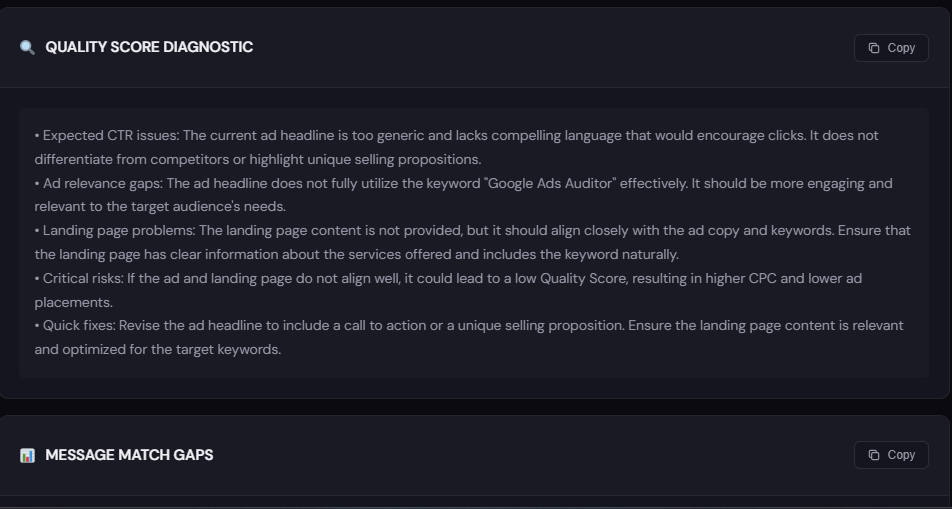
    • Use a headline/landing rewrite to close messaging gaps.

    4) Time-of-day volatility (missed dayparting wins)

    Symptoms

    • Strong performance in narrow hour windows and poor elsewhere
    • Manual schedules that don’t match conversion patterns
    • ROAS swings by hour that can’t be explained by volume

    Why it happens

    Most accounts set broad schedules and ignore hourly performance; that leaves budget on the table during peak hours and wastes it during low-return windows.

    Fix this week

    • Run an hour-of-day performance report for the last 60 days.
    • Set conservative bids during low-conversion hours, increase during peaks.
    • Monitor hourly CPA for three business cycles before locking schedule.

    5) Attribution and measurement drift

    Symptoms

    • Reported conversions change after analytics updates
    • Different teams see different conversion counts
    • Hard to reconcile ROAS across platforms

    Why it happens

    Multiple pixels, mismatched lookback windows, and changing attribution models cause inconsistent data. That uncertainty leads to wrong optimization decisions.

    Fix this week

    • Standardize conversion windows and document the model.
    • Reconcile Google Ads conversions with backend KPIs for top campaigns.
    • Use a wastage snapshot to surface measurement inconsistencies tied to spend.

    Fixes you can apply this week

    • Run a wastage snapshot on high-spend campaigns and add negatives for obvious leakage.
    • Export and tag keywords by intent; rebuild 5 ad groups that drive most conversions.
    • Audit top 50 search terms and pause/negate irrelevant ones.
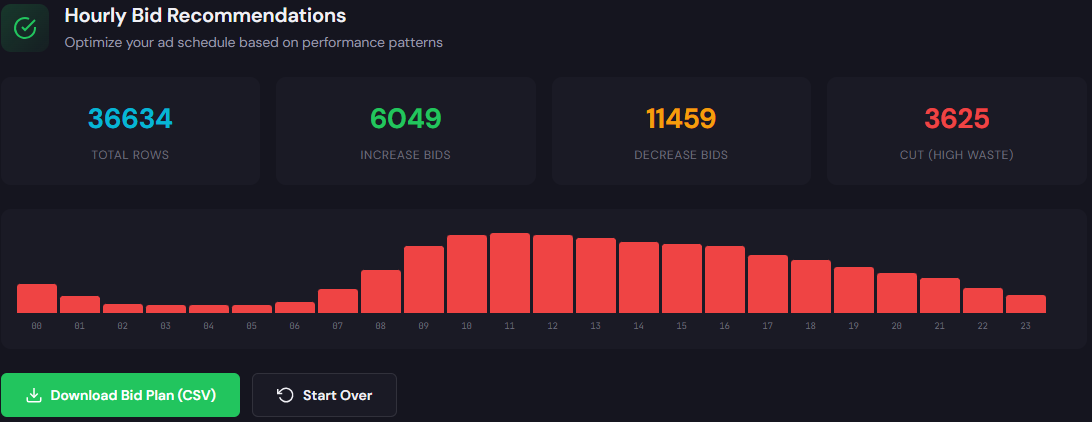
    • Use hourly performance data to implement daypart bid adjustments.
    • Document conversion definitions and reconcile top 3 campaigns to backend conversions.
    Quick start: run a free snapshot

    Run a wastage snapshot to see where budget leaks in minutes. The report gives specific negative keyword and recovery recommendations.

    Run a free check on ExecWrite


    Tool-based workflow: map problems to ExecWrite tools

    Wastage Snapshot & Recovery

    Wastage snapshot preview showing waste totals and recovery plan

    What it outputs: Dashboard snapshot with total wasted spend, top leakage categories (search terms, placements, match types), and a prioritized recovery plan you can action in under an hour.

    How to use it in 3 steps

    • Connect the account and select 30–90 day window to capture recent trends.
    • Review the top leakage list; export search terms flagged as high-spend, low-conversion.
    • Apply negative keywords and suggested campaign pauses, then re-run after 7 days.

    Open the Wastage Snapshot & Recovery tool

    Free AI Keyword Generator

    AI keyword generator preview showing structured keyword lists

    What it outputs: Intent-tiered keyword lists (high intent, informational, negatives), suggested ad group structure, and exportable CSVs ready for Google Ads Editor.

    How to use it in 3 steps

    • Enter your seed keywords and top converting landing pages to capture offer language.
    • Choose intent buckets and generate a list; review and tag by performance priority.
    • Export as CSV and import into the rebuilt campaign structure; keep negatives suggested by the tool.

    Open the Free AI Keyword Generator

    Using both tools together: run the wastage snapshot first to remove leakage, then rebuild clean keyword/ad-group structure with the AI generator to restore Quality Score and scale efficiently.

    90-minute account triage playbook

    Follow this time-boxed checklist to stabilize performance fast.

    • 0–10 min: Open account overview. Identify top 3 campaigns by spend.
    • 10–30 min: Run a search-term export for those campaigns. Flag top 20 irrelevant queries.
    • 30–50 min: Run the Wastage Snapshot tool on the same campaigns; apply immediate negatives it recommends.
    • 50–70 min: Export keyword lists; run the AI Keyword Generator for the highest-converting campaign to restructure 3 ad groups.
    • 70–85 min: Implement paused changes: add negatives, upload CSVs to Ads Editor, adjust ad schedules per hourly data.
    • 85–90 min: Document changes and set a 7-day check to compare CPA/ROAS vs baseline.
    Recover wasted spend & rebuild structure

    Start the triage with the Wastage Snapshot and follow with the AI Keyword Generator to rebuild campaign structure quickly.

    Start your account triage at ExecWrite

    FAQ

    How fast will I see impact after applying negatives?

    Expect CTR and CPA improvements within 48–72 hours, but measure over a 7–14 day window to control for seasonality and bid learning.

    Can I trust automated suggestions from these tools?

    Yes—tools surface high-confidence candidates, but always review recommendations against business context before applying them account-wide.

    Will restructuring keywords hurt historical data?

    Moving keywords between ad groups can reset some historical signals. Prioritize high-impact ad groups first and keep a snapshot of baseline metrics.

    How often should I run this triage?

    Weekly for high-spend accounts, biweekly for mid-size accounts. Run a full snapshot monthly.

    Sources

  • Why is my PPC account underperforming? Practical Google Ads fixes

    PPC Google Ads Marketing Ops

    Underperforming accounts look messy at a glance—lots of clicks, few conversions, odd CPA swings. This guide walks operators through the exact checks, quick fixes, and a tool-based workflow using ExecWrite so you can stop wasting budget and steer campaigns back to profitable signals. Visit ExecWrite to run live audits and recovery tools.

    TL;DR — Quick wins
    • Audit fast: find the top 20% of leakage that creates 80% of wasted spend.
    • Apply immediate controls: negatives, budget caps, and hour-based bid shifts.
    • Use ExecWrite tools to generate recovery plans and search-term bid fixes in minutes.

    Why PPC feels harder now

    Two trends make modern paid media unforgiving: rising CPCs and more noisy intent signals. Platforms push automated bidding and expanded match types while privacy changes reduce event fidelity. That means mistakes that used to be small (a single leaking search term, misaligned landing page) now compound faster and are harder to spot without tooling and a systematic triage.

    The 5 biggest PPC problems marketers face

    Problem 1: Wasted spend on low-intent search terms

    Symptoms

    • High impressions/clicks but low conversion rate in specific search-term reports.
    • Large tail of terms with spend but zero or one conversion.

    Why it happens

    Broad match and liberal keyword match settings plus limited negative keyword lists allow irrelevant queries to win clicks. Over time these low-intent queries inflate spend and drag down overall CPA.

    Fix this week

    • Export search terms, filter by spend-to-conversion ratio, and add top offenders to negatives.
    • Move high-spend, low-intent terms to passive match types and monitor for intent.
    • Pause or reduce budgets on campaigns with disproportionate tail spend while you triage.

    Problem 2: Budget leaks and misallocated spend

    Symptoms

    • Campaigns hitting daily budgets early with poor conversion efficiency.
    • Manual budget moves result in unpredictable performance elsewhere.

    Why it happens

    Without a top-down view, teams over-allocate to legacy campaigns or high-impression buckets instead of anchoring on ROAS/CPA. Smart bidding can amplify the issue by spending to maximize conversions that aren’t valuable.

    Fix this week

    • Freeze new budget increases. Reassign only after identifying where conversions originate.
    • Cap budgets on poor-performing campaigns and reallocate to proven winners.
    • Set portfolio bid strategies only after cleaning the search-term and conversion data.

    Problem 3: Hour-of-day and dayparting mismatch

    Symptoms

    • Large CPA swings by hour. Peak CPCs during non-converting hours.
    • Flat schedules that don’t match user behavior.

    Why it happens

    Many accounts use default schedules or historical averages that no longer match current demand. Auto-bidding can push spend into hours that appear cheaper but convert poorly.

    Fix this week

    • Analyze hour-of-day conversion rates and set bid adjustments to dampen spend in poor hours.
    • Test tighter ad schedules for 1–2 weeks and compare net CPA/ROAS.
    • Apply conservative bid decreases for low-conversion hours and increases where conversion rate is strong.

    Problem 4: Landing page mismatch and Quality Score drag

    Symptoms

    • Low click-to-conversion rates despite healthy CTRs.
    • Costly keywords with low Quality Score and high CPCs.

    Why it happens

    Ad copy and landing pages drift apart from the search intent. Even small relevance gaps reduce Quality Score, raising CPC and lowering competitive position.

    Fix this week

    • Align top ad headlines to landing page headlines and value props.
    • Run a short A/B test with a landing copy variation focused on the keyword intent.
    • Prioritize Quality Score fixes on high-volume, high-cost keywords first.

    Problem 5: Data noise from attribution and conversion tracking

    Symptoms

    • Conversion counts fluctuate with tag changes or platform updates.
    • Performance looks good in clicks but bad in last-click conversions (or vice versa).

    Why it happens

    Partial event capture, inconsistent attribution windows, and cross-domain failures introduce measurement error. That noise confuses bidding algorithms and operator decisions alike.

    Fix this week

    • Verify tag firing on key pages and events using a tag debugger.
    • Standardize attribution windows across reports used for bidding.
    • Segment an A/B experiment with a stable conversion definition to validate changes.

    Fixes you can apply this week

    • Run a waste snapshot to identify top leakage sources (campaigns, keywords, hours).
    • Export search-term reports, add top offenders to negatives, and label queries for follow-up.
    • Implement temporary budget caps on poor-performing campaigns and reallocate to clean audiences.
    • Apply hour-of-day bid adjustments based on last 30 days and watch CPA over 7 days.
    • Align ads and landing pages for your 10 highest-spend keywords and monitor Quality Score.
    • Confirm conversion tracking and freeze bidding changes during the cleanup window.
    Recover wasted spend faster

    Run a fast audit with ExecWrite to surface the top leakage areas and a prioritized recovery plan you can act on this week.

    Start a recovery snapshot on ExecWrite

    Tool-based workflow: map problems to ExecWrite tools

    Tool: Google Ads Wastage Snapshot & Recovery

    Wastage snapshot dashboard showing waste totals and recovery plan

    What it outputs: a dashboard-style snapshot that quantifies wasted spend, lists top leakage categories (search terms, campaigns, audiences), and proposes a step-by-step recovery plan.

    How to use it — 3 steps

    • Upload account data or connect your Google Ads view to generate the waste snapshot in minutes.
    • Review the top 10 leakage items and apply the recommended negative keywords, budget caps, or pause suggestions.
    • Export the recovery plan and assign actions to operators with deadlines; rerun the snapshot after 7 days to measure improvement.

    Open the Wastage Snapshot & Recovery tool


    Tool: Bid Adjustment by Search Term (Search Term Analyzer)

    Search term analyzer output table showing spend, conversions, tags, and recommended bid actions

    What it outputs: a per-search-term table that shows spend, conversion performance, recommended bid actions (up, down, neutral), and tags for quick bulk uploads.

    How to use it — 3 steps

    • Run the Search Term Analyzer to surface terms with poor spend-to-conversion ratios and recommended bid changes.
    • Apply bid adjustments or add negatives directly from the report. Tag terms for follow-up testing or keyword expansion.
    • Re-run weekly to keep the negative list and bid map current; export to bulk edit for Google Ads Editor.

    Open the Search Term Analyzer

    Both tools work together: run the waste snapshot first to prioritize recovery areas, then use the Search Term Analyzer for surgical bid and negative keyword actions.

    90-minute account triage playbook

    1. 0–10 min: Pull top-level metrics (last 30/7/1 day). Note CPA/ROAS swings and campaigns hitting budgets.
    2. 10–30 min: Run the Wastage Snapshot. Export top leakage items and top campaigns by wasted spend.
    3. 30–50 min: Run Search Term Analyzer for those campaigns. Mark top 20% of terms driving 80% of leakage.
    4. 50–70 min: Apply immediate fixes—add negatives, cap budgets, pause poor ad groups, set conservative bid adjustments for bad hours.
    5. 70–90 min: Align ads and landing pages on the 10 highest-spend keywords, confirm conversion tracking, and schedule a follow-up snapshot in 7 days.
    Run a 90-minute triage with ExecWrite

    Use the snapshot and search-term tools to get a prioritized recovery plan and export-ready fixes. Click below to start.

    Run tools now at ExecWrite

    FAQ

    How fast will I see results after applying fixes?

    You should see measurable lift in CPA/ROAS within 7–14 days for the fixes listed—unless major attribution issues hide true conversion performance.

    Are automated bid strategies still safe to use?

    Yes, but only after you clean search-term noise, fix conversion tracking, and stabilize budgets. Automation on noisy data amplifies mistakes.

    Can I recover historical wasted spend?

    You can’t retroactively reclaim clicks, but you can reallocate budget to higher-value queries and recover efficiency moving forward.

    Which ExecWrite tool should I run first?

    Start with the Wastage Snapshot to prioritize leakage, then use the Search Term Analyzer for surgical bid and negative moves.

    Sources

  • Why is my Google Ads performance slipping? A practical PPC audit playbook

    PPC Google Ads Marketing Ops

    If your Google Ads account feels inefficient, you’re not alone. This article gives a no-fluff, operational playbook to find waste, fix bids, and recover conversions using repeatable checks and two ExecWrite tools. Learn fast fixes, a 90-minute triage, and how to apply the tools at ExecWrite.

    TL;DR
    • Most performance drops stem from wasted spend, bid misalignment, or landing-page mismatch.
    • Run a quick waste snapshot and search-term bid audit to recover budget and improve ROI.
    • Use the 90-minute triage to create prioritized fixes you can apply this week.

    Why PPC feels harder now

    Automation, privacy changes, and rising CPCs increased variability and reduced signal. That makes manual assumptions risky and surfaces small leaks into big losses. The fix is not another metric dashboard — it’s targeted operational checks that find high-impact issues and apply deterministic fixes.

    The 5 biggest PPC problems marketers face

    1) Wasted spend (leakage across accounts)

    • Symptoms: Spend high, conversions flat; high cost-per-conversion for specific campaigns; many low-intent clicks.

    Why it happens: Campaigns and keywords accumulate leakage—broad match, poor negatives, and underused exclusions—while automated bidding hides the waste behind higher volume.

    • Fix this week:
    • Run a waste snapshot to quantify leakage by campaign and search term.
    • Pull top 200 search terms by spend and tag negatives in bulk.
    • Pause non-performing audience signals and reduce budgets on high-leak campaigns.

    2) Bid mismatch by hour/day (bad dayparting)

    • Symptoms: Hourly CPA or ROAS swings >30%, manual bids performing worse than automated in specific time windows.

    Why it happens: Aggregated metrics mask intra-day volatility. Default ad schedules or blanket bid modifiers ignore hour-level performance.

    • Fix this week:
    • Run an hour-of-day table to identify profitable windows.
    • Apply bid adjustments per hour or update ad schedule to favor top hours.
    • Monitor for 72 hours and iterate.

    3) Search term and keyword mismatch

    • Symptoms: High spend on unrelated queries, low CTR or high bounce rates, irrelevant impressions.

    Why it happens: Broad match expansion or poorly structured ad groups let irrelevant queries drive traffic. Negative keyword lists lag behind query behavior.

    • Fix this week:
    • Audit search terms by spend and conversions; add negatives and create focused exact/ad group rules for high-cost terms.
    • Segment high-intent vs exploratory queries and adjust match types.

    4) Low Quality Score / landing-page mismatch

    • Symptoms: High CPCs, low ad rank, low conversion rate on clicks that should convert.

    Why it happens: Ads, keywords, and landing pages aren’t aligned. Automated bidding can keep traffic flowing even when relevance is poor.

    • Fix this week:
    • Audit top ad groups for headline/landing page mismatch; run a small A/B on headline to landing page alignment.
    • Improve landing page CTAs and load speed; remove generic pages from campaign targets.

    5) Poor campaign structure and reporting blind spots

    • Symptoms: Hard-to-interpret performance, inconsistent tagging, and trouble exporting usable Editor CSVs.

    Why it happens: Accounts evolve without governance; naming conventions and export-ready structures are missing.

    • Fix this week:
    • Standardize naming, remove overloaded campaigns, and export current structure for a rebuild.
    • Create an Editor CSV with one high-priority campaign rebuilt and test changes live.

    Fixes you can apply this week

    • Run a top-level waste snapshot to quantify leakage by campaign, keyword, and search term.
    • Export search terms (last 30 days) and tag low-intent queries as negatives.
    • Generate an hour-of-day bid table and apply bid modifiers to top 25% hours.
    • Audit top 10 ad groups for landing-page mismatch and update 3 headlines to improve relevance.
    • Standardize names and export a single campaign to Google Ads Editor for a controlled rebuild.
    Ready to find wasted spend now?

    Run a Wastage Snapshot to see where budget is leaking and get an automated recovery plan.

    Run the Wastage Snapshot


    Tool-based workflow: map problems to ExecWrite tools

    Wastage Snapshot & Recovery

    Wastage snapshot output showing waste totals and recovery plan

    What it outputs: A dashboard-style snapshot showing total wasted spend, top leakage areas (campaigns, keywords, audiences), and a prioritized recovery plan with negative keyword candidates and budget recommendations.

    How to use it in 3 steps:

    • Upload or connect your account and run the snapshot to get a leakage summary (5–10 minutes).
    • Review the top 10 leakage items and accept the suggested negatives and pause recommendations.
    • Apply the recovery actions, reduce budgets on leaking campaigns, and remeasure performance after 72 hours.

    Tool: Wastage Snapshot & Recovery

    Bid Adjustment by Search Term (Search Term Analyzer)

    Search term analyzer output table showing spend, conversions, tags, and recommended bid actions

    What it outputs: A prioritized table of search terms with spend, conversions, CPA/ROAS, tags, and recommended bid actions (raise, hold, lower, negative).

    How to use it in 3 steps:

    • Export search-term data (last 30 days) and run the Search Term Analyzer.
    • Apply tags to group high-intent vs low-intent queries and export the recommended bid adjustments.
    • Update bids at keyword or ad group level, and lock in hourly adjustments for identified windows.

    Tool: Search Term Analyzer (Bid Adjustment by Search Term)

    Both tools together: run the Wastage Snapshot to stop leaks, then use the Search Term Analyzer to align bids and enforce negatives. This combination recovers budget and turns it into targeted, profitable traffic.

    90-minute account triage playbook

    • 0–10 min: Account quick-check — look at spend vs conversions, 3-day CPA trend, and top 5 spenders.
    • 10–30 min: Run Wastage Snapshot and export the top leakage list.
    • 30–50 min: Export search terms (last 30 days) and run Search Term Analyzer; tag and export recommendations.
    • 50–70 min: Apply urgent fixes — negatives, pause worst-leaking campaigns, and reduce budgets where recommended.
    • 70–90 min: Apply bid adjustments for top hours and the highest-value keywords; document changes and set a 72-hour check-in.
    • Post-triage: Schedule follow-ups — 72-hour performance check and a 14-day quality score and landing-page review.
    Execute the triage with ExecWrite

    Start the triage by running the Wastage Snapshot and Search Term Analyzer — get prioritized actions you can apply in the next 90 minutes.

    Start a free check at ExecWrite

    FAQ

    How fast will I see results after applying fixes?

    You should see measurable changes in 72 hours for spend and CPA. Quality Score and conversion-rate improvements typically show within 7–14 days after landing page updates.

    Can automation interfere with these fixes?

    Yes. Automated bidding can obscure leakage. Run the snapshot first, then apply conservative adjustments and monitor to avoid bouncing automated models.

    Do I need developer access to use the tools?

    No. ExecWrite tools accept exports or simple account connections. Most users run snapshots from CSV exports or a direct link depending on permissions.

    How do I prioritize fixes across many campaigns?

    Prioritize by wasted spend and convertibility: fix high-spend low-conversion campaigns first, then high-intent keyword bid alignment, then landing-page relevance.

    Sources

  • Why is my PPC wasting budget—and how do I fix it?

    PPCGoogle AdsMarketing Ops

    If your account feels like it leaks budget daily, this post gives an operator-level, prioritized plan to stop the bleeding. Try the quick checks below and try ExecWrite for fast audits and bid actions: execwrite.com.

    TL;DR
    • Most wasted PPC is process-driven: bad search term controls, weak bids, and landing-page mismatch.
    • Run a 90-minute triage, recover low-hanging spend with a wastage snapshot, and apply search-term bid actions.
    • Use the ExecWrite Wastage Snapshot and Search Term Analyzer to prioritize fixes and push corrective actions this week.

    Why PPC feels harder now

    Costs and complexity rise as auction dynamics, audience signals, and automation overlap. Teams are stretched and tooling hasn’t caught up: more automation decisions happen upstream while human workflows still handle negatives, landing pages, and campaign structure. That mismatch creates persistent leakage and slow reaction cycles.

    The 5 biggest PPC problems marketers face

    1. Wasted spend and budget leakage

    Symptoms

    • High spend with low conversion volume.
    • A lot of impressions and clicks from unexpected queries.
    • Campaigns hit budget caps but conversions remain flat.

    Why it happens: Lack of fast diagnostics and a centralized recovery plan. Teams can’t quickly find where budgets leak — broad keywords, irrelevant placements, or mis-tagged conversions.

    Fix this week

    • Run a wasted-spend snapshot to see top leakage buckets.
    • Pause or reduce budget for poorly converting campaigns by 20% until triage completes.
    • Export top spend rows by query and tag the worst offenders as negatives.

    2. Search term garbage (and missing negatives)

    Symptoms

    • Conversions concentrated in a few terms; remaining queries are irrelevant.
    • Broad-match or smart campaigns driving long-tail low-intent clicks.
    • High click volume on informational queries that never convert.

    Why it happens: Automation and broad match are useful but require active negative management and periodic pruning. Without a regular search-term review, costs balloon on low-intent demand.

    Fix this week

    • Pull last 30 days of search terms, sort by cost and conversion rate.
    • Mark obvious non-converting phrases as negatives and add intent modifiers to high-value keywords.
    • Convert repeat high-value search terms into exact/ad-group-level keywords.

    3. Wrong bids by time of day (dayparting misses)

    Symptoms

    • Conversion rate swings dramatically by hour/day.
    • Same campaign performs differently on weekdays vs weekends.
    • Automated bidding overcorrects and amplifies hourly noise.

    Why it happens: Many accounts rely on broad automated rules that ignore hour-of-day patterns. Without hour-level insight you bid up during poor-performing windows.

    Fix this week

    • Review hour-of-day performance for last 14–30 days for CPA/ROAS.
    • Apply conservative bid adjustments: -20% for low-conversion hours, +10–25% for high-conversion windows.
    • Monitor impact for 48–72 hours and iterate.

    4. Low ad-to-landing-page relevance (Quality Score drag)

    Symptoms

    • High CPCs for keywords with weak ad CTRs.
    • Landing page mismatch: traffic lands on generic pages with low conversion.
    • Traffic with decent CTR but low conversion rate.

    Why it happens: Ads and landing pages are built in silos. Copy changes or product updates leave ads out of sync with landing pages, reducing Quality Score and increasing costs.

    Fix this week

    • Identify top 10 high-cost keywords with low Quality Score.
    • Align headlines and description copy to landing-page H1s or create dedicated landing pages.
    • Test a single revised landing page per high-cost ad group.

    5. Poor account structure and attribution mismatch

    Symptoms

    • Many keywords stuffed into one ad group; little control.
    • Conversion tracking fires inconsistently across pages.
    • Performance looks different in GA vs Ads.

    Why it happens: Rapid scaling and piecemeal campaign builds create structural debt. Attribution differences hide true ROI and prevent correct bid decisions.

    Fix this week

    • Remap top-performing keywords into 1–2 focused ad groups.
    • Audit conversion tags and confirm event counts match across platforms.
    • Use first/last-click checks to reconcile obvious discrepancies.

    Fixes you can apply this week

    • Run a single wasted-spend snapshot across your account to identify the top 3 leakage buckets.
    • Create a temporary budget lock: cut 10–30% from underperforming campaigns until triage.
    • Export search terms (last 30 days), tag negatives, and promote high-intent queries to exact match.
    • Apply conservative hour-of-day bid adjustments where CPA is 20%+ worse than daily average.
    • Align 1 landing page per top ad group and measure lift for 7 days.
    Quick recovery option

    Run an automated wastage audit and get a prioritized recovery plan in minutes.

    Run an ExecWrite snapshot

    Tool-based workflow: map problems to ExecWrite tools

    Wastage snapshot preview

    Wastage Snapshot & Recovery

    What it outputs: A dashboard-style snapshot showing total wasted spend, top leakage areas, and a recovery plan with prioritized actions.

    How to use it (3 steps)

    1. Upload your account spend data or connect via export and run the Wastage Snapshot: it finds budget leaks and negative keyword opportunities automatically.
    2. Review the top 5 leakage buckets and the recommended quick actions in the recovery plan.
    3. Apply the recommended changes: pause low-converting campaigns, add negatives, and reallocate budget to high-return campaigns.

    Open the Wastage Snapshot

    Search term analyzer output table showing spend, conversions, tags, and recommended bid actions

    Bid Adjustment by Search Term (Search Term Analyzer)

    What it outputs: A ranked table of search terms with spend, conversion rate, and recommended bid actions (increase, decrease, negative).

    How to use it (3 steps)

    1. Export your search terms for the last 30 days and upload to the Search Term Analyzer.
    2. Filter by cost and low conversion rate to get immediate negative candidates and bid-adjust recommendations.
    3. Export recommended bid changes and upload to Google Ads Editor or apply via scripts for fast execution.

    Try the Search Term Analyzer

    90-minute account triage playbook

    1. 0–10 min — Snapshot overview: run the Wastage Snapshot and skim the top 3 leak buckets.
    2. 10–30 min — Pause action: reduce budgets or pause the worst-performing campaigns identified.
    3. 30–50 min — Search-term clean sweep: upload search terms to the Search Term Analyzer, create negatives, and identify keywords to promote.
    4. 50–70 min — Bid tweaks: apply hour-of-day adjustments for identified poor windows and push conservative bid reductions where CPA is high.
    5. 70–90 min — Landing page check & tracking: confirm conversion tags and adjust 1 landing page copy or CTA for a high-cost ad group.
    6. Post-triage — Monitor for 48–72 hours and revert or iterate based on delta in CPA/ROAS.
    Start the 90-minute triage

    Use ExecWrite to run the snapshot and export immediate bid and negative recommendations to execute your triage faster.

    Start a snapshot

    FAQ

    How fast will I see results after applying fixes?

    Answer

    Expect initial KPI movement in 48–72 hours for bid and negative changes. Landing-page and structural changes may take 7–14 days to stabilize.

    Can I trust automated bid recommendations?

    Answer

    Use automated recommendations as a prioritization layer, not an automatic deploy. Validate top changes in a low-risk environment (small budgets or Editor CSVs) before scaling.

    Will removing keywords hurt volume?

    Answer

    Removing low-intent queries reduces volume but improves efficiency. Promote high-performing queries to exact match to preserve conversion volume while cutting waste.

    How often should I run these audits?

    Answer

    Start weekly for accounts with >$10k/month spend until leakage is under control, then move to biweekly or monthly checks depending on volatility.

    Sources

  • Why is my Google Ads PPC budget leaking?

    PPCGoogle AdsMarketing Ops

    If your account spends but doesn’t convert, you need a practical triage—not theory. This guide walks through the exact faults that leak budget and gives a tight, tool-backed recovery path you can run this week. Start with a quick audit or visit ExecWrite for free snapshots and generators.

    TL;DR
    • Most wasted spend comes from poor match/keyword hygiene, ad-to-landing mismatch, and undiagnosed budget leaks.
    • Run a 90-minute triage: waste snapshot, keyword surface, and targeted bid fixes to stop the bleeding.
    • Use two ExecWrite tools (Wastage Snapshot & AI Keyword Generator) to recover spend and re-launch high-intent campaigns.

    Why PPC feels harder now

    Fewer cheap wins, more automation, and noisy signals make routine optimizations less effective. Cookies and targeting shifts increase ambiguity; smart bidding amplifies broken inputs. The result: accounts burn budget faster and yield fewer clear fixes. You need surgical diagnosis, not broad strategy sessions.

    The 5 biggest PPC problems marketers face

    Poor keyword hygiene and match-type leakage

    Symptoms

    • High spend on long-tail queries with zero conversions.
    • Unexpected branded or irrelevant search terms triggering ads.
    • CTR low but CPC high on broad-match-heavy campaigns.

    Why it happens — Broad match and aggressive expansion without consistent search-term reviews create the biggest source of waste: irrelevant impressions and clicks.

    Fix this week

    • Export last 90 days of search terms; tag non-converting and irrelevant queries.
    • Push top negatives into shared negative lists and pause offending keywords/ad groups.
    • Convert high-volume irrelevant queries into negatives at account level.

    Ad-to-landing-page mismatch (low relevance)

    Symptoms

    • High bounce rate and low conversion rate despite decent CTR.
    • Low quality score on key keywords.
    • Short session times and quick exits from paid landing pages.

    Why it happens — Messaging drift: ads promise one thing, landing pages deliver another. Automated bidding magnifies the cost of this mismatch.

    Fix this week

    • Map top ad headlines to landing page headlines; fix the most mismatched pairs first.
    • Add clear intent-driven CTAs and one-click conversion paths on landing pages.
    • Use a simple A/B test: control vs. messaging-aligned variant for highest-spend ad groups.

    Budget leaks and wasted spend pockets

    Symptoms

    • Spikes of spend that produce little or no conversions.
    • High spend on low-intent campaigns or test variations nobody owns.
    • Cross-campaign cannibalization where multiple campaigns target the same queries.

    Why it happens — Complex account structures, overlapping targeting, and unmonitored experiments create places where spend runs unchecked.

    Fix this week

    • Run a waste snapshot to identify top leakage areas (by spend, by ad group).
    • Pause or cap budget on experiments that exceed ROI thresholds.
    • Consolidate overlapping campaigns or set negative audiences/keywords to reduce cannibalization.

    Poor bid timing and dayparting

    Symptoms

    • Large hour-to-hour swings in CPA or conversion rate.
    • Automatic bidding incorrectly prices low-converting hours the same as peak hours.
    • Ad schedule is flat even when performance is not.

    Why it happens — Many accounts never check hour-of-day performance; automated bidding can’t fix a flawed schedule without correct inputs.

    Fix this week

    • Pull hourly performance and apply -30% to hours with worst CPA, +20% to highest-performing hours.
    • Set ad schedule caps for low-converting times rather than full pause if volume matters.
    • Revisit after 7 days and adjust based on observed conversion windows.

    Landing page conversion leaks (post-click)

    Symptoms

    • Good lead volume but poor lead quality or low demo requests.
    • High drop-off on multi-step forms or gated content pages.
    • Conversion rate declines while impressions/clicks stay steady.

    Why it happens — UX frictions, slow pages, or poor qualification flows turn clicks into wasted budget.

    Fix this week

    • Strip forms to essentials on highest-volume pages and retest for conversion lift.
    • Run page-speed checks and fix assets causing >1s load delays.
    • Implement quick verification or qualification steps to improve lead quality without blocking conversion.

    Fixes you can apply this week

    • Run a one-click wastage audit on your top 3 campaigns to expose leakage areas.
    • Export search terms, create shared negative lists, and apply at account level.
    • Align top 10 ad headlines with landing-page H1s for your two highest-spend ad groups.
    • Implement simple daypart bid adjustments for the worst and best 3 hours.
    • Cap experimental budgets, and reassign budget to top-performing ad groups.
    Stop the bleeding: run a quick recovery

    Run a wastage snapshot and a keyword generation pass to recover wasted spend and relaunch focused campaigns.

    Start recovery on ExecWrite

    Tool-based workflow

    Below are two lightweight ExecWrite tools that replace hours of manual triage. Each entry shows output and a 3-step usage plan with a preview.

    Wastage Snapshot & Recovery

    Wastage snapshot dashboard showing waste totals and recovery plan

    What it outputs: Dashboard-style snapshot with top leakage areas, waste totals, and a prioritized recovery plan you can act on immediately.

    How to use (3 steps)

    • Upload your Google Ads export for the last 90 days and let the tool identify top-leaking campaigns and ad groups.
    • Review the prioritized recovery list and accept recommended pauses, negative keyword suggestions, and budget caps.
    • Export the recovery plan and apply changes in Google Ads Editor or via the linked CSV to implement in under 30 minutes.

    Open the Wastage Snapshot & Recovery tool

    Free AI Keyword Generator

    Keyword generator preview showing high-intent and negative lists

    What it outputs: Structured keyword lists split by intent, negative keyword suggestions, and export-ready ad group structures.

    How to use (3 steps)

    • Enter your core product, landing page, or top-converting search terms.
    • Generate intent-segmented lists and review suggested negatives to prevent match-type leakage.
    • Export ad-group CSV or copy the lists into Google Ads Editor to rebuild focused campaigns quickly.

    Open the Free AI Keyword Generator

    90-minute account triage playbook

    Follow this timed checklist to stop budget leakage and create a prioritized recovery plan.

    • 0–10 min: Run a Wastage Snapshot on your top 3 campaigns to get a leakage heatmap.
    • 10–25 min: Export search terms for those campaigns; tag and compile negatives.
    • 25–40 min: Apply immediate pauses/budget caps to top 3 leaking ad groups (per snapshot).
    • 40–60 min: Use the AI Keyword Generator to create focused ad group lists for the two highest-value themes from your snapshot.
    • 60–80 min: Align top ad headlines with landing-page H1s; create one messaging-aligned landing page variant per theme.
    • 80–90 min: Deploy changes via Google Ads Editor, reassign saved budgets, and set a 7-day monitoring check.
    Run the triage with ExecWrite

    Get the snapshot and keyword generator in the same workflow—recover spend and relaunch clean campaigns fast.

    Run your account triage

    FAQ

    How fast will I see improvements?

    You should see lower wasted spend immediately after pausing leaks; conversion-rate improvements typically appear within 7–14 days after aligning ads and landing pages.

    Do these tools change bids automatically?

    ExecWrite provides recommended bid adjustments and export files. You retain control—apply changes manually or via Google Ads Editor to keep governance intact.

    Will negative lists hurt scale?

    Properly scoped negatives reduce irrelevant clicks without blocking high-intent traffic. Use intent-segmented negatives so you remove noise but preserve scale.

    Can the tools work for small budgets?

    Yes. Small accounts benefit most from quick waste discovery—recovering even 10–20% of spend can materially improve CPA and ROI.

    Sources

  • Why is my Google Ads PPC account wasting budget — how do I fix it fast?

    PPCGoogle AdsMarketing Ops

    Why is my Google Ads PPC account wasting budget — and how do I fix it fast?

    Wasted spend shows up as noise in reports and missed targets in board meetings. This post walks through the practical fixes you can apply this week, a 90-minute account triage playbook, and two ExecWrite tools that turn audits into action. See more at ExecWrite for hands-on utilities.

    TL;DR
    • Most waste comes from mismatched intent, untracked conversions, and poor bid timing — not just bidding algorithm failure.
    • Run a waste snapshot and search-term bid audit to find immediate levers (negatives, bid cuts, ad-schedule changes).
    • Use the ExecWrite Wastage Snapshot and Search Term Analyzer to produce prioritized, executable lists in minutes.

    Why PPC feels harder now

    Performance marketing has fewer obvious levers than it used to: privacy changes, automated bidding, and complex account structures hide the root cause. Marketers who rely on surface-level metrics (impressions, CTR) miss spikes in leakage and attribution gaps. The result: budgets climb while ROAS and pipeline decline.

    Fixing this requires operator-level work: audit signals, validate conversions, prune low-intent queries, and apply time-based bid controls. Below are the recurring pain points and exact, short checklists you can run through this week.

    The 5 biggest PPC problems marketers face

    1) Wasted spend from low-intent search terms

    Symptoms

    • High spend on queries with no conversions
    • Lots of clicks from broad or modified-match queries
    • Surprising search terms in search-term reports

    Why it happens

    Automated match types and aggressive keyword match expansion can pull in queries with low purchase intent. Accounts that haven’t been pruned regularly accumulate negatives and low-performing search terms.

    Fix this week

    • Export last 30 days of search terms, sort by cost without conversions.
    • Add top zero-conversion, high-cost queries as negatives by relevance bucket.
    • Limit broad and phrase match spend with tighter bids or anchoring them to performance-focused match types.

    2) Conversion tracking and attribution gaps

    Symptoms

    • Discrepancies between GA4 and Ads conversions
    • High clicks, low recorded conversions after site changes
    • Automatic rules and smart bidding losing signal

    Why it happens

    Tagging breaks from site updates, consent mode changes, or incorrect goal setup. When smart bidding loses conversion signal it optimizes on weaker proxies, wasting spend.

    Fix this week

    • Validate Ads conversion lines against server logs or CRM for a sample of recent conversions.
    • Check global site tags, gtag.js presence, and consistent event names.
    • Temporarily switch critical campaigns to manual bidding while you repair conversion signal.

    3) Poor ad-to-landing relevance (Quality Score drains)

    Symptoms

    • Low Quality Scores in high-opportunity ad groups
    • Declining CTRs and rising CPCs on previously stable keywords
    • Landing pages with poor alignment to ad headlines

    Why it happens

    Copy and landing pages drift apart over time: promo pages change, creative rotates, and nobody updates headlines. Quality Score falls and costs rise.

    Fix this week

    • Identify ad groups with QS <= 6 and high volume.
    • Align one ad headline and one landing page per ad group to match the top keyword intent.
    • Test a landing-page headline swap or focused variant for 7–14 days.

    4) Hourly/dayparting misses (wrong bids at wrong time)

    Symptoms

    • Strong conversion windows with low impression share or poor bids by hour
    • Unexplained CPA swings by time of day
    • Manual or automated bids that ignore local buying hours

    Why it happens

    Many accounts use blanket ad schedules or let automated bidding smooth across hours. When user intent is time-sensitive, you either underspend peak windows or overbid slow ones.

    Fix this week

    • Break performance by hour-of-day and identify top 3 converting hours.
    • Apply positive multipliers for peak windows and reduce bids off-peak by a set percentage.
    • Monitor for 7 days and adjust by small increments.

    5) Overlapping audiences and campaign cannibalization

    Symptoms

    • Multiple campaigns competing for the same queries/audiences
    • Lower ROAS when new campaigns launch
    • Conversion credit split across similar funnels

    Why it happens

    Account sprawl and lack of negative targeting allow campaigns to compete, raising CPCs and reducing clarity on which creative or landing page performs best.

    Fix this week

    • Map campaign objectives and target overlaps in a spreadsheet.
    • Add campaign-level negatives to enforce priority (brand vs. generic, geo splits).
    • Pause overlapping low-volume campaigns and reassign high-value queries to a single, prioritized funnel.

    Fixes you can apply this week

    • Run a quick wastage snapshot to find top leakage buckets (search terms, auto-bids, budgets).
    • Export the last 30 days of search terms; add negatives for zero-conversion high-cost queries.
    • Validate conversion events for top 3 campaigns; fix tag/consent issues or pause smart bidding temporarily.
    • Align one ad group per campaign: headline, keyword, landing page. Test a landing headline swap.
    • Apply ad-schedule bid modifiers based on top converting hours.
    Run a quick audit with ExecWrite

    Use the Wastage Snapshot to find leaks and the Search Term Analyzer to convert findings into negatives and bid actions fast.

    Open ExecWrite tools

    Tool-based workflow (map each pain point to ExecWrite tools)

    Below are two tools that replace hours of manual triage with prioritized outputs. Each tool shows what it produces and a 3-step way to use the output.

    Wastage snapshot dashboard showing waste totals and recovery plan

    Wastage Snapshot & Recovery — what it outputs
    • Dashboard-style snapshot with total wasted spend and top leakage areas.
    • Priority recovery plan: negatives, budget moves, and quick ad fixes.
    • Exportable tasks you can push to an audit ticket list.

    How to use it — 3 steps

    1. Upload or connect your account data and run the snapshot.
    2. Review the top 5 wasted areas the tool surfaces (search terms, budget leaks, poor-performing campaigns).
    3. Export the recovery plan and implement the top 1–3 actions this week.

    Open the Wastage Snapshot

    Search term analyzer output table showing spend, conversions, tags, and recommended bid actions

    Bid Adjustment by Search Term — what it outputs
    • Search-term table with spend, conversions, CPA, and recommended bid adjustments.
    • Tagging and export features for negatives and bid-change CSVs.
    • Hour-of-day aggregate views in the Hourly Bid Adjuster when you need dayparting.

    How to use it — 3 steps

    1. Run the Search Term Analyzer over the past 30 days to get a sorted list of cost-without-conversion queries.
    2. Tag high-cost/no-conversion rows as negatives and export a negative list for upload.
    3. Use the recommended bid changes to generate a Google Ads Editor CSV or apply multipliers directly.

    Open the Search Term Analyzer

    90-minute account triage playbook

    Run this sequence with a single analyst. The goal: identify top 3 actionable fixes you can implement the same day.

    1. Minutes 0–10: Pull top-level KPIs (last 30/90 days) — cost, conv, CPA, conv rate; flag campaigns with +25% CPA or -20% conv rate vs baseline.
    2. Minutes 10–30: Run Wastage Snapshot for a leakage heatmap. Export top 10 leak items.
    3. Minutes 30–50: Run Search Term Analyzer for high-cost/no-conversion queries; tag and export negatives and bid actions.
    4. Minutes 50–70: Check conversion tracking for the top 3 campaigns flagged earlier — confirm event fires and look for GA/Ads mismatches.
    5. Minutes 70–90: Implement three quick actions: upload negatives, pause/adjust worst-performing campaign, and set ad-schedule modifiers for peak hours.

    FAQ

    Q: How quickly will these fixes improve CPA?

    Short answer: you can see visible CPA improvement in 7–14 days after implementing negatives and bid changes. Smart bidding needs stable conversion signal — if that’s broken, fixes may be immediate once tracking is restored.

    Q: Should I pause smart bidding while I triage?

    Pause only for campaigns where conversion signal is unreliable. Otherwise use small manual overrides and leverage dayparting. If conversions are missing, pause smart bidding until you verify events.

    Q: Can these tools generate Google Ads Editor CSVs?

    Yes. The Search Term Analyzer and bid adjustment tool export Editor-ready CSVs for negatives and bid change bulk uploads.

    Q: Are these safe to run on high-volume accounts?

    Yes — start in read-only mode, review the proposed actions, and apply changes incrementally. The tools prioritize conservative fixes first.

    Start triaging now with ExecWrite

    Run a Wastage Snapshot and Search Term Analyzer to generate prioritized actions in minutes. Stop wasting budget and reclaim performance.

    Open ExecWrite

    Sources

  • Why is PPC getting harder—and how do you stop wasting Google Ads budget?

    PPCGoogle AdsMarketing Ops

    PPC is noisier, more automated, and more expensive than it was five years ago. This post gives a tight, tactical playbook and shows how to use ExecWrite tools at execwrite.com to stop leakage and create predictable wins.

    TL;DR
    • Most wasted spend comes from relevance, bidding timing, and unfiltered search terms—fix those first.
    • Run a 90-minute triage, then apply a 7-item checklist to capture quick wins this week.
    • Use the Wastage Snapshot for a rapid audit and the Free AI Keyword Generator to rebuild intent-aligned ad groups.

    Why PPC feels harder now

    Execution expectations are higher: automation is everywhere, auctions are more competitive, and measurement noise makes decisions riskier. Two structural shifts drive the pressure:

    • Automation opacity: Smart bidding and automated targeting reduce manual levers and hide causal signals; you need better inputs to get reliable outputs (see Google’s Smart Bidding guidance).
    • Attention fragmentation and rising CPCs: More advertisers chasing fewer high-intent queries increases CPCs and forces tighter ROI control.

    The fixes below focus on what operators can actually control this week: relevance, waste audits, bids by time, and structure. Where automation is used, give it cleaner data and tighter constraints.

    The 5 biggest PPC problems marketers face

    Poor search-term hygiene

    Symptoms

    • High spend on irrelevant queries with no conversions.
    • Large sets of low-intent search terms inflating CPA.
    • Ad groups with mixed intent keywords and collapsing CTR/Conversions.

    Why it happens

    Search-term reports are large and tedious; teams delay cleaning. Without quick tagging and action, negative keywords lag and automation continues to bid on junk.

    Fix this week

    • Export last 30 days search terms, sort by spend and zero conversions.
    • Add negatives for exact-match junk queries and pause low-intent keywords.
    • Create tags for ‘review’/’negative’ to track changes.

    Ad-to-landing-page mismatch (Quality Score leaks)

    Symptoms

    • Low CTR, high CPCs, and conversion rate drops after message changes.
    • High impression share but low conversion rate compared to peers.

    Why it happens

    Disjointed creative or landing pages trigger lower Quality Scores. Automation assumes relevance; when messaging drifts, bid strategies optimize for the wrong outcome. Google’s Quality Score factors show relevance matters.

    Fix this week

    • Compare top-performing ad headlines to landing page H1s and CTAs—align them exactly.
    • Run a 1-page relevance audit: headline, offer, CTA, and load speed.
    • Temp reduce bids on ad groups with QS below account median until fixes are live.

    Wasted budget from overlap and broad matches

    Symptoms

    • Multiple ad groups triggering for the same set of search terms.
    • Broad match keywords generating irrelevant but high-cost traffic.

    Why it happens

    Broad match and Broad Match Modifier expose accounts to query drift. Without negative keyword lists and staged keyword expansion, overlap multiplies wasted spend.

    Fix this week

    • Identify top overlapping queries and pin them to a single tightly themed ad group.
    • Add negatives to other groups and move aggressive expansion to a separate test campaign.
    • Convert high-cost, irrelevant broad matches to phrase or exact for testing.

    Wrong bid timing and inefficient dayparting

    Symptoms

    • Sharp hourly swings in CPA or ROAS with no bid adjustments.
    • Campaigns exhausting budget during low-conversion hours.

    Why it happens

    Many teams rely on daily budgets alone. Hour-of-day performance patterns are predictable and actionable—ignoring them wastes daily spend.

    Fix this week

    • Segment last 14 days by hour-of-day and calculate CPA/ROAS per hour.
    • Reduce bids or ad delivery during low-performance hours; increase during consistent high-performance hours.
    • Use a conservative +-20% cap on adjustments to avoid throttling automation.

    Poor campaign structure and orphan keywords

    Symptoms

    • Ad groups with 20+ unrelated keywords; low relevance and low CTR.
    • Legacy keywords leaking impressions across campaigns.

    Why it happens

    Rapid scaling or handed-off accounts accumulate orphaned keywords. Poor structure stops learning signals from accumulating where they matter.

    Fix this week

    • Rebucket keywords into tighter ad groups (3–7 keywords each) by intent and landing page.
    • Pause orphan keywords and re-import them into a structured CSV via Google Ads Editor.
    • Document a naming convention and enforce it in new campaigns.

    Fixes you can apply this week

    • Run a 30-day wastage snapshot to find top leakage areas.
    • Apply negative keywords for the top 20 irrelevant search terms.
    • Stage broad-match tests in a separate campaign with strict budget control.
    • Align top 3 ad headlines with landing page top-fold headline and CTA.
    • Calculate hourly CPA/ROAS and set conservative daypart bid adjustments.
    • Consolidate ad groups to 3–7 keywords and pause low-volume or duplicate keywords.
    • Track all changes in a shared spreadsheet for 14-day outcome measurement.
    Run a rapid wastage audit

    Use the Wastage Snapshot to find quick negative keywords, budget leaks, and recovery actions in minutes.

    Open ExecWrite


    Tool-based workflow (map problems to ExecWrite tools)

    Tool: Wastage Snapshot & Recovery

    Wastage snapshot dashboard preview

    What it outputs

    • Dashboard showing total wasted spend, top leakage sources, and a prioritized recovery plan.
    • Lists of high-spend, zero-conversion search terms and recommended negative additions.

    How to use it (3 steps)

    1. Upload account spend & search term CSV for the last 30 days.
    2. Review the top leakage areas and export the negative keyword list.
    3. Apply negatives and export a step-by-step recovery plan to your ops doc.

    Open the Wastage Snapshot

    Tool: Free AI Keyword Generator

    AI keyword generator preview

    What it outputs

    • Intent-segmented keyword lists (high intent, modifiers, negatives) and ad group suggestions ready for export.
    • Structured CSVs suitable for Google Ads Editor.

    How to use it (3 steps)

    1. Input your top-performing landing page or product description.
    2. Select intent buckets and generate keyword sets.
    3. Export grouped CSVs and upload to Editor or a staging campaign.

    Try the Free AI Keyword Generator

    Mapping: use the Wastage Snapshot to fix search-term hygiene, overlap, and budget leaks. Use the AI Keyword Generator to rebuild structure and align ads to landing pages, improving Quality Score and CTR.

    90-minute account triage playbook

    1. 0–10 min: Export account-level search terms, campaign performance, and top ad group stats (last 30 days).
    2. 10–25 min: Run the Wastage Snapshot and skim the top 10 leak items (spend with no conversions).
    3. 25–40 min: Apply immediate negatives for the top 10 irrelevant terms and pause 1–2 worst-performing broad matches.
    4. 40–55 min: Pull ad->landing page pairs for the top 5 ad groups by spend. Align headlines and CTAs; note edits to push live.
    5. 55–70 min: Calculate hour-of-day CPA/ROAS for top campaigns and add conservative bid adjustments for clear low/high hours.
    6. 70–85 min: Rebucket 5 orphan keywords into tighter ad groups using the AI Keyword Generator for suggested groupings.
    7. 85–90 min: Record every change in your ops doc and set a 14-day check-in to measure lift.

    FAQ

    How fast will I see results after applying negatives?

    Expect immediate reduction in irrelevant clicks within 24–72 hours. Performance improvements like lower CPA usually show within a week if you also align ads and bids.

    Can automation hurt performance after these fixes?

    Yes—automation amplifies both good and bad inputs. Treat smart bidding as an amplifier: cleaner structure and better negatives improve automated outcomes (see Google’s Smart Bidding documentation).

    Should I pause broad match entirely?

    No. Use broad match in a controlled test campaign with strict budgets and negative lists. Scale only when it drives stable ROI.

    How do I prioritize fixes if resources are limited?

    Start with search-term negatives, then stop the top 1–2 leak campaigns. Next, align ads to landing pages for your top-spend ad groups. Those three moves return the fastest ROI.

    Sources

    Start recovering wasted spend today

    Run a snapshot, export negatives, and rebuild a structured keyword set—all from ExecWrite. Fast audits, export-ready outputs, and playbooks for ops teams.

    Get started at ExecWrite

  • Why is my Google Ads PPC budget leaking — and how do I stop it?

    PPC Google Ads Paid Media

    If your Google Ads account feels like a money drain, you’re not alone. This post walks through why paid media gets harder, the five core problems that cause budget leakage, and an operator-grade recovery workflow. Use the guidance below alongside the free tools at ExecWrite to triage and fix waste in hours, not weeks.

    TL;DR
    • Wasted spend usually comes from poor match/type controls, broken intent signals, time-of-day and device swings, and low relevance across ad → landing page.
    • Quick wins: pause high-cost non-converting queries, add negatives, reduce bids by hour/device where CPA spikes, and fix top landing-page mismatches.
    • Use two focused ExecWrite tools—the Wastage Snapshot & Recovery and the Search Term Analyzer—to find leak points, then apply a 90-minute triage playbook.

    Why PPC feels harder now

    Performance marketing used to be a predictable auction—signal to conversion. Today you’re battling broader match types, AI-driven bidding, cross-device journeys, and noisier query sets. Those changes increase volume but reduce visibility into which clicks actually drive value. The result: more spend, less insight, and slower troubleshooting cycles.

    The 5 biggest PPC problems marketers face

    1) Query-level wastage (bad search terms)

    Symptoms

    • High spend on long-tail queries with zero conversions.
    • High CPA for broad/phrase match groups that previously performed.
    • Large search term reports with dozens of low-intent hits.

    Why it happens

    Match-type expansion and broad match with smart bidding can amplify low-intent queries. Without systematic search-term tagging and negative lists, wasted clicks compound quickly.

    Fix this week

    • Export last 30–90 days of search terms; filter by cost > X and conversions = 0.
    • Turn those queries into negatives or add to a low-priority diagnostic campaign.
    • Create intent-based labels (branded, transactional, research) and segment reports by label.

    2) Time-of-day and dayparting leaks

    Symptoms

    • CPA or ROAS swings wildly by hour.
    • Top-converting hours have small impression share; low-converting hours consume budget.
    • Manual bids unchanged despite clear hourly patterns.

    Why it happens

    Automated bidding models smooth to averages; hourly performance gets flattened. Without hour-level analysis, bids stay too high during poor-performing windows.

    Fix this week

    • Review hour-of-day performance for cost, conversions, CPA over 30 days.
    • Apply -20% to bids on recurring low-performing hours and +10–20% to peak hours.
    • Set an ad schedule to limit exposure during expensive, low-converting times.

    3) Landing page relevance and Quality Score sinks

    Symptoms

    • Low CTR for keywords that should be high-intent.
    • High bounce rates and falling conversion rates after recent copy or creative changes.
    • Quality Score under 6 on priority keywords.

    Why it happens

    Messaging mismatch between ad and landing page, slow pages, or poorly aligned CTAs reduce ad relevance and increase CPC. Quality Score penalties compound wasted spend over time.

    Fix this week

    • Run a headline-to-landing-page alignment check for top keywords.
    • Prioritize fixing headline, CTA, and above-the-fold messaging for the top 3 low-QS keywords.
    • Use a landing-page rewrite or targeted A/B test for those pages.

    4) Budget leaks from duplicate or overlapping audiences/campaigns

    Symptoms

    • Competing bids across campaigns for the same queries.
    • Unexpected spend spikes when new audience layers are applied.
    • CPA rising after broadening targeting.

    Why it happens

    Campaigns targeting the same intent can bid against each other; layered audiences with overlapping members reduce efficiency and increase CPCs.

    Fix this week

    • Audit campaign targeting overlaps; pause or consolidate duplicates.
    • Prioritize single campaign funnels for identical intent groups.
    • Use negative audience or bid adjustments to separate layers.

    5) Automation masking performance shifts

    Symptoms

    • Automated bidding hides why CPA increased.
    • Sudden CAC increases linked to algorithm changes.
    • Metrics improve superficially but conversion quality drops.

    Why it happens

    Smart bidding optimizes to signals but can overfit to short-term noise. Without query and landing-page inspection, automation can steer budget to low-quality conversions.

    Fix this week

    • Set performance guardrails (target CPA bands, max bid caps) for critical campaigns.
    • Run a short-term manual experiment on key campaigns to isolate changes.
    • Use conversion value filters to ensure optimization aligns with business KPIs.

    Fixes you can apply this week

    • Export search-term data (30–90 days); add negatives for high-cost non-converting queries.
    • Run an hour-of-day performance report and apply ad scheduling/bid modifiers.
    • Audit top 10 keywords for Quality Score and align ad headlines with landing pages.
    • Consolidate overlapping campaigns and freeze new audience layers until performance stabilizes.
    • Apply bid caps or conservative targets on automated bids while troubleshooting.
    Run a quick wastage snapshot

    Use a focused account snapshot to find top leakage areas and a prioritized recovery plan in minutes.

    Start a snapshot at ExecWrite

    Tool-based workflow: map problems to ExecWrite tools

    Below are two tools that produce actionable outputs. Use them in sequence: snapshot → search-term analysis → targeted fixes.

    Wastage Snapshot & Recovery

    Wastage snapshot preview

    What it outputs

    • Top leakage areas by campaign/ad group/keyword.
    • Estimated wasted spend and quick-recovery checklist.
    • Negative keyword and budget reallocation recommendations.

    How to use it (3 steps)

    1. Upload your Google Ads account export or connect via the tool and run the snapshot for the last 30 days.
    2. Review the recovery plan: it highlights high-impact negatives, budget leaks, and campaigns to pause.
    3. Apply top-3 recommendations (negatives, budget shifts, quick landing fixes) and re-run in 7 days to measure lift.

    Open the Wastage Snapshot & Recovery tool

    Search Term Analyzer (Bid Adjustment by Search Term)

    Search term analyzer output table showing spend, conversions, tags, and recommended bid actions

    What it outputs

    • Search-term table with spend, conversions, intent tags, and bid recommendations.
    • Suggested negatives and bid adjustments for keywords and hours.
    • CSV export ready for Google Ads Editor.

    How to use it (3 steps)

    1. Run the analyzer on your last 90 days of search terms to surface costly, non-converting queries.
    2. Tag and export negatives and recommended bid adjustments by campaign/hour.
    3. Apply changes via Google Ads Editor or bulk uploads; monitor CPA for the next 7–14 days.

    Open the Search Term Analyzer

    90-minute account triage playbook

    1. Minutes 0–10: Run the Wastage Snapshot & Recovery. Note the top 3 leakage causes.
    2. Minutes 10–30: Export search terms for high-spend campaigns and load into the Search Term Analyzer.
    3. Minutes 30–50: Apply immediate negatives for top high-cost no-conversion queries and pause clearly wasteful ad groups.
    4. Minutes 50–70: Check hour-of-day report; apply conservative ad schedule adjustments and -/+ bid modifiers for extreme hours.
    5. Minutes 70–90: Quick landing-page alignment — update headlines/CTAs for the top 3 low-QS keywords or flag them for a landing page rewrite. Document all changes and set a 7-day review.

    Recover wasted spend today

    Start with a snapshot, then run search-term analysis and deploy targeted negatives and bid adjustments. Get measurable recovery in days.

    Run tools at ExecWrite

    FAQ

    Q: How fast will I see improvement after applying negatives?

    A: You can see reduced wasted clicks within 24–48 hours; meaningful CPA improvements usually appear within 7–14 days as smart bidding stabilizes.

    Q: Should I pause automation while fixing issues?

    A: Not necessarily. Put conservative bid caps and tighter targets on critical campaigns while you troubleshoot to avoid runaway spend.

    Q: How many negatives should I add at once?

    A: Start with the top 20–50 high-cost, zero-conversion queries. Track impact before expanding your negatives list.

    Q: Will these fixes hurt growth if I scale later?

    A: Proper negatives and hour bidding preserve intent — they reduce noise, not demand. Once clean, scaling is more predictable and efficient.

    Q: Which ExecWrite tool should I run first?

    A: Start with the Wastage Snapshot & Recovery to prioritize fixes, then use the Search Term Analyzer for query-level actions.

    Sources

  • Why is my Google Ads PPC performance dropping — what can I fix this week?

    PPC Google Ads Marketing Ops

    Why is my Google Ads PPC performance dropping — what can I fix this week?

    If cost is up and leads are down, this is an operational playbook — not a manifesto. Use the checks below and the two ExecWrite tools linked to catch waste, fix keyword leaks, and get measurable bid and quality improvements fast. For hands-on tools, see ExecWrite.

    TL;DR
    • Most short-term Google Ads losses come from wasted spend, mis-tagged search terms, and bid timing—fixable in days.
    • Run a quick wastage snapshot and a search-term bid audit to recover budget and reallocate to high-intent queries.
    • Use the 90-minute triage below and ExecWrite tools to automate detection and deliver action lists managers can execute immediately.

    Why PPC feels harder now

    Every account has the same structural problems: data fragmentation, automated bidding opacity, and a higher cost-to-conversion in many verticals. Platforms push automation but don’t surface where it’s costing you money. That gap—where humans need to steer machine learning—creates the day-to-day grind: manual audits, confusing reports, and missed negative keyword opportunities. The rest of this article gives a short list of symptoms, quick fixes, and a tool-backed workflow to close the gap.

    The 5 biggest PPC problems marketers face

    1) Wasted spend hidden in low-intent search queries

    Symptoms

    • High impressions with zero conversions on many search terms.
    • CPA drifting up while conversion rate drops.
    • Large volume of clicks from irrelevant long-tail queries.

    Why it happens

    Auto-targeting, broad match and layered match types can surface irrelevant queries that bleed budget. Teams often lack a fast way to identify which exact terms to block or bid down.

    Fix this week

    • Export top 30 days of search terms by spend and sort by CPA.
    • Tag terms with clear actions: negative, reduce bid, keep testing.
    • Push high-volume negatives into a shared negative list and apply at campaign level.

    2) Keyword and ad copy relevance / Quality Score leaks

    Symptoms

    • Declining click-through rate (CTR) and rising CPCs for core ad groups.
    • Landing page conversion rate lower than expected despite steady traffic.

    Why it happens

    Mismatch between ad messaging, keyword intent, and landing page content reduces Quality Score and forces higher bids to sustain position.

    Fix this week

    • Audit top ad groups for headline-landing page alignment.
    • Rewrite underperforming ad headlines to include the primary keyword and offer.
    • Test a landing page headline tweak that mirrors the ad copy.

    3) Bid timing and dayparting mismatches

    Symptoms

    • Huge CPA swings between hours or days of week.
    • Conversion volume concentrated in narrow windows but budget evenly spread.

    Why it happens

    Default bid strategies often flatten time-of-day nuances. Without hour-level adjustments you either overspend in low-conversion hours or miss opportunities when buyers are active.

    Fix this week

    • Pull hour-of-day conversion and CPA report for last 30 days.
    • Schedule bid modifiers: +X% on high-conversion hours, -Y% on low-performing hours.
    • Monitor one week and roll adjustments into automated rules if stable.

    4) Poor campaign structure and cross-contamination

    Symptoms

    • Search terms from different intents appear in the same ad group.
    • Broad match causing important terms to be bidded at the same rate as generic traffic.

    Why it happens

    Rushed campaign builds or aggressive automation can lump mixed intent into single ad groups, limiting precise bidding and ad testing.

    Fix this week

    • Segment by intent: transactional vs informational vs navigational.
    • Create new ad groups for high-intent clusters and move exact or phrase match terms there.
    • Use separate budgets for testing vs scale campaigns.

    5) Tracking gaps and mismatched conversions

    Symptoms

    • Google Ads conversions decrease but CRM leads remain steady.
    • Conversion paths longer than the Ads attribution window.

    Why it happens

    Missing events, incorrect conversion windows, or broken tag setups create false negatives in Ads reporting, causing misguided optimization decisions.

    Fix this week

    • Validate tag fires and attribution windows in GA4 or server logs.
    • Compare Ads conversions vs CRM lead counts for the last 30 days.
    • Adjust conversion windows and import correct events if needed.

    Fixes you can apply this week

    • Run a fast wastage audit to identify the top 10 leak terms by spend.
    • Apply negative lists and tag each term with the action (negative, bid down, keep).
    • Optimize 3 headline-lp pairs for your highest-spend ad groups and A/B test.
    • Set hour-of-day bid modifiers based on last 30 days of conversions.
    • Validate conversion events end-to-end and correct attribution mismatches.
    Run a rapid wastage snapshot

    Use an automated audit to find the biggest drains and export actions you can apply right away.

    Open ExecWrite

    Tool-based workflow: map problems to the ExecWrite tools that fix them

    Wastage snapshot dashboard showing waste totals and recovery plan

    Wastage Snapshot & Recovery — what it outputs

    Dashboard-style snapshot with total wasted spend, top leakage categories, and an exportable recovery plan (negatives, budget moves, quick wins).

    How to use it — 3 steps

    1. Upload last 30 days of Google Ads data to the snapshot tool: it surfaces top waste by campaign and search term.
    2. Review the recovery plan: the tool lists immediate negatives and budget reallocations you can apply.
    3. Export actions and apply them in Ads/Editor; re-run the snapshot after 7 days to confirm improvement.

    Open the Wastage Snapshot

    Search term analyzer output table showing spend, conversions, tags, and recommended bid actions

    Search Term Analyzer — what it outputs

    Term-level table with spend, conversions, CPA, recommended tag (negative/keep/bid), and suggested bid adjustments per term.

    How to use it — 3 steps

    1. Load the account search-term export and let the tool classify each term by intent and performance.
    2. Apply the suggested tags and export a negative list or a CSV for Google Ads Editor to apply bid changes.
    3. Track results: the tool highlights which removals and bid edits produced immediate CPA reductions.

    Open the Search Term Analyzer

    These two tools are designed to work together: the snapshot finds where budget is leaking at scale, and the search-term analyzer turns that signal into exact actions you can push to Ads or Editor.

    90-minute account triage playbook

    • 0–10 min: Pull account-level metrics (last 30 days vs prior 30). Note spend, convs, CPA, CTR.
    • 10–30 min: Run Wastage Snapshot and identify top 5 leakage campaigns.
    • 30–50 min: Run Search Term Analyzer on those campaigns; tag top 20 terms for action.
    • 50–70 min: Apply negative lists and bid adjustments via Google Ads Editor (bulk CSV) and update ad schedules if needed.
    • 70–90 min: Fix 3 headline/LP mismatches (quick copy tweaks) and deploy A/B tests. Schedule a 7-day check-in.
    Start the 90-minute triage with ExecWrite

    Automate the first two steps and get an exportable action plan you can apply immediately.

    Run the tools at ExecWrite

    FAQ

    Q: How fast will I see results after applying negatives and bid edits?

    Most accounts see measurable CPA improvement within 3–7 days; traffic will rebalance. Track conversions and CPA daily and re-run the wastage snapshot after one week.

    Q: Can automation undo these changes?

    Yes—bidding algorithms can reallocate if conversion signals change. Lock in negative lists and monitor automated bid strategies; use rules or portfolio bids only after you stabilize data.

    Q: Do I need Editor or can I implement changes in the Ads UI?

    Small accounts can use the Ads UI. For bulk negatives, bid edits, and campaign restructures, Google Ads Editor is faster and safer for rollbacks.

    Q: Are these ExecWrite tools secure with my account data?

    ExecWrite accepts exports and data uploads; it does not require account credentials. For privacy-sensitive environments, use CSV exports and local processing flows.

    Sources

  • Why is my PPC getting worse? How do I fix Google Ads performance fast?

    PPCGoogle AdsMarketing Ops

    Why is my PPC getting worse? How to fix Google Ads performance fast

    If conversion rates, CPA, or ROAS have slipped, this post gives an operator-level triage path: symptoms, why it happens, checklists you can execute this week, and exact ExecWrite tools to recover wasted spend and rebuild predictability. Run quick snapshots and exports at ExecWrite to turn theory into action.

    TL;DR
    • Five recurring problems cause most performance decay: bad keywords, leaking budget, mismatched landing pages, poor dayparting, and hidden wasted spend.
    • There are measurable, 1-week fixes you can apply (negative keyword sweeps, ad-to-LP alignment, hourly bid adjustments, QA on scripts and audiences).
    • Use ExecWrite tools — Wastage Snapshot, Search Term Analyzer, Hourly Bid Adjuster, Quality Score Optimizer, and Campaign Generator — to automate diagnostics and lock in wins.

    Why PPC feels harder now

    Google Ads hasn’t become mystical overnight; the ecosystem shifted. Less keyword visibility, rising CPCs, tighter privacy controls, and aggressive automation mean small structural issues now compound faster. If you rely on manual tweaks or dashboards that only surface high-level metrics, you miss the leakage behind rising CPA and falling ROAS.

    The 5 biggest PPC problems marketers face

    Problem 1 — Leaking budget from non-converting search terms

    Symptoms
    • High spend on many low-intent queries with zero or poor conversions.
    • Search term reports show long tails driving cost but not value.
    Why it happens

    Broad match, poorly structured modifier use, and stale negative keyword lists let irrelevant queries run. Over time, automation bids more aggressively on volume that looks promising superficially but converts poorly.

    Fix this week
    • Export last 30–90 days of search terms grouped by spend and conversions.
    • Add the top 100 no-convert queries as negatives (start with exact and phrase).
    • Switch high-spend low-value keywords to more restrictive match types and test.

    Problem 2 — Ad-to-landing-page mismatch (Quality Score decay)

    Symptoms
    • CTR and QS drop while CPC climbs.
    • Landing page conversion rate falls even when ad impressions stay steady.
    Why it happens

    Messaging drift between ad creative and landing pages, or recent page edits that broke relevance, cause lower expected click-through and landing experience scores. Automated bidding then increases CPC to maintain volume.

    Fix this week
    • Map top-performing ad headlines to landing page H1s and CTAs; align messaging.
    • Run a headline/CTA swap test on at-risk ad groups.
    • Validate page load and mobile UX—drop any slow templates immediately.

    Problem 3 — Bad dayparting and hourly CPA swings

    Symptoms
    • CPA varies dramatically by hour; conversions cluster in narrow windows.
    • Automated schedules are too broad or unchanged from legacy assumptions.
    Why it happens

    User behavior evolves; holidays, promotions, or partner traffic sources change peak windows. Without hour-level analysis, bids are inefficient during low-value hours and too low during spikes.

    Fix this week
    • Pull last 60–90 days hourly conversion and CPA data by campaign.
    • Implement an ad schedule that bids down low-value hours and shifts budget to peak hours.
    • Monitor for 7 days and refine with +/- 10–20% adjustments.

    Problem 4 — Account-level wasted spend and structure debt

    Symptoms
    • Campaign overlap, duplicate keywords, or unnecessary audience targeting.
    • High impression share loss for efficient campaigns, while inefficient ones eat budget.
    Why it happens

    Accounts that evolved by layering tactics accumulate structural debt: duplicates, misrouted intents, and orphaned ad groups. That debt produces internal competition and stealth waste.

    Fix this week
    • Run a campaign overlap audit and consolidate overlapping keywords/ad groups.
    • Pause low-quality campaigns and reassign budgets to top performers.
    • Standardize naming conventions and lock down who can create campaigns.

    Problem 5 — Missing negative keywords and signals from new creatives

    Symptoms
    • Sudden traffic spikes from unexpected queries after creative or landing page changes.
    • Conversion rate drops while clicks rise.
    Why it happens

    New creatives can attract broader intent or clickbait traffic. When you don’t translate those signals into negative keyword updates and audience exclusions, the system keeps buying the wrong clicks.

    Fix this week
    • Schedule a weekly search-term sweep and tag queries for negative additions or new ad groups.
    • Create a running negative keyword shared list and assign it to vulnerable campaigns.
    • Use creative-level reports to spot high-click, low-convert ads and pause until fixes are live.

    Fixes you can apply this week

    • Run a 30/60/90-day search term export; add negatives for zero-convert high-spend queries.
    • Use an automated Quality Score headline alignment (swap top performing ad headlines into LP H1s).
    • Build an hourly CPA report and enforce a conservative ad schedule for low-value hours.
    • Do a structure sweep: merge duplicate keywords, pause losing campaigns, standardize naming.
    • Implement a weekly negative-keyword grooming routine and assign one owner.
    Start fast: run an account snapshot and get a recovery plan

    Run a Wastage Snapshot to find immediate budget leaks and a prioritized recovery checklist in minutes.

    Open ExecWrite now


    Tool-based workflow: map problems to ExecWrite tools

    Below are the ExecWrite tools to diagnose and fix each issue, what each outputs, and a 3-step usage workflow. Previews show the exact outputs you’ll get.

    Wastage Snapshot & Recovery

    Wastage snapshot dashboard showing waste totals and top leakage areas

    What it outputs: Dashboard-style waste totals, top leakage areas, and prioritized recovery items.

    How to use (3 steps):

    • Upload your account CSV or connect via file exports and run the Wastage Snapshot: Open Wastage Snapshot.
    • Review top leakage categories (search terms, overlapping keywords, budget leaks) and export the recovery checklist.
    • Apply the recommended negatives and campaign pauses, then re-run the snapshot in 7 days to measure recovered budget.

    Search Term Analyzer (Bid Adjustment by Search Term)

    Search term analyzer output table showing spend, conversions, tags, and recommended bid actions

    What it outputs: A table of search terms with spend, convs, CPA, and suggested bid actions or negative tagging.

    How to use (3 steps):

    • Run the Search Term Analyzer for the last 30–90 days: Open Search Term Analyzer.
    • Tag top no-convert terms as negatives and export exact/phrase lists.
    • For marginal terms, apply conservative bid adjustments or move them into dedicated ad groups for tailored creative.

    Hourly Bid Adjuster (Aggregate Hour-of-Day Data)

    Table showing hour-of-day rows with cost, conversions, CPA, and bid adjustment recommendations

    What it outputs: Hour-by-hour CPA/ROAS trends with recommended bid multipliers for ad schedules.

    How to use (3 steps):

    • Load 60–90 days of campaign data into the Hourly Bid Adjuster: Open Hourly Bid Adjuster.
    • Apply the suggested schedule adjustments (bid +/− recommendations) to low-risk campaigns first.
    • Monitor 7 days, then scale changes account-wide once CPA stabilizes.

    Quality Score Optimizer (Landing Page Rewriter)

    Quality Score diagnostic and optimized headlines/landing page suggestions

    What it outputs: Diagnostic gaps between ad copy and landing pages plus rewritten headlines and CTA suggestions to improve relevance.

    How to use (3 steps):

    • Point the optimizer at the landing page for your top ad groups: Open Quality Score Optimizer.
    • Review suggested headlines, H1 swaps, and CTA tweaks; publish the highest-impact swaps as A/B tests.
    • Re-measure QS and CTR after 7–14 days and iterate.

    Free AI Keyword Generator & Campaign Generator

    Generated keyword list sections with high intent and negative ideas

    What it outputs: Structured keyword lists (high intent, modifiers, negatives) and export-ready campaign/ad-group structures.

    How to use (3 steps):

    • Generate keyword clusters around your landing pages: Open AI Keyword Generator.
    • Export campaign structure from the Google Ads Campaign Generator for fast Editor import: Open Campaign Generator.
    • Import into Google Ads Editor, add top-performing creatives, and monitor for early negative-keyword signals.

    90-minute account triage playbook

    Follow this timed checklist for a focused audit you can do in 90 minutes.

    • 0–10 min: Run a Wastage Snapshot and export top 10 leakage items.
    • 10–30 min: Run Search Term Analyzer; add top 50 zero-convert/high-spend negatives.
    • 30–50 min: Pull hourly conversion/CPA and load Hourly Bid Adjuster; implement temporary ad schedule changes.
    • 50–70 min: Run Quality Score Optimizer on top 5 low-QS ad groups; swap headlines to match LPs.
    • 70–80 min: Use Campaign Generator to rebuild any orphaned or messy ad groups into clean structures.
    • 80–90 min: Document changes, apply shared negative lists, and set a 7-day review reminder.
    Run the triage now

    Execute the 90-minute playbook with data exports and automated reports from ExecWrite. Quick wins are actionable in the same session.

    Start your audit on ExecWrite

    FAQ

    Q: How quickly will changes show in CPA or ROAS?

    Most structural fixes (negatives, ad-to-LP swaps, ad schedule changes) surface within 3–14 days. Expect immediate CTR changes for ad headline swaps; conversion trends need a full learning window.

    Q: Can I trust automation to make these changes?

    Use automation for diagnostics and recommendations. Apply conservative changes manually or to low-risk campaigns first. ExecWrite tools prioritize actionable items rather than blind automation.

    Q: What’s the minimum data window for reliable hour-of-day recommendations?

    60–90 days is recommended to smooth weekly seasonality. If volume is low, combine similar campaigns or extend the window to 180 days.

    Q: Will removing keywords hurt visibility?

    Removing or adding negatives reduces waste and improves budget efficiency. If a keyword is truly valuable, move it to a tightly themed ad group rather than keeping it in a broad, unfocused shell.

    Sources