Google Ads
Marketing Ops
If your account feels like it’s burning budget with little to show, this playbook surfaces the root causes, quick fixes you can run in a workweek, and a focused tool workflow using ExecWrite to stop leakage and recover wasted spend. Learn more at ExecWrite.
- Most wasted spend comes from three sources: irrelevant search terms, poor bidding cadence, and ad-to-landing-page mismatch.
- Run a 90-minute triage: waste snapshot, search-term sweep, and bid-hour checks to capture immediate wins.
- Use two focused ExecWrite tools—Wastage Snapshot & Recovery and Search Term Analyzer—to automate audits, pull negative keyword lists, and generate bid action recommendations.
Why PPC feels harder now
Platforms have evolved: automation, broader match types, and privacy-driven reporting changes mean accounts that relied on simple rules or last-click attribution now show more noise. That makes manual triage slow and surface-level optimizations ineffective. Two facts matter: irrelevant queries still convert poorly, and automated bids can magnify small segmentation problems into big spend.
The 5 biggest PPC problems marketers face
1) Irrelevant search-term leakage
Symptoms
- High spend on low/no-conversion queries.
- Lots of clicks with poor time-on-site and bounce spike.
- Search terms report shows many branded or informational queries driving cost.
Why it happens
Broad and phrase match plus automated expansions surface long-tail queries that don’t match intent; without regular negative keyword sweeps, this accumulates and feeds automated bidding.
Fix this week
- Export recent search terms (last 30–90 days) and flag queries with CPA > 2x target or zero conversions with >50 clicks.
- Add negatives at campaign and account level for repeat offenders.
- Segment by match type and pause overly-broad keywords while you rebuild structure.
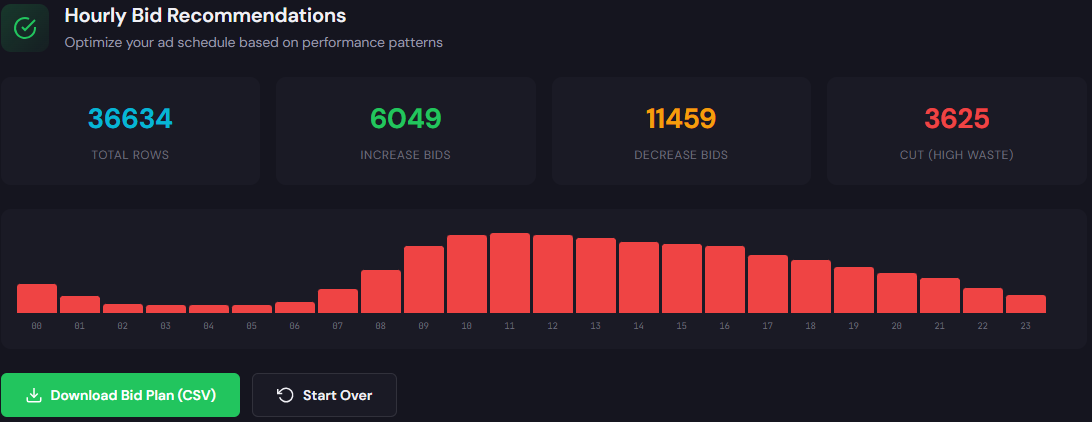
2) Bidding that ignores hour-of-day or audience shifts
Symptoms
- CPA or ROAS swings dramatically by hour.
- Automated bidding increases spend during weak hours.
- Manual ad schedule changes are inconsistent or never tested.
Why it happens
Most accounts run single bid modifiers or none at all; without hourly analysis, bids stay high during low-intent hours and platforms compound the issue with automated bidding.
Fix this week
- Pull hour-of-day performance and compare CPA/ROAS to your target.
- Apply conservative negative bid adjustments for low-performing hours or create targeted ad schedules.
- Monitor automated bidding campaigns closely for bid creep.
3) Ad-to-landing-page relevance problems
Symptoms
- High impressions and clicks but low conversion rate.
- Quality Score components (expected CTR, ad relevance, landing page experience) slide.
- Frequent messaging mismatch between ad headlines and landing page copy.
Why it happens
Rapid ad testing without aligning landing page headlines, forms, and CTAs causes dissonance. Platforms then reward better-aligned competitors with lower CPCs.
Fix this week
- Audit top-performing ads vs. landing pages and align headline/CTA language.
- Run a simple A/B: original vs. headline-aligned page for top ad groups.
- Capture top negative on-page signals (load speed, intrusive popups) that reduce conversion.
4) Poor keyword structure and cross-contamination
Symptoms
- Multiple keywords bidding on the same query or broad keywords cannibalizing exact intent.
- Difficulty isolating performance at ad-group level.
Why it happens
Quick expansions without a coherent SKAG or themed ad-group strategy lead to noisy data and poor optimization signals for automated bidding.
Fix this week
- Identify top-spend ad groups and map overlap using the search-terms export.
- Pause or tighten match types for high-overlap keywords.
- Use a campaign generator to rebuild clean, intent-driven ad groups.
5) Wasted spend from small leaks that compound
Symptoms
- Multiple small line-items add up to a material monthly waste (e.g., many $1–$10 clicks).
- Negative keywords and placement exclusions haven’t been maintained.
Why it happens
Teams focused on creative and bidding often skip routine hygiene. Small, persistent leaks keep feeding automated bidding models and erode budget.
Fix this week
- Run a quick wastage audit to quantify leak categories (search, placements, demographics).
- Export and act on recovery recommendations: negatives, placement exclusions, budget shifts.
Fixes you can apply this week
- Export search terms for past 30–90 days; tag and add negatives for high-cost/no-convert queries.
- Run hour-of-day analysis; apply conservative bid adjustments for low-performance hours.
- Audit ad-to-landing-page messaging for top 10 ad groups and align headlines/CTAs.
- Quantify waste by channel and line-item; prioritize fixes that reclaim at least 10% of monthly spend.
- Schedule a weekly 30–60 minute hygiene check: new negatives, placement blocks, and bid anomalies.
Automate the audit that finds negative keywords, placement leaks, and recovery actions in minutes.
Tool-based workflow: map problems to ExecWrite tools
Below are two focused tools you can use to fix the five problems above. Each tool section shows what it outputs and how to use it in three practical steps.

What it outputs: an account-level snapshot showing total wasted spend, top leakage categories (search terms, placements, demographics), and a prioritized recovery plan.
How to use it (3 steps)
- Upload account data or connect via export and run the snapshot to get a waste total and breakdown.
- Download the recovery plan: negative keyword suggestions, placement blocks, and budget reassignments.
- Apply top-3 recovery actions this week and re-run snapshot after 7–14 days to measure reclaimed spend.

What it outputs: a table of search terms with spend, conversion metrics, intent tags, and suggested actions (negative, reduce bid, increase bid).
How to use it (3 steps)
- Feed your search-terms export into the tool and tag rules (e.g., CPA thresholds, intent keywords).
- Review suggested actions; bulk-generate a negative keyword list and a CSV of bid adjustments for Google Ads Editor.
- Apply negatives and upload the bid adjustments; monitor the impact on CPA within a week.
90-minute account triage playbook
Run this in a single focused block to capture quick wins and create an action queue.
- 0–10 min: Pull account snapshot—monthly spend, top campaigns, and conversion trends.
- 10–30 min: Run Wastage Snapshot to get leakage categories and a recovery plan (export results).
- 30–60 min: Export search terms (last 30–90 days) and run Search Term Analyzer to get negatives and bid recommendations.
- 60–75 min: Apply top negatives and upload bid adjustments via Google Ads Editor for the most wasteful campaigns.
- 75–90 min: Align top 5 ad headlines with landing pages (quick edits) and schedule a 7-day recheck to measure improvement.
Use ExecWrite to automate the snapshot and search-term analysis so your 90-minute run produces action-ready files and recovery steps.
FAQ
Typical initial audits show 5–20% recoverable spend depending on account hygiene. The exact amount depends on match-type usage, negative keyword history, and automated bid behavior.
Not if you apply negatives based on performance thresholds. Targeted negatives remove low-intent traffic and usually improve conversion rate and ROAS.
Weekly lightweight hygiene checks for negatives and placements, with a full snapshot monthly or after major campaign changes.
Yes—these fixes provide cleaner data signals so automated bidding can perform better. Treat automation as a consumer of clean signals, not a substitute for account hygiene.
Sources
- Google Ads Help: Search terms report — details on how search terms are reported and recommended actions.
- Google Ads Help: About automated bidding — how automated bidding reacts to signals and why clean data matters.
- WordStream: How to reduce wasted spend — practical recommendations on negative keywords and structure.