Google Ads
Marketing Ops
If your account is losing efficiency, this is a hands-on operator’s guide. We map the five most common causes of underperformance and give checklist fixes you can run in a week. Try the tools at ExecWrite to speed audits and recover wasted spend.
- Most underperformance traces to wasted spend, bid misalignment, sloppy keyword structure, landing-page mismatch, or tracking gaps.
- Run a focused 90-minute triage, apply three tactical fixes this week, and use two ExecWrite tools to automate audits and hourly bid adjustments.
- Use the playbook below to recover budget, lift conversion rate, and stabilize bids within one audit cycle.
Table of Contents
Why PPC feels harder now
Competition, automated bidding opacity, and shifting user intent have made performance less predictable. Platforms push automation but give less surface-level insight into where budget leaks occur. That means operators must be surgical: find waste, restore relevance, and control bids at times and queries that matter.
The 5 biggest PPC problems marketers face
Problem 1 — Wasted spend (budget leakage)
Symptoms
- High impressions and clicks with near-zero conversions on specific campaigns.
- Large spend on broad-match or untagged search terms.
- Conversion rate drops while CPCs remain steady or climb.
Why it happens
Broad targeting, missing negatives, and outdated match-type strategies let low-intent queries eat budget. Automation can amplify the problem by scaling spend to signals that don’t convert.
Fix this week
- Export search terms for the last 30 days and tag low-intent queries for negative keywords.
- Pause underperforming broad-match ad groups; move high-potential queries into exact or phrase ad groups.
- Implement device and location bid modifiers where CPA is worse than target.
Problem 2 — Bid volatility and poorly timed bids
Symptoms
- CPA or ROAS swings hour-to-hour or day-to-day.
- Automated strategies oscillate between aggressive and conservative without business input.
- Ad schedule doesn’t reflect conversion timing (e.g., high spend overnight with no conversions).
Why it happens
Auto-bidding interprets noisy signals and can overreact to short-term trends. Without granular hourly adjustments or dayparting, you either overpay during low-value hours or miss volume during peak windows.
Fix this week
- Run an hour-of-day performance extract and flag hours with CPA > 2x target.
- Apply negative bid adjustments for low-value hours and raise bids on proven hours by +10–30% incrementally.
- Lock target ROAS/CPA ranges to avoid wide swings from a single day’s data.
Problem 3 — Keyword and ad group structure leaks
Symptoms
- Ad groups with dozens or hundreds of unrelated keywords.
- Low ad relevance scores and poor click-to-conversion rates.
- High cost-per-conversion for long-tail queries buried in broad groups.
Why it happens
Quick account builds and bulk uploads create mixed-intent groups that dilute relevance. That drives down Quality Score and inflates CPCs.
Fix this week
- Split ad groups by intent clusters (commercial, navigational, informational).
- Create tightly themed ad copy and landing pages per cluster.
- Add negatives at campaign level for common mismatches found in your search terms export.
Problem 4 — Landing page mismatch (Quality Score and CVR drops)
Symptoms
- High impression share but low conversion rate on specific ads or keywords.
- High bounce rates from paid traffic with short session times.
Why it happens
Ads promise one thing and landing pages deliver another. Even small headline or CTA misalignments cause relevance penalties and conversion friction.
Fix this week
- Match headline language and the primary CTA between ad copy and landing page.
- Run quick A/Bs on one high-traffic landing page element (headline or hero CTA).
- Implement session recordings or funnel event tracking for pages with highest paid traffic.
Problem 5 — Tracking and attribution blindspots
Symptoms
- Conversions are missing or show a sudden drop after platform updates.
- Offline conversions and CRM events aren’t linked to campaigns.
Why it happens
Broken tags, changes in tracking scripts, and unconnected CRM imports produce bad signals. Bidding systems then optimize to incomplete data.
Fix this week
- Validate conversion tags and test with real events.
- Reconcile CRM leads to Google conversions for a recent 14–30 day window.
- Set up distinct conversion actions for online and offline funnels.
Fixes you can apply this week
- Export search terms + tag negatives (30–60 minutes).
- Run hour-of-day CPA split, apply conservative bid adjustments for the worst 3 hours (20–40 minutes).
- Split 2–3 mixed ad groups into tighter intent clusters and update 1 ad per new group (60–90 minutes).
- Validate top 3 conversion actions and reconcile CRM data for sample leads (30–60 minutes).
- Run a landing-page headline alignment test on the top paid landing page (set hypothesis and launch A/B in one afternoon).
Use a snapshot audit to find wasted spend and an hourly bid table to fix dayparting quickly.
Tool-based workflow — map problems to ExecWrite tools
Tool: Wastage Snapshot & Recovery

What it outputs: A dashboard-style snapshot that quantifies wasted spend, identifies top leakage areas (search terms, campaigns, devices), and produces a prioritized recovery plan.
How to use it — 3 steps
- 1) Upload or connect your account data to generate the snapshot. The tool highlights top wasted queries and campaigns.
- 2) Export the recovery checklist (negatives, pauses, budget reallocations) and assign actions to owners.
- 3) Re-run after 7–14 days to measure recovered budget and incremental conversion lift.
Tool: Hourly Bid Adjuster (Bid Adjustment by Search Term)
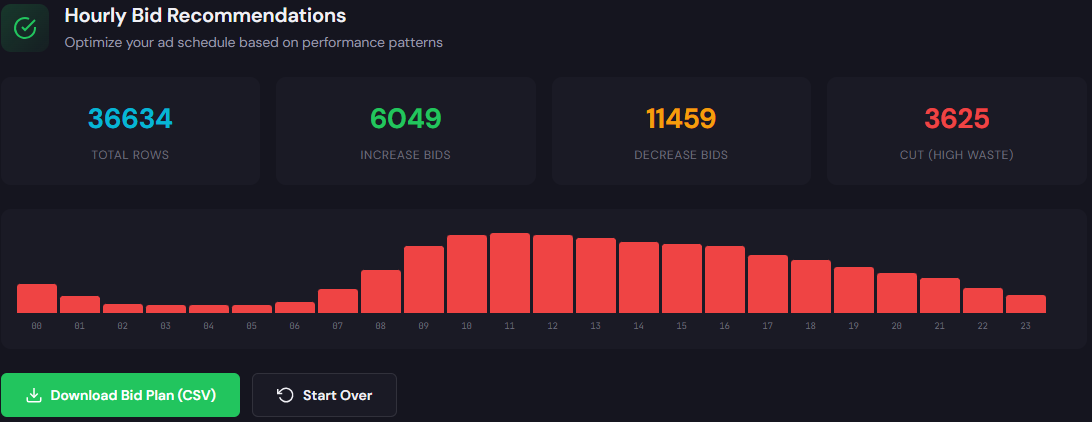
What it outputs: An hour-of-day performance table with CPA/ROAS by hour and recommended bid multipliers so you can apply precise dayparting adjustments.
How to use it — 3 steps
- 1) Pull the last 30–90 days of campaign data into the tool to calculate hour-level CPA and conversion volume.
- 2) Review flagged hours where CPA exceeds threshold and accept suggested bid down adjustments or raise bids for high-performing hours.
- 3) Export the adjustment plan and apply in Google Ads (or via Editor) as incremental bid changes, then monitor for 7 days.
90-minute account triage playbook
Follow this timed checklist to triage an account and prioritize fixes.
- 0–10 minutes: Quick health check — note impressions, click trends, and conversion dips.
- 10–30 minutes: Run the Wastage Snapshot to identify top leakage (queries, campaigns, devices).
- 30–50 minutes: Export search terms; mark top 20 low-intent queries as negatives and move high-potential terms into focused ad groups.
- 50–70 minutes: Run the Hourly Bid Adjuster; apply bid adjustments for the worst and best performing hours.
- 70–90 minutes: Validate top conversion tags and set a 7-day monitoring plan. Assign owners for negatives, ad group splits, and landing-page test.
FAQ
Concrete recovery varies, but snapshot audits commonly identify 10–30% of monthly spend as misapplied. The quick wins (negatives + ad group fixes) typically recover the low-hanging portion within 1–2 weeks.
They can. Use hourly adjustments as guardrails: small, incremental modifiers that nudge automated strategies rather than replace them. If you run fully manual bidding, adjustments are applied directly; if automated, treat them as constraints.
Start with the Wastage Snapshot to quantify leakage, then run the Hourly Bid Adjuster to stabilize time-based volatility. The snapshot tells you where money is wasted; the bid tool shows when.
Yes. Set a weekly snapshot export and a daily hour-of-day check to trigger alerts when CPA thresholds are breached. The tools at ExecWrite support recurring exports and checklist outputs for handoffs.
Execute the 90-minute triage with tools that produce action checklists and exportable recovery plans.
Sources
- Google Ads Help — Quality Score
- Google Ads Help — Ad Scheduling
- HubSpot — Common PPC Mistakes
- Search Engine Journal — PPC Mistakes and Fixes
Want faster audits and exportable recovery plans? Get started at ExecWrite.
Leave a Reply