Rising CPCs, lower conversion rates, and fading automation signals are suffocating paid media results. This article gives the exact checks, quick fixes, and a tool-based workflow (including ExecWrite tools) to recover budget this week.
- Quick wins: stop runaway keywords, fix ad-to-landing-page relevance, and apply hourly bid adjustments to stabilize CPA.
- Tools: use the Wastage Snapshot to find leaks and the Hourly Bid Adjuster to recover dayparting opportunities.
- Playbook: a 90-minute triage will identify 60–80% of recoverable waste and give a prioritized action list.
Table of Contents
Why PPC feels harder now
Costs rarely climb for a single reason. Increased competition, shifting intent, and layered automation make signal interpretation harder. Benchmarks show CPCs and click volatility rising year-over-year, and Quality Score sensitivity means small relevance gaps now compound cost-per-conversion quickly (WordStream Google Ads Benchmarks). At the same time, ad platforms reward tightly relevant creative and landing page alignment—so small mismatches hit both CPC and conversion rate (Google Ads Help: Quality Score).
The 5 biggest PPC problems marketers face
1) Wasted spend on low-intent or irrelevant search terms
Symptoms
- High clicks with zero conversions from long-tail queries.
- High cost but poor assisted metrics (time on site, low pages per session).
Why it happens — Broad match + automated bidding surfaces queries machine-learning models think will convert, but without negative keywords or regular search-term pruning this creates leakage.
Fix this week
- Export last 30 days search terms, sort by cost and conversions; tag zero-conversion, high-cost queries.
- Add immediate negatives for clearly irrelevant queries.
- Move marginal queries into phrase or exact match ad groups with tailored ads and landing pages.
2) Quality Score and landing-page mismatch
Symptoms
- High impression share but low click-through or conversion rate.
- QS below 6 for many keywords; high CPC relative to competitors.
Why it happens — Ads and landing pages diverge on intent or offer. Automation then bids higher to maintain volume, increasing cost-per-conversion.
Fix this week
- Audit top-performing and top-cost keywords for headline/landing-page alignment.
- Use focused headlines with the same primary keyword and a single CTA.
- Run a fast A/B of landing page headlines and form layouts on top 20 spend keywords.
3) Hour-of-day and dayparting inefficiency
Symptoms
- Sharp CPA swings by hour; peak-hour spend underperforms off-peak.
- Ad schedule is blanket-based, not performance-driven.
Why it happens — Many teams set schedules once and forget. Automated bidding masks hour-level performance; without granular adjustment, budgets flow to costly times.
Fix this week
- Pull hour-of-day conversion and cost data for the last 90 days.
- Lower bids during high-CPA hours and raise during low-CPA hours selectively.
- Monitor and roll back changes over 72 hours if volatility spikes.
4) Overreliance on one automation signal
Symptoms
- Performance collapses when conversion tracking changes or data thresholds drop.
- Little manual oversight: broad budgets, few exclusions, rare negative-list maintenance.
Why it happens — Smart bidding needs stable signals. If conversions are sparse or tracking shifts, the algorithm hunts, spending to find conversions.
Fix this week
- Enable at least two conversion actions and set proper attribution windows for the main funnel events.
- Split campaigns by conversion value tiers so automation optimizes homogenous groups.
5) Campaign structure and keyword cannibalization
Symptoms
- Multiple ad groups competing for the same queries; high internal impression overlap.
- Mixed match types in the same ad group causing allocation issues.
Why it happens — Fast scaling without structure leads to competing signals; automation can’t optimize efficiently when goals are mixed.
Fix this week
- Group keywords by intent and landing page; enforce match type discipline per ad group.
- Use the search-term list to move queries into the most relevant ad group and add negatives to others.
Fixes you can apply this week
- Identify top 20 spend keywords and search terms; add negatives for irrelevant traffic.
- Run a landing-page headline alignment test for top spend buckets.
- Apply hourly bid adjustments on the worst-performing hours; throttle budgets during waste spikes.
- Split campaigns by conversion value and pause any low-intent automated experiments.
- Schedule a recurring 30-minute search-term prune on your calendar.
Run a quick waste snapshot and get a prioritized recovery plan you can implement this week.
Tool-based workflow: map problems to ExecWrite tools

What it outputs: dashboard-style snapshot of wasted spend, top leakage categories, and an actionable recovery plan that lists negative keywords, budget reallocations, and quick wins.
How to use it (3 steps)
- Upload a 30–90 day Google Ads export into the Wastage Snapshot.
- Review the top leakage categories and the generated negative keyword suggestions.
- Apply the high-confidence negatives and budget shifts; export the recovery checklist for stakeholders.
Open the Wastage Snapshot tool to generate your account recovery plan.
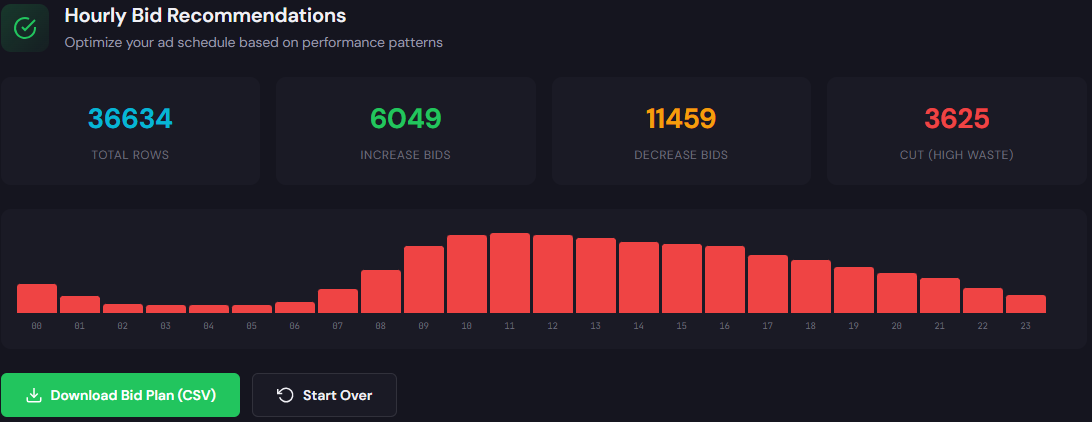
What it outputs: hour-of-day rows with cost, conversions, CPA, and recommended bid adjustments to improve dayparting decisions.
How to use it (3 steps)
- Pull 60–90 days of performance by hour and upload to the Hourly Bid Adjuster.
- Apply suggested bid multipliers for hours with consistent CPA improvements.
- Monitor 72 hours and iterate; if CPA worsens, revert the largest adjustments first.
Open the Hourly Bid Adjuster to create hour-level bid actions.
Both tools integrate into a weekly cadence: use Wastage Snapshot to triage where the money leaks, then apply Hourly Bid Adjuster recommendations for immediate cost stabilization.
90-minute account triage playbook
- 0–10 minutes: Pull last 30–90 days reports: account summary, search terms, ad schedule, and top landing pages.
- 10–30 minutes: Run Wastage Snapshot to surface top leakage by campaign and keywords; export high-confidence negatives.
- 30–50 minutes: Apply immediate negatives and pause campaigns/ad groups with clear zero-conversion waste.
- 50–70 minutes: Run Hourly Bid Adjuster on the same date range; implement conservative bid multipliers for worst hours.
- 70–85 minutes: Align top 10 spend keywords with landing-page headlines; deploy a quick copy update where mismatch exists.
- 85–90 minutes: Document changes, set monitoring windows (24/72 hours), and schedule a 1-week follow-up with owners.
Execute the 90-minute playbook with tools and exportable recovery checklists from ExecWrite.
FAQ
Most accounts show reduced wasted clicks within 24–48 hours. Conversion rate changes can take longer as automation re-learns; watch performance for 72 hours before further large changes.
Not always. If conversion volume is sufficient, leave smart bidding but tighten budgets and add exclusions. If conversions are sparse or you’re restructuring heavily, run manual bidding on core campaigns until structure stabilizes.
Yes. ExecWrite tools provide export-ready lists and CSVs for negatives, bid adjustments, and campaign mappings compatible with Google Ads Editor.
Yes—principles are the same. B2B often needs longer attribution windows and more careful conversion action setup; adjust monitoring windows accordingly.
Prioritize by spend: run the Wastage Snapshot on the top 20% of campaigns by spend to capture most recoverable waste quickly, then expand with the same workflow.
Sources
- WordStream — Google Ads Benchmarks — benchmark data and CPC trends referenced for rising costs.
- Google Ads Help — Quality Score — guidance on relevance and factors that influence Quality Score.
- ExecWrite — Wastage Snapshot & Recovery — tool used for waste audits and recovery plans.
- ExecWrite — Hourly Bid Adjuster — tool for dayparting and hour-level bid actions.
Leave a Reply