PPC feels like moving targets: less raw signal, more automation, and faster budget leakage. Use quick audits and targeted fixes — or run fast tools at ExecWrite to find and recover wasted spend in hours.
- Most PPC performance drops come from wasted spend, broken relevance, and poor time-of-day bidding — these are fixable in a week.
- Run a fast wastage snapshot and a campaign generator (keywords + structure) to recover budget and rebuild quality at scale.
- Follow the 90-minute triage playbook to find the top 3 leak sources, apply quick fixes, and deploy structured follow-ups.
Table of Contents
Why PPC feels harder now
PPC used to be a steady pipeline: keyword -> ad -> landing page -> conversion. Today that chain is blurred by automation, privacy changes, and broader competition for attention. Signals are noisier, attribution is worse, and the cost of experimentation is higher because wasted clicks compound quickly.
Contributing trends include the decline of third-party tracking, heavier reliance on automated bidding, and more advertisers using similar smart campaigns. Read more about browser privacy changes in the Chrome Privacy Sandbox overview.
The 5 biggest PPC problems marketers face
Symptoms
- High clicks with minimal conversions in specific campaigns or search terms.
- Daily spend spikes that don’t move revenue.
- Ad groups with large impression share but poor ROI.
Why it happens
Unchecked search terms, broad match expansion, and stale negative lists let low-intent traffic eat budget while automated bidding amplifies the problem across hours.
Fix this week
- Download search term report and tag low-intent terms as negatives.
- Pause poor-performing SKUs/ad groups, reallocate budget to winners.
- Audit automated rules and caps — enforce max CPA or ROAS bounds.
Symptoms
- High CTR but low conversion rate.
- Quality Score slipping on multiple keywords.
- Landing page bounce spikes after campaign launches.
Why it happens
Marketers iterate ads faster than landing pages. Automation can boost impressions on mismatched creative, but the user experience still determines conversions.
Fix this week
- Align top ad headlines with primary landing page H1 and offer.
- Create one high-intent landing page variant and route traffic for 7 days.
- Add on-page micro-conversions (chat, micro-form) to capture intent.
Symptoms
- Big CPA variance by hour or day of week.
- Automated bids that ignore predictable hourly performance swings.
- Budget exhausted early in day with poor ROI in prime hours.
Why it happens
Most accounts use account-level bidding with limited hour granularity. Without hourly adjustments, bids pay the same for low-value clicks as for high-value moments.
Fix this week
- Identify top 4 hours with best CPA/ROAS and set bid multipliers.
- Reduce bids during low-value hours; shift budget to top-performing slots.
- Schedule ads to avoid wasteful hours in low-converting campaigns.
Symptoms
- Many keywords in single ad groups; inconsistent match types.
- Duplicated keywords across campaigns causing internal competition.
- New campaigns that copy-paste old lists without pruning negatives.
Why it happens
Speed often trumps structure. When teams or agencies copy legacy lists, they inherit noise that hides signal and raises CPCs.
Fix this week
- Use a generator to create tightly themed ad groups (1 theme = 1 ad group).
- Standardize match types: exact for winners, phrase for discovery.
- Remove internal duplicates and enforce a naming convention.
Symptoms
- Conversions don’t match backend sales; last-click undercounts revenue.
- Cross-channel effects are invisible; manual optimizations miss true drivers.
- Delayed conversion data prevents timely bid adjustments.
Why it happens
Privacy changes and server-side or CRM mismatches mean Google’s front-end reporting is no longer the single source of truth for performance decisions.
Fix this week
- Compare Google conversions to CRM sales for a rolling 7–14 day window.
- Implement simple server-side conversion imports if possible.
- Flag campaigns with delayed conversion patterns and lower bid aggression.
Fixes you can apply this week
- Run a focused wastage snapshot for top-spend campaigns and export the leakage report.
- Pull search term reports and add negatives on low-intent phrases; update match types.
- Build one landing page variant for your top ad group and test for 7 days.
- Set conservative hour-of-day bid multipliers after reviewing 30-day hourly CPA trends.
- Consolidate keywords into tight themes and deploy a campaign CSV for Editor upload.
Run a quick wastage snapshot to identify the top leakage sources and get an immediate recovery plan.
Tool-based workflow: map problems to ExecWrite tools

What it outputs: A dashboard-style snapshot with total wasted spend, top leakage areas (search terms, campaigns, match-type leaks), and an action plan to recover budget.
How to use (3 steps):
- Upload your Google Ads account export or connect via the tool and select a 30-day window.
- Review the snapshot: note top wasted search terms, pause lists, and recommended negative additions.
- Apply the recovery plan: add negatives, pause low-ROI ad groups, and reallocate budgets to winners.
Tool link: Wastage Snapshot & Recovery
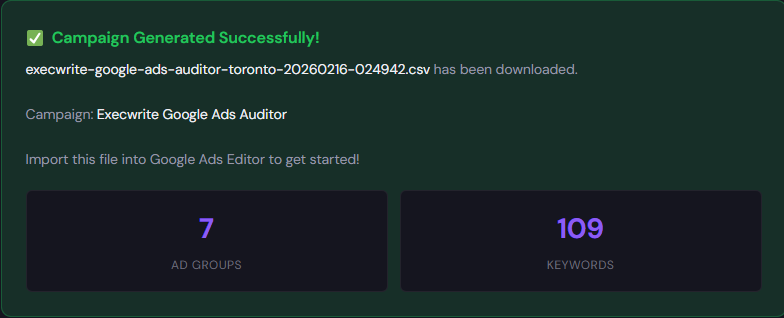
What it outputs: Export-ready campaign structure: themed ad groups, prioritized keyword lists, suggested match types, and Google Ads Editor CSV.
How to use (3 steps):
- Enter 3–5 landing pages or offers and select your intent level (high/medium/discovery).
- Generate themed ad groups and review suggested negatives and headlines.
- Export the CSV and import into Google Ads Editor to deploy structured campaigns.
Tool link: Free Campaign Generator
90-minute account triage playbook
- 0–10m: Open account overview. Filter campaigns by spend (30 days) and note top 5 by cost.
- 10–30m: Run search term exports for those top 5 campaigns. Flag terms with clicks but no conversions and add to a negative list.
- 30–50m: Run the ExecWrite Wastage Snapshot for a quick leakage summary and copy the top 10 recommendations.
- 50–70m: Implement quick fixes: add negatives, pause two worst ad groups, and set conservative hourly bid multipliers for low-value hours.
- 70–90m: Use the Campaign Generator to build 1 replacement campaign for a top performer: structured keywords, ad copy, and Editor CSV. Schedule a 7-day check-in.
Do the 90-minute triage with tools that output action items, negative lists, and export-ready campaigns.
FAQ
You should see budget recovery within 3–7 days after applying negatives and pausing wasteful ad groups. Full performance stabilization can take 2–4 weeks as bids and quality scores re-equilibrate.
ExecWrite accepts account exports and has connectors for faster ingestion. If you can export search term and performance reports, the tools produce action lists you can apply immediately.
Yes — start with negative lists, pause low-ROI ad groups, and apply hour-of-day bid limits. Rebuilding is the next step to sustain improved efficiency.
ExecWrite offers free generators for keywords and campaign structure; the Wastage Snapshot provides a fast paid recovery plan. Check each tool page for current access details.
Sources
- Chrome Privacy Sandbox overview — Explains browser-level privacy changes that affect tracking and signal.
- WordStream: Top PPC Challenges Marketers Face — Long-form list of structural PPC issues and common symptoms.
- Google Ads Help: About conversion tracking — Official guidance on conversion tracking configurations and limits.
Need to stop wasting ad spend and rebuild structure? Run a snapshot and generate a recovery campaign using ExecWrite tools at https://execwrite.com.
Leave a Reply