If your Google Ads account feels like it’s drifting—flat conversion rates, rising CPA, creeping wasted spend—this is a tactical playbook, not theory. Use these steps with the tools on ExecWrite to find, fix, and reclaim performance in days.
- Fast diagnose: audit spend leakage, poor keywords, and time-of-day swings.
- Quick fixes: pause waste, tighten match types, rebuild 3 poorly performing ad groups.
- Use tools to scale: recovery snapshot + bid-adjustment analysis to automate next steps.
Table of Contents
Why PPC feels harder now
Google Ads hasn’t become mystical overnight. Two trends make everyday management more brittle: automation hides problems until they compound, and cross-channel attribution dilutes signal. Ad budgets are finite; if a few leaky levers aren’t fixed, automation amplifies waste.
That’s why manual triage and targeted tooling are still essential. This post gives concrete symptoms, one-week fixes, and a tool-led workflow to recover spend and stabilize CPA.
The 5 biggest PPC problems marketers face
Poor keyword-level ROI (wasted spend)
- Symptoms:
- High-spend search terms with zero conversions
- Broad match spending spikes with poor CPAs
- High clicks but low conversion rates
Why it happens
Match-type creep, weak negative keyword lists, and generic query traffic cause leakage. Automated bidding can keep funding these terms until CPA blows out.
Fix this week
- Pull top 100 search terms by spend; tag non-converting ones.
- Apply negatives for irrelevant modifiers and pause top wasted terms.
- Shift broad-match traffic to phrase/exact in high-cost ad groups.
Quality Score & landing page mismatch
- Symptoms:
- Low ad relevance or low expected CTR messages in UI
- High impression share but low conversions
- Large ad-to-landing-page message gap
Why it happens
Ads and landing pages drift apart after campaign edits, or the creative doesn’t match search intent. That increases CPCs and lowers rank.
Fix this week
- Flag ad groups with QS below account median.
- Align 3 headlines and the landing page hero copy to the top 5 queries.
- Run an A/B headline test on highest-volume ad groups.
Time-of-day and dayparting inefficiencies
- Symptoms:
- Large hourly swings in CPA or ROAS
- Budget exhausted early in the day with poor late-day performance
Why it happens
Default schedules or automated bidding without hour-level inputs can over/under-invest across the day. Missing hour-by-hour data means bidding at the wrong times.
Fix this week
- Export hourly performance for the last 30 days.
- Apply -20% to hours with CPA 30%+ above average; +15% where CPA is 30% below average.
- Monitor and iterate weekly, not daily.
Campaign structure entropy
- Symptoms:
- Overloaded ad groups with unrelated keywords
- Repeated keywords across campaigns causing internal competition
Why it happens
Quick edits and pressure to scale often lead to loose grouping. This dilutes relevance and hurts Quality Score and bidding signals.
Fix this week
- Identify 5 worst-performing ad groups and split by intent.
- Create focused ad groups with 10–20 tightly-related keywords.
- Export for Editor and upload structured CSVs to streamline edits.
Attribution and conversion tracking drift
- Symptoms:
- Reported conversions drop after site changes
- Discrepancies between GA4 and Google Ads conversion counts
Why it happens
Tracking updates, tag changes, or new GTM containers can break conversions. When signal weakens, automated bidding makes worse decisions.
Fix this week
- Verify conversion actions and recent edits in Google Ads.
- Reconcile event counts in GA/Tag Manager; restore missing events.
- Use a conservative bidding strategy until signals are fixed.
Fixes you can apply this week
- Run a 30-day spend-by-search-term report; add negatives and pause the top 5 waste drivers.
- Prioritize improving Quality Score for top-spend ad groups (headlines, landing page alignment).
- Implement hour-of-day bid adjustments where CPA deviates ±30% from account average.
- Split messy ad groups into focused groups and upload via Editor CSVs.
- Validate conversions and revert automated bidding to manual target CPA if signals are broken.
Use a snapshot tool to identify wasted spend and recover budget fast.
Tool-based workflow (map each pain point to ExecWrite tools)

What it outputs: A dashboard-style snapshot listing total wasted spend, top leakage areas (search terms, placements, devices), and a prioritized recovery plan.
How to use it (3 steps)
- Upload or connect your account and run the snapshot to get the waste summary (Wastage Snapshot).
- Export the top wasted search terms and apply negatives or pause offending keywords immediately.
- Follow the recovery plan: reassign budgets from waste to high-ROI campaigns and re-run in 7 days to measure impact.

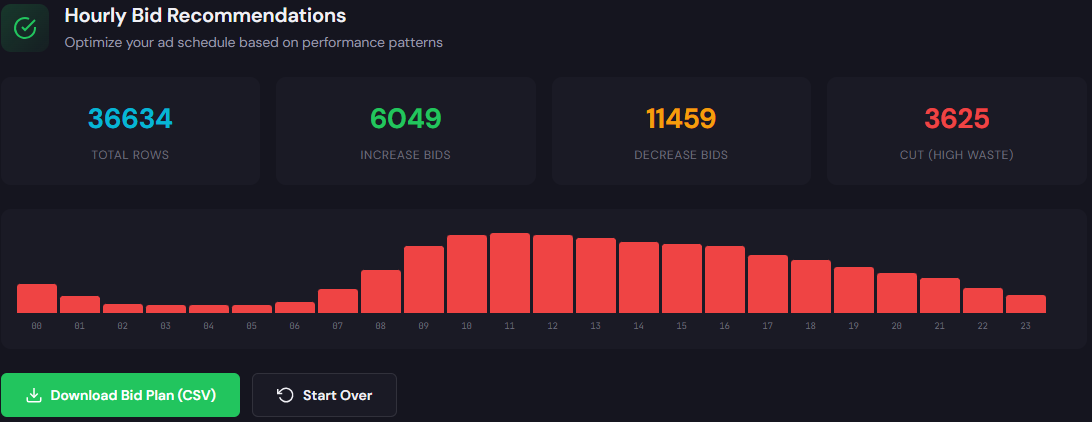
What it outputs: Hour-of-day performance with recommended bid adjustments and a searchable table of terms tagged by ROI and suggested bid actions.
How to use it (3 steps)
- Run the Hourly Bid Adjuster to spot stable windows for aggressive bids and hours to cut spend (Hourly Bid Adjuster).
- Use the Search Term Analyzer to tag high-cost, non-converting queries and generate exact-match candidates (Search Term Analyzer).
- Export the recommended bid actions and upload as campaign-level adjustments or use automated rules to implement during peak windows.
These two tools address the largest levers—waste identification and hour/term-level bid control—so you fix root causes rather than patch symptoms.
90-minute account triage playbook
Follow this timed sequence to stabilize an underperforming account in 90 minutes.
- 0–15 min: Pull last 30 days: spend by campaign, search terms by spend, hourly CPA, and conversion actions.
- 15–35 min: Run the ExecWrite Wastage Snapshot to identify top leakage and generate the negative keyword list.
- 35–55 min: Use the Search Term Analyzer and pause/negate the top 10 waste drivers; move broad-match heavy keywords to phrase/exact where appropriate.
- 55–70 min: Run the Hourly Bid Adjuster; apply conservative +/- adjustments to hours that deviate by 30%+ from average CPA.
- 70–85 min: Fix the top 3 ad groups with poor Quality Score: update headlines, align landing page hero text, and enable an ad test.
- 85–90 min: Set a 7-day monitoring check and revert automated bidding to manual or target CPA with a conservative cap if conversions are unstable.
Run the snapshot and bid-adjustment tools now to turn these 90-minute steps into automated reports and exports.
FAQ
Most accounts see immediate CPA improvements within 3–7 days because budget shifts from unproductive terms to higher-ROI areas. Continue monitoring hourly and daily to avoid automation reintroducing waste.
Tools speed diagnosis and produce recommended actions, but a human should review high-impact pauses and bid changes. Automation without governance can hide new leakages.
Fallback to conservative bidding and manual CPA caps. Fix or rebuild conversion events in GTM/GA4, then allow automated strategies to ramp back up once signal stabilizes.
Run a deep snapshot monthly and a lightweight waste/term check weekly. Hourly bid reviews can be monthly unless you have large intraday swings.
Sources
- Google Ads Help — Google Support (reference for Quality Score and tracking concepts)
- WordStream — PPC and paid media benchmarks (industry benchmarks and wasted spend analysis)
- Search Engine Journal — PPC optimization best practices (guides on bidding and ad relevance)
- ExecWrite — Wastage Snapshot & Recovery (tool used in this workflow)
- ExecWrite — Bid Adjustment by Search Term (search term analyzer and hourly bid adjuster)
Leave a Reply