If your account is spending more but delivering less, this is an operational playbook you can use now. We reference quick checks and two ExecWrite tools you can run in minutes: the Wastage Snapshot & Recovery and the Hourly Bid Adjuster. Start at https://execwrite.com for tool access.
- Most performance drops come from waste, bidding drift (time-of-day), and relevance gaps — not mysterious algorithm changes.
- Run a single-hourly sweep + a wastage snapshot to find 70% of quick wins in 90 minutes.
- Use the ExecWrite Wastage Snapshot and Hourly Bid Adjuster to generate action items and recommended bid moves you can apply this week.
Table of Contents
Why PPC feels harder now
Automation, privacy changes, and higher auction competition have changed how signals translate into outcomes. But the core problems are predictable and fixable: wasted reach, poor query-to-ad-to-landing relevance, and bidding that lags performance swings. Automation helps—when fed clean inputs. Without routine triage, automation amplifies waste.
The 5 biggest PPC problems marketers face
1) Invisible wasted spend
- Symptoms: high impression volume with low conversions, rising CPA, spend on long-tail queries with zero traction.
Why it happens: Broad match + automated bidding frequently expands into low-intent queries. Negative keyword maintenance falls behind account growth.
- Run a query-level spend scan and tag high-spend/zero-conversion terms.
- Apply negatives for low-intent modifiers (“free”, “jobs”, unrelated categories).
- Pause or reduce bids for problematic search terms immediately.
2) Bid schedules that miss hourly performance swings
- Symptoms: profitable hours vs unprofitable hours with the same bid, odd CPA spikes during specific hours or days.
Why it happens: Advertisers set broad ad schedules and let portfolio bidding adjust. If hour-level performance shifts, the algorithm lacks a clean signal to correct intra-day swings.
- Analyze cost and conversions by hour; reduce bids during low-conversion hours.
- Use dayparting to protect budget during costly periods.
- Test incremental bid modifiers by hour (start small, ±10–20%).
3) Relevance and Quality Score leaks
- Symptoms: low CTR compared to peers, high CPC for keywords that should be cheap, landing-page drop-offs.
Why it happens: Messaging mismatch between queries, ad copy, and landing pages lowers Quality Score and pushes up CPCs.
- Audit top-performing and top-spend ad groups for headline/LP mismatch.
- Align 1–2 headlines and a landing page variant per problematic ad group.
- Measure CTR and conversion-rate deltas after changes (3–7 days).
4) Conversion tracking noise
- Symptoms: sudden conversion drops without funnel changes, spike in cross-device conversions mismatched to revenue.
Why it happens: Tagging, GA/Server-Side updates, or import misconfigurations change what counts as a conversion.
- Verify conversion actions in Google Ads and check attribution windows.
- Run a conversion audit: compare clicks → sessions → conversions across tools.
- Temporarily monitor cost per lead (raw) in addition to converted value.
5) Account structure drift
- Symptoms: shared budgets masking failing campaigns, mixed-intent keywords in single ad groups, large generic ad groups with uneven CTRs.
Why it happens: Tactical changes over time add noise. Without periodic restructuring, learning is slower and automation underperforms.
- Identify top X ad groups by spend and split by intent where CTR and CVR differ by >30%.
- Apply single-theme keywords per ad group and rewrite ads for each theme.
- Use export-ready structures to rebuild underperforming areas (Google Ads Editor CSV).
Fixes you can apply this week
- Run a wastage snapshot to surface top leak categories and export a negative keyword list.
- Pull hour-of-day performance and set temporary bid modifiers for low-performance hours.
- Audit 10 top-spend search terms: tag, negative, or reduce bids.
- Align ad headlines to landing pages for the worst 10 ad groups by CPA.
- Check conversion actions and attribution windows; run a parallel raw-LEAD metric for 7 days.
- Apply one structural split for a large generic ad group and measure impact for a week.
Launch a Wastage Snapshot to get a prioritized recovery plan and immediate negatives you can apply this week.
Tool-based workflow (map each pain point to ExecWrite tools)

Wastage Snapshot & Recovery — what it outputs
Outputs a dashboard-style snapshot showing total wasted spend, top leakage areas (search terms, placements, audience overlap), and a prioritized recovery plan with negative-keyword suggestions and budget moves.
How to use it in 3 steps
- 1) Upload or connect your account, run the snapshot; it scans search terms, placements, and campaigns for leakage.
- 2) Review the prioritized recovery plan and download the negative-keyword CSV and campaign-level fixes.
- 3) Apply the negatives and budget moves in Google Ads Editor or via the UI; re-run in 7 days and measure spend recovered.
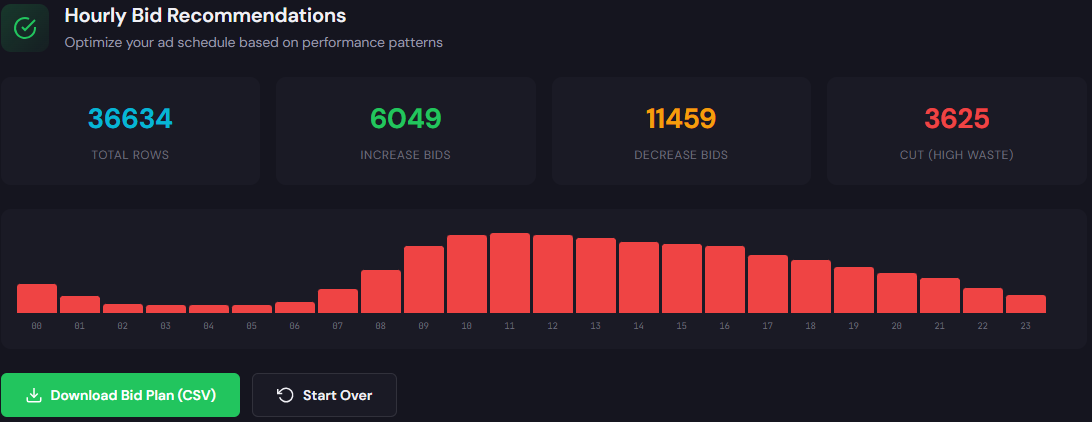
Hourly Bid Adjuster — what it outputs
Generates hour-of-day rows with cost, conversions, CPA/ROAS and recommended bid adjustments so you can daypart with confidence instead of guesswork.
How to use it in 3 steps
- 1) Pull 30–90 days of performance into the Hourly Bid Adjuster and let it calculate hourly CPA/ROAS deltas.
- 2) Review recommended bid modifiers grouped by campaign or portfolio, and select conservative changes (±10–20%).
- 3) Apply ad schedule modifiers in Google Ads, monitor for 7 days, and iterate based on conversion volume.
90-minute account triage playbook
Run this sequence with a single tab and the two tools above. Aim for decisive, reversible actions.
- 0–15m: Run Wastage Snapshot. Export top 50 waste terms and recovery checklist.
- 15–30m: Pull top 100 search terms; tag high-spend/zero-conversion items and add to negatives.
- 30–50m: Run Hourly Bid Adjuster for 30–90 days. Note top 3 profitable and top 3 costly hours.
- 50–65m: Apply temporary hour bid modifiers (-20% to +20%) and set campaign-level protective caps.
- 65–80m: Audit conversion actions (5 minutes) and mark any recent changes. Re-enable older settings if needed.
- 80–90m: Document actions (CSV and change log), schedule a 7-day review, and set alerts for CPA/ROAS swings.
Use the two ExecWrite tools to automate the scans and generate the CSVs and bid moves you need to act this week.
FAQ
Most accounts see measurable reduction in wasted spend within 3–7 days; look for lower impressions on irrelevant queries and improved CPA.
Automation can adapt, but give changes 7–14 days. Use conservative bid modifiers and pair manual structure fixes with automation-friendly inputs.
Aggregate 30–90 days or combine similar campaigns to increase sample size. Start with small modifiers and monitor.
ExecWrite offers both free and paid tools. Start with the snapshot to see immediate recommendations; advanced exports and automations may require a paid plan.
Leave a Reply